
Livraison le jour même ou le lendemain

Qualité garantie

Débloquez vos offres de bienvenue: Livraison GRATUITE | Jusqu'à -80 % | 30 jours d'essai gratuits à JoyPlus
Téléchargez l'application
Choosing a Corsair RS ARGB PC case is about more than selecting a colour or counting the included fans. Whether you are building a gaming PC or a creative workstation, airflow, component compatibility and lighting connections all directly affect day-to-day comfort and future upgrade options.
However, some marketing claims deserve closer scrutiny. Here are the key points to check before buying, followed by a selection of Corsair mid-tower cases suited to different needs.
The phrase ‘ARGB included’ does not mean that the fans work without any connections. The models featured here use 12 V DC fan power and 5 V, 3-pin connector ARGB lighting, connected to the motherboard or a compatible controller.
Before ordering, check that your motherboard has a 5 V ARGB header. Connecting it to a 12 V RGB output may damage the lighting. Fan speed is adjusted via the PWM signal when supported by the motherboard.
Fans included as standard do not guarantee good airflow. A solid or overly restrictive front panel can limit the intake of cool air. When choosing an airflow PC case, prioritise a mesh front panel, easy-to-remove filters and well-designed openings at the front, top and base of the chassis.
The Corsair RS ARGB models selected here feature mesh front panels and high-density dust filters. This is a real advantage for maintenance, particularly in homes where dust quickly builds up around the desk.
An ATX-compatible mid-tower case can accommodate several motherboard formats, but that does not mean every graphics card, power supply and cooling solution will have the same amount of room. Check the case dimensions, maximum graphics card length, CPU cooler height and the space provided for cable management.
The tempered glass panel displays the components beautifully, but it requires some care. Place it on a padded surface during assembly or cleaning to reduce the risk of impact damage.
All four models featured support ATX, Micro-ATX and Mini-ITX motherboards. This versatility is suitable for both a full gaming build and a more compact PC. Even so, check that the correct standoffs are included and that there is enough space around the motherboard for routing cables.
The Corsair FRAME 4000D RS ARGB also supports certain modern motherboards with rear-facing connectors and wider layouts. This design helps conceal cables more effectively on the visible side, provided that your motherboard is compatible.
A mesh front panel generally allows more air in than a closed panel. Top, front and bottom filters help limit dust build-up on the components and power supply. They also need to be easy to remove so that you can clean them regularly.
To clean the case, shut down the computer, switch off the power and unplug the mains cable. Use a soft, dry cloth on the glass and external surfaces. Do not block the openings, and leave approximately 10 cm of clear space around the ventilation areas.
The RS ARGB fans can be connected to the motherboard or a compatible Corsair iCUE controller. iCUE support allows you to centralise lighting synchronisation and certain system monitoring functions, depending on the components and controller used.
The case does not offer wireless functionality or an integrated battery: the fans are powered directly by the PC.
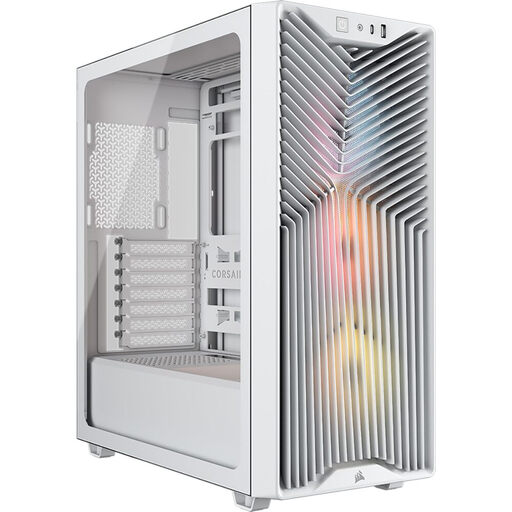
Why this choice suits this profile : This white mid-tower case is ideal for a first ATX, Micro-ATX or Mini-ITX build, with RS ARGB fans already installed.
The mesh front panel, top, front and bottom filters, and pre-installed fans mean you do not need to buy several cooling accessories straight away.
Compact dimensions of 445 × 455 × 220 mm, a tempered glass side panel and a net weight of 7.2 kg.
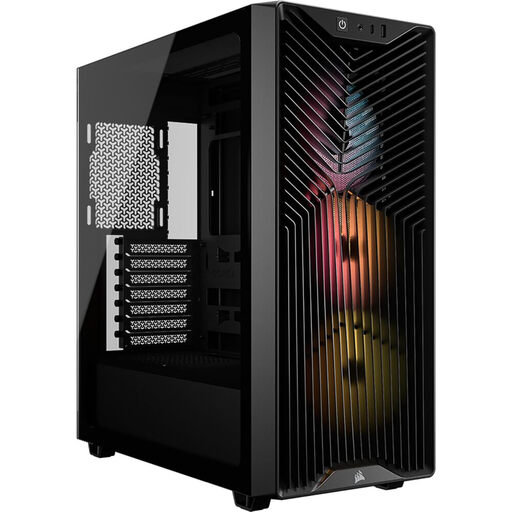
Why this choice suits this profile : Its black finish fits easily into a gaming setup while offering the same motherboard-format compatibility as the white version.
It focuses on open ventilation, removable filters and PWM control, rather than relying solely on visible lighting.
RS ARGB fans included, a tool-free removable tempered glass panel and a steel chassis.
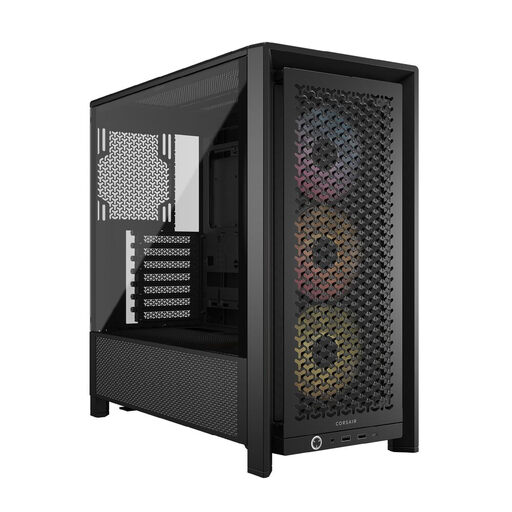
Why this choice suits this profile : Its design is aimed at neat, upgradeable builds, particularly those using a compatible motherboard with rear-facing connectors.
It does not reduce cooling to lighting alone: the mesh front panel, filters and pre-installed fans are integral to the design.
Dimensions of 453 × 466 × 230 mm, support for ATX, Micro-ATX and Mini-ITX formats, plus iCUE integration as announced by the manufacturer.
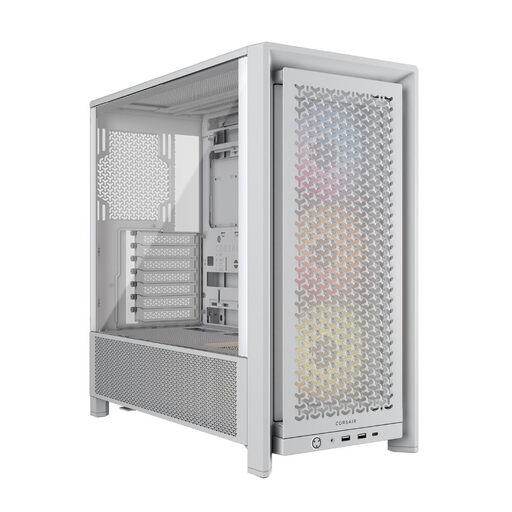
Why this choice suits this profile : This white version is designed for anyone who wants a visible, well-ventilated build that is ready to evolve over time.
Filters distributed across several panels and tool-free glass removal make regular maintenance and cleaning easier.
Weight of 7.8 kg, white RS ARGB fans included and support for compatible motherboards with rear-facing connectors.
Connect the fans’ power supply to the appropriate socket on the motherboard or controller, then plug the ARGB cable into a 5 V 3-pin header. Consult your motherboard manual before carrying out any work. The cable must never come into contact with the fan blades.
Lifespan depends mainly on the quality of the chassis, how often it is handled and how well it is maintained. A steel frame, regularly cleaned filters and careful handling of the tempered glass all help preserve the case. Fans are moving parts, so monitor their noise and speed over time.
According to the data supplied for these models, the combined rated power of the fans and lighting reaches 18 W during operation. However, the PC’s total power consumption depends primarily on the processor, graphics card, power supply and other components.