
Livraison le jour même ou le lendemain

Qualité garantie

Débloquez vos offres de bienvenue: Livraison GRATUITE | Jusqu'à -80 % | 30 jours d'essai gratuits à JoyPlus
Téléchargez l'application
RGB lighting may catch the eye, but it doesn't guarantee effective cooling or easy assembly. When choosing a Corsair RGB PC case, gamers, content creators and builders should focus primarily on airflow, component compatibility and the connectors used.
Three common pitfalls crop up time and again at the point of purchase:
For a gaming rig or a creative workstation, it's best to choose a mesh front panel – in other words, a ventilated grille – rather than a largely solid panel. It allows fresh air to flow in, while the rear and top openings let heat escape.
A Corsair airflow PC case may come with pre-installed fans. However, you should check their size, control method and positioning. 120 mm models are very common and easy to replace. A PWM fan uses a 4-pin connector and adjusts its speed according to the system temperature. This regulation is generally more precise than with a model that runs at a fixed speed only.
To complete a build, a 3-pack PC fan kit can greatly simplify installation. The RS120 ARGB models feature a PWM connection and 3-pin 5 V ARGB lighting. Their daisy-chain connection also helps reduce the number of visible cables.
A case's ATX compatibility isn't just about the motherboard. You should also check:
The 3200D and FRAME 4000D chassis featured here support ATX, Micro-ATX and Mini-ITX motherboards. The CORSAIR iCUE 4000D RGB also accepts the E-ATX format, with a motherboard limit of 305 × 277 mm.
The term RGB covers several technologies. ARGB allows you to control the LEDs on a single fan independently, provided you have a compatible 3-pin 5 V header. PWM, on the other hand, governs speed regulation and uses a 4-pin connector.
Corsair RGB fans can be controlled from the motherboard or via Corsair iCUE, depending on the model and controller used. iCUE LINK technology works differently: the fans connect in a chain using a digital system, and the RX120 kit includes an iCUE LINK hub. This solution reduces the number of cables, but you'll need a SATA power connection, an internal USB header and enough space to install the hub.
Finally, tempered glass offers a great view of your components, but it must be handled with care. Always place the panel on a soft surface and avoid impacts to the edges.
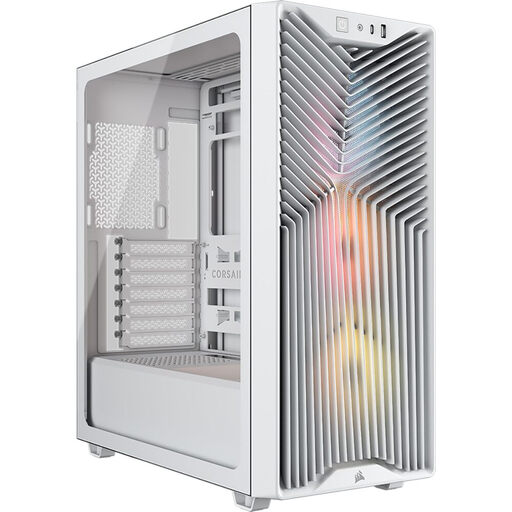
Why this choice suits this profile: This white RGB PC case combines a mesh front panel, pre-installed RS ARGB fans and ATX, Micro-ATX and Mini-ITX compatibility, all in a mid-tower format measuring 445 × 455 × 220 mm.
The included fans mean you don't have to buy several separate components from the start. The top, front and bottom filters also make routine maintenance easier.
Mesh front panel, tempered glass side panel, PWM control and Corsair iCUE integration.
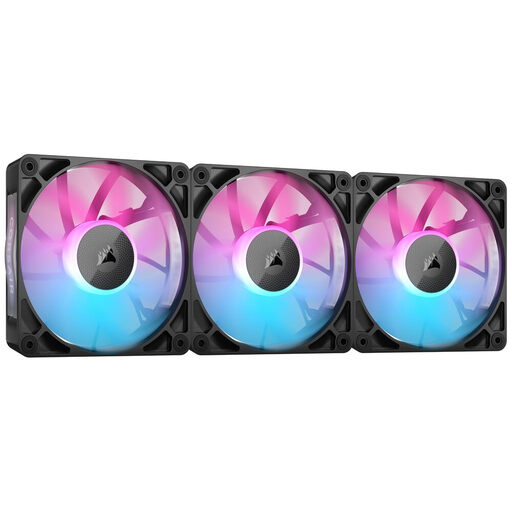
Why this choice suits this profile: This kit is aimed at users who want to install multiple 120 mm fans with digital daisy-chain cabling and centralised management via iCUE LINK.
The included hub avoids having to make multiple direct connections to the motherboard. However, you will need a SATA power supply and an internal USB header.
Three fans, iCUE LINK hub included and digital PWM control.
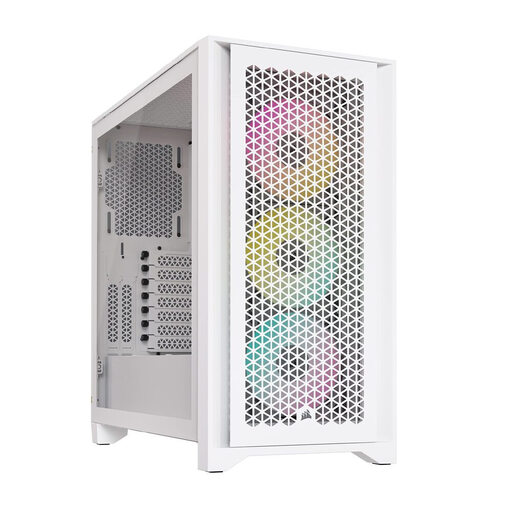
Why this choice suits this profile: With three pre-installed AF120 RGB ELITE PWM fans, space for up to eight 120 mm fans and front radiator support up to 360 mm, this model is built for expandable configurations.
The maximum dimensions specified for the graphics card, CPU cooler and power supply allow you to check compatibility before you start building.
E-ATX, ATX, Micro-ATX and Mini-ITX support, cable management with rear channel and removable filters.
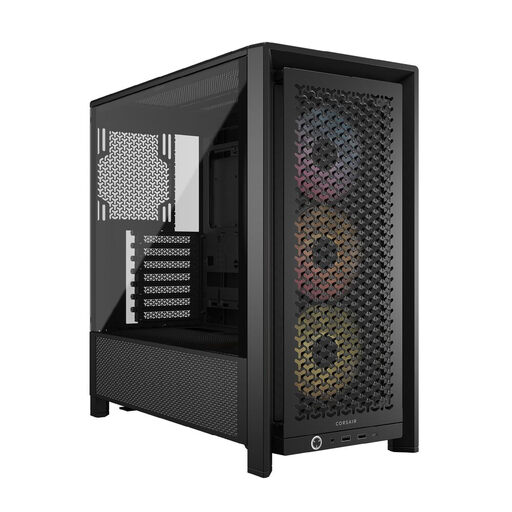
Why this choice suits this profile: This black RGB PC case maintains a discreet appearance while offering an airflow-optimised front panel, a tempered glass side panel and pre-installed RS ARGB fans.
Compatibility with certain motherboards featuring rear connectors can improve cable management and appearance, provided you check the exact motherboard model.
Mid-tower format, dimensions of 453 × 466 × 230 mm, front, top and bottom filters.
We've put together a comprehensive, real-time updated selection of products that meet these demanding criteria and European safety standards.
No. Start by checking the size, thickness and available slots. For lighting, make sure you have a 3-pin 5 V ARGB header. For speed, check that your motherboard has a 4-pin PWM fan connector. iCUE LINK systems, on the other hand, require the connection hardware designed for that technology.
It all depends on your components, processor, graphics card and workload. Installing fans at the front to draw air in, then one or more fans at the rear or top to exhaust it, provides a good foundation. Adding extra fans should remain consistent with the chassis slots and the capabilities of your motherboard or controller.
Clean the filters and blades regularly using a soft brush or compressed air, after switching off and unplugging the PC. Avoid blocking the vents and leave enough space around the case. A well-tuned PWM curve in the motherboard BIOS or in Corsair iCUE can also reduce fan speed when the temperature stays moderate.