
Livraison le jour même ou le lendemain

Qualité garantie

Débloquez vos offres de bienvenue: Livraison GRATUITE | Jusqu'à -80 % | 30 jours d'essai gratuits à JoyPlus
Téléchargez l'application
Finding the ideal gaming keyboard can be a daunting task. Responsiveness, typing noise, footprint, budget… there are many factors to consider. To help you navigate the jungle of Corsair QWERTY keyboards, our editorial team has analysed the current flagship models. This guide gives you everything you need to make the right choice—one that perfectly matches your playstyle and your setup.
Before we break down our selection, let's review the features that make all the difference in a gaming keyboard. Here are the key points to consider.
The choice of switch under each key is crucial. It defines the typing feel and the keyboard's responsiveness.
The size of the keyboard is more than just a detail: it affects your ergonomics and the vital space for your mouse.
Far from being purely aesthetic, an RGB gaming keyboard offers real in-game advantages. Corsair's iCUE software allows you to customise the lighting key-by-key, create profiles for different games, or synchronise lighting effects with other compatible peripherals. This lets you highlight critical keys (like abilities in a MOBA) or simply immerse yourself in an atmospheric setup.
Our editorial team has put three iconic models from the Corsair range through their paces, each catering to a different player profile and budget. All are, of course, available in QWERTY.
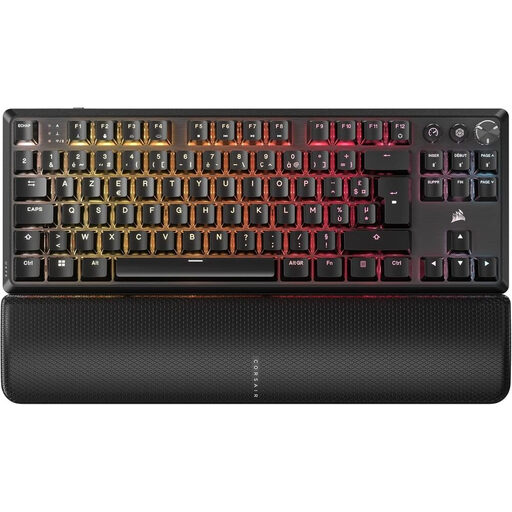
Why it stands out?? This model is the perfect blend of mechanical performance and wireless freedom. It's equipped with pre-lubricated CORSAIR MLX Red v2 linear mechanical switches, ensuring smooth, ultra-responsive keystrokes. Its dual layer of internal sound dampening provides surprisingly quiet acoustics for a mechanical keyboard. The ultra-low-latency SLIPSTREAM WIRELESS connectivity is built for high-level gaming.
Pros:
Who is it for?? For the demanding gamer who wants performance, responsiveness, and a clean, minimalist desk. It's the weapon of choice for competitive gaming where every millisecond counts, without compromising on typing comfort or wireless versatility.
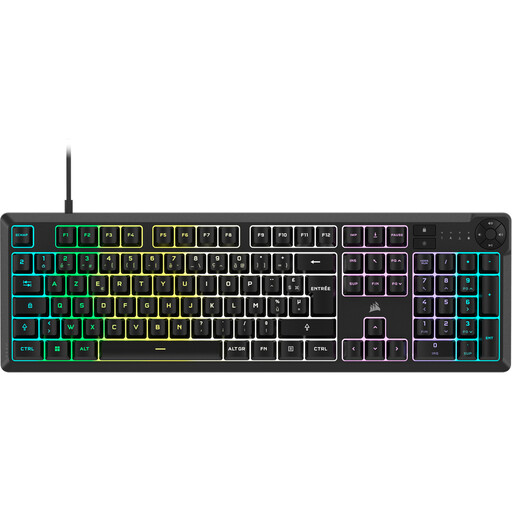
Why it stands out?? The K55 CORE is a membrane keyboard whose main strengths are its quiet operation and versatility. Its full-size format with a number pad and dedicated multimedia keys makes it as practical for gaming as it is for everyday tasks. Its spill-resistant design is a real lifesaver against mishaps during intense gaming sessions.
Pros:
Who is it for?? For the all-round gamer looking for a reliable, comfortable, and discreet keyboard. Its full-size format and practical features make it an excellent companion, whether you share your desk or use your PC for everything.
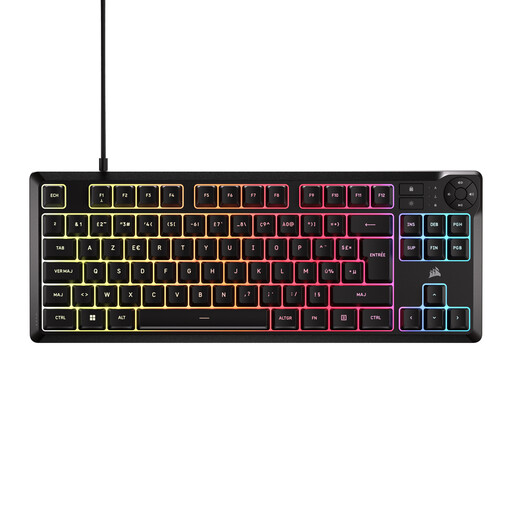
Why it stands out?? This model takes the winning formula of the K55 CORE (quiet typing, spill resistance) and packs it into an ultra-compact TKL format. It frees up valuable desk space without sacrificing essentials like multimedia keys and RGB backlighting.
Pros:
Who is it for?? This is the perfect option for gamers with modest-sized desks or fans of minimalist setups. It's an excellent entry point into the world of QWERTY gaming keyboards for anyone seeking silence and compactness without breaking the bank.
Our selection is just a glimpse of what the gaming ecosystem has to offer. To complete your setup with other accessories, check out our selection of luminous gaming peripherals and find the gear that will make your gaming sessions shine.
A mechanical keyboard has an independent switch for each key, giving it superior precision, tactile feedback, and durability. A membrane keyboard, on the other hand, uses a single rubber sheet for all keys, making it quieter, softer to type on, and generally more affordable.
The TKL format omits the number pad. The benefit? It brings your mouse closer to the keyboard for a more natural posture and, most importantly, frees up maximum space for wide mouse movements—a crucial advantage in FPS games. Its compact size also makes it easier to transport.
No, Corsair keyboards are plug-and-play right out of the box. However, installing the free iCUE software is highly recommended to unlock the full potential of your hardware: advanced customisation of your RGB gaming keyboard, macro creation, key remapping, and synchronising lighting effects across your entire Corsair ecosystem.