
Livraison le jour même ou le lendemain

Qualité garantie

Débloquez vos offres de bienvenue: Livraison GRATUITE | Jusqu'à -80 % | 30 jours d'essai gratuits à JoyPlus
Téléchargez l'application
Engraving, finishing a 3D print, sanding a small part or polishing a metal object: a cordless rotary tool can replace several devices in a home workshop. The key is choosing a model that is genuinely suited to your needs.
The options often look very similar, but certain details can make the difference between a practical tool and an accessory that ends up forgotten in a drawer. Here are the criteria to check before choosing your DIY precision tool, along with a selection of models suited to different users.
A 25,000 rpm rotary tool may appear versatile, but its maximum speed alone is not enough to assess its precision. When engraving or working with plastic, excessive speed can heat the material or create an uneven finish. For polishing, sanding or drilling, gradual adjustment is often more useful than a high top speed.
It is therefore best to choose a model offering several speed settings, so you can adapt the rotation to the material and accessory being used.
Accessories are not all compatible with one another. Some tools use 2.3 mm bits, while others accept different diameters. Before ordering a kit, check the size of the chuck and that of the burrs, discs or tips.
The Fanttik F2 Master, for example, is advertised as compatible with 2.3 mm accessories, or 3/32 inch. This information matters if you already own accessories or want to expand your kit later.
A rechargeable battery is convenient, but battery life varies depending on the selected speed, the pressure applied and the type of work being carried out. A compact tool can also become uncomfortable if the control button does not sit naturally beneath your finger or if changing the bit requires too many steps.
For regular use, look for a model with USB-C charging, a battery indicator and a stable grip. These details help reduce interruptions during a DIY or creative session.
For a cordless engraving pen, having several speed settings makes detailed work considerably easier. A moderate speed is generally better suited to light marking, plastic or finishing a 3D-printed part. A faster rotation can be reserved for polishing or certain sanding tasks, depending on the accessory and material.
The essential thing is being able to start gently, without having to press hard on the tool.
Noise is a criterion that is often overlooked, particularly in flats or shared workspaces. Product descriptions may highlight a quieter motor, but these claims remain manufacturer-stated features rather than universal measurements that apply in every situation.
The type of motor, ventilation and duration of use also affect the amount of heat produced. Take breaks during prolonged work and avoid blocking the rotation in the material.
A USB-C rechargeable mini drill can be charged easily using a compatible adaptor, power bank or computer, depending on the power required. Check the following:
For purchases in France, also consult the manual, compliance information and, where available, the contact details of the responsible person established in the European Union.
A kit may include abrasive discs, engraving tips, drill bits, brushes and polishing attachments. However, the stated number does not tell the whole story: check the actual selection of accessories and their diameter.
For 3D printing, prioritise attachments designed for small adjustments, removing burrs and sanding hard-to-reach areas. For engraving, the shape and hardness of the tip matter more than the total number of pieces.
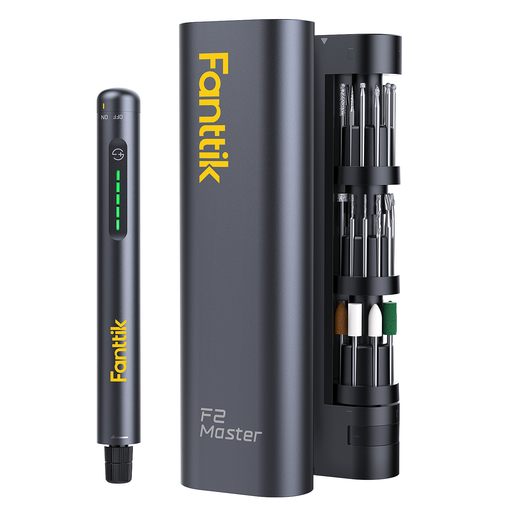
Why this choice suits this user profile : Weighing 100 g and offering five speed settings, it lets you get started with engraving, sanding or polishing without investing in several separate devices.
The five-level adjustment means you do not have to rely solely on maximum speed, while the magnetic storage system helps prevent small accessories from getting lost.
Advertised maximum speed of 25,000 rpm, 35 accessories measuring 2.3 mm, USB-C charging and integrated LED lighting.
Why this choice suits this user profile : Users looking for a compact, well-organised set get a tool with speed adjustment, an LED display and accessories grouped in a rotating holder.
The 360° storage system reduces the risk of buying incompatible bits, provided you stick to the specified 2.3 mm diameter.
Aluminium casing advertised as rust-resistant, brushless motor and full charging advertised in 60 minutes.
Why this choice suits this user profile : Its pocket-sized design is ideal for model makers, hobbyists and 3D printer users carrying out occasional adjustments or detailed finishing work.
The front light helps you follow a small work area, while the rear indicator signals when the battery level falls below 30%.
35 advertised accessories for sanding, polishing, drilling, engraving and post-processing 3D-printed parts.
Before each session, check that the attachment is securely fitted and suitable for the material you are working on. Wear safety goggles when drilling, sanding or engraving, especially when fine particles may be projected.
Work on a stable surface without applying excessive pressure. When working on a 3D-printed part, start by testing on an inconspicuous area. Then clean away any residue and store the accessories in a dry place.
Yes, it can be used to remove small burrs, smooth an area or carry out localised touch-ups. However, it does not replace hand sanding for large surfaces. Use a moderate speed to limit heat build-up in the plastic.
Battery life varies according to the selected speed, the attachment used and the pressure applied. Intensive use will consume more energy than light engraving. A battery-level indicator and USB-C charging make it easier to monitor battery life, but the product specifications remain the reference for precise figures.
No. The accessory diameter must match the chuck or collet supplied. The Fanttik F2 Master is advertised as compatible with 2.3 mm accessories. Always check this information before buying additional attachments.