
Livraison le jour même ou le lendemain

Qualité garantie

Débloquez vos offres de bienvenue: Livraison GRATUITE | Jusqu'à -80 % | 30 jours d'essai gratuits à JoyPlus
Téléchargez l'application
Building or upgrading a gaming PC involves more than comparing clock speeds, fan numbers or a few RGB effects. Cooler Master and MSI PC components cover very different needs: cases, mechanical keyboards, air coolers and liquid cooling. You still need to read the technical specifications carefully to avoid unnecessary purchases and unpleasant surprises during assembly.
The most common mistakes involve case compatibility, choosing an oversized CPU cooler, lighting connectors and, in the case of a keyboard, battery life or the type of connection. Here are the key points to check before ordering, along with a selection suited to several user profiles.
A gaming PC case that supports ATX is not necessarily suitable for every Mini-ITX or Micro-ATX motherboard under the same conditions. You also need to check the length of the graphics card, the length of the power supply and the maximum height of the CPU cooler.
For example, the Cooler Master Elite 302 supports Mini-ITX and Micro-ATX motherboards, graphics cards up to 365 mm without front fans or a radiator, and a CPU cooler up to 163.5 mm high. These dimensions become particularly important if you are considering an all-in-one liquid cooler.
A 240 mm or 360 mm radiator is about more than the length shown on the box. You also need to consider its thickness, the thickness of the fans, the height of the RAM and any heatsinks around the socket.
A 360 mm liquid cooler may require a very specific front, top or bottom mounting position. The Cooler Master Elite 502 supports a front radiator up to 420 mm and a top radiator up to 360 mm. By contrast, a compact case can significantly limit your mounting options.
ARGB lighting generally uses a 3-pin 5 V connector, which should be connected to the motherboard or a compatible controller. Do not confuse it with 12 V 4-pin RGB: connecting it incorrectly can damage the hardware.
Some products also include proprietary connectors or several cables: PWM power for the fans, ARGB for the lighting effects and an internal USB connection for the pump display. It is therefore best to check the available cabling before placing your order.
With a mechanical keyboard, the choice of switches is not everything. Check the format — compact, tenkeyless or full-size —, the key layout, compatibility with Windows or macOS, and the type of connection provided.
A wireless model may work via Bluetooth or a 2.4 GHz receiver. The second option is generally better suited to gaming, while Bluetooth makes it easier to connect to a laptop, tablet or smartphone. Also consider battery life, whether it can be used in wired mode and whether the switches can be replaced if you want to keep the keyboard for several years.
A CPU cooler must be compatible with the motherboard socket. The models featured here support Intel LGA 1700 and LGA 1851, as well as AMD AM4 and AM5, but exact compatibility always depends on the model selected.
For example, the MSI MAG Corefrozr AA13 comes with a pre-assembled mount for Intel LGA 1700/1851 and a kit for AMD AM4/AM5. However, its height of 152 mm must remain below the maximum height supported by the case.
For an air CPU cooler, measure the distance between the processor and the side panel of the case. The Cooler Master V4 Alpha 3DHP is 161 mm high, compared with 159 mm for the Hyper 612 APEX. These figures must remain below the clearance specified for the chassis.
For the case, also compare:
The CPU air cooler is generally easier to install and contains no liquid circuit. It is suitable for users who want to minimise the number of connections and the amount of maintenance required.
An AIO liquid cooler provides more space around the socket, but requires a compatible radiator mounting position. The Cooler Master ML Core Nex Digital 240 models use a 277 × 119.6 × 27.2 mm radiator and two fans. The 360 versions feature a 394 × 119.6 × 27.2 mm radiator and three fans. You should also plan for the digital display, ARGB cables and internal USB connection.
Start by defining how you plan to use it. A full-size keyboard with a number pad is practical for work and office tasks, while a more compact format leaves more room for your mouse. For gaming, a 2.4 GHz connection is appealing if it offers low latency; Bluetooth is mainly useful for switching quickly between devices.
The type of switch directly affects comfort and noise levels. Linear models are often well suited to gaming, tactile switches provide more noticeable feedback and silent versions are preferable in a shared space. For a keyboard designed to last, PBT keycaps and hot-swappable switches are genuine advantages.
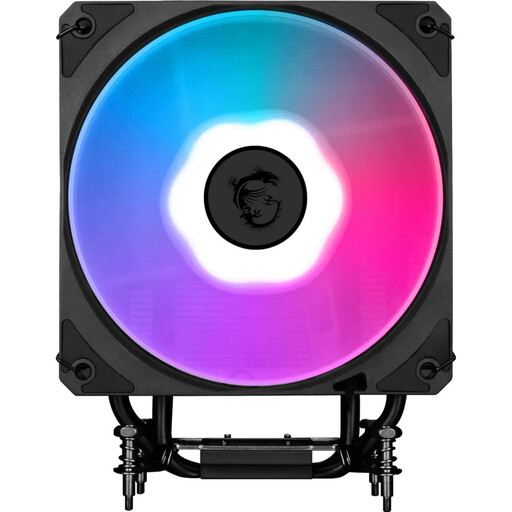
Why this choice suits this profile: This air CPU cooler is designed for straightforward installation, with pre-applied thermal paste and compatibility with Intel LGA 1700/1851 and AMD AM4/AM5.
At 152 mm high, its compatibility with your case is easy to check, with no need to accommodate an external radiator.
Four 6 mm copper heat pipes, a 120 mm PWM fan and support for up to 240 W TDP.
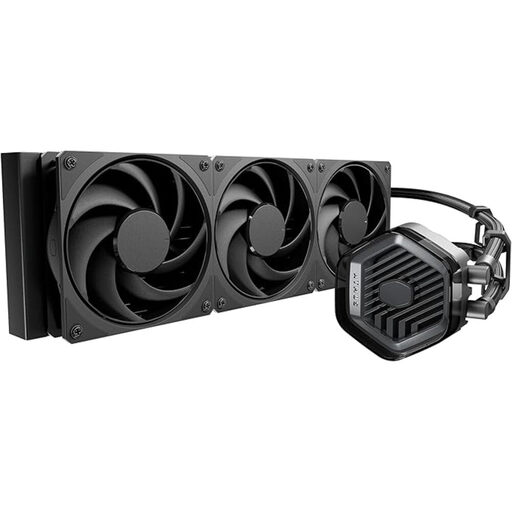
Why this choice suits this profile: Its 360 mm format is intended for systems with a sufficiently spacious chassis and users looking for a black finish without integrated lighting.
The radiator and three fans come pre-installed, reducing the amount of handling and the risk of missing a connection during setup.
A dual-chamber pump, three Mobius 120 fans and compatibility with Intel LGA 1851/1700 and AMD AM5/AM4.
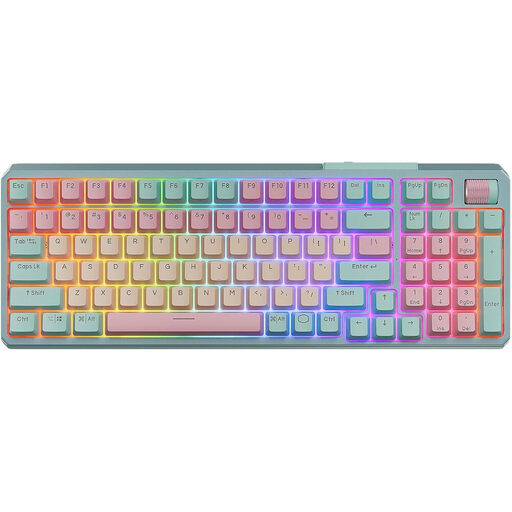
Why this choice suits this profile: This wireless Cooler Master mechanical keyboard is equally at home with gamers and creators who switch between work, gaming and mobile devices.
Its three connection options — wired, 2.4 GHz and Bluetooth 5.1 — mean you are not dependent on a single connection method.
A gasket-mounted structure, double-shot PBT keycaps, hot-swappable Kailh Box V2 switches and a 4000 mAh battery.
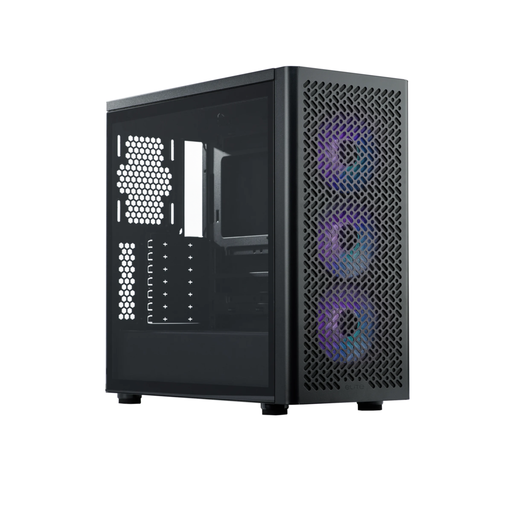
Why this choice suits this profile: This gaming PC case is suitable for builders who want room for a long graphics card, several fans and future upgrades.
The available graphics card clearance varies depending on whether the HDD bracket or a front radiator is installed: this limitation must be measured before assembly.
Support for ITX, Micro-ATX and ATX motherboards, a front radiator up to 420 mm and three included front ARGB fans.
We have brought together a complete, real-time selection of products meeting these demanding criteria, in compliance with European safety regulations.
It depends entirely on the processor, its power limits, the case and the expected workload. A 240 mm model can suit many configurations, provided the radiator and fans have a suitable mounting position. Always check the socket and internal dimensions.
Its lifespan depends on the quality of the fans, dust build-up, ambient temperature and frequency of use. Product specifications sometimes state an average operating life for the fans or pump, but this figure does not guarantee an actual service life. Clean the filters regularly and watch out for unusual noises.
ARGB lighting adds a limited amount of power consumption, which varies according to the number of fans, brightness and controller used. On a gaming PC, most power is generally consumed by the processor, graphics card and power supply. Check the available power and the motherboard connectors before adding multiple illuminated accessories.