
Livraison le jour même ou le lendemain

Qualité garantie

Débloquez vos offres de bienvenue: Livraison GRATUITE | Jusqu'à -80 % | 30 jours d'essai gratuits à JoyPlus
Téléchargez l'application
A connected robot vacuum and mop can take care of a good chunk of your daily cleaning, but a spec sheet doesn’t always tell the full story. High suction power, a comprehensive app or a multifunction docking station aren’t enough to guarantee a hassle-free experience in a British home.
Before you buy, there are three pitfalls worth paying close attention to.
Values expressed in pascals — such as 4,000, 9,000 or 15,000 Pa — refer to the suction power claimed by the manufacturer. On their own, they don’t let you judge how well a model performs on a thick carpet, against crumbs or pet hair.
The brush design, the anti-tangle system, automatic suction boost on carpets and the quality of the filter all play a decisive role too. A robot vacuum for pet hair should therefore be assessed as a whole, not based on a single number.
A robot vacuum and mop won’t always replace a manual clean when it comes to tackling stubborn stains. Check the type of mop pad, the water flow adjustment and whether there’s an automatic washing or drying system.
The mopping function shouldn’t be used on carpets or rugs unless the manufacturer includes automatic detection or configurable no-go zones. Standing liquids, flammable products and very wet debris can damage the appliance.
An automatic emptying station or an all-in-one base needs a clear area around it. Depending on the model, allow enough space on the sides and at the front for the robot to dock, open its tanks and carry out maintenance operations.
Also think about the height available under your furniture. A model with a LiDAR turret can be over 9 cm tall, while some more compact devices can slip under more sofas and beds.
A LiDAR robot vacuum uses a laser sensor to map rooms and plan its movements. This technology makes it easier to create maps, manage multiple floors and set up no-go zones.
Check which features are actually available in the app:
A robot vacuum with an app may also offer voice control. In daily use, though, connection stability and a clear interface remain essential.
An automatic emptying station reduces how often you need to empty the dustbin, but it doesn’t eliminate all maintenance tasks. Depending on the model, you’ll still need to clean the filters, remove hair from the brush, empty the dirty water tank or rinse the filter elements.
Stations that can wash and dry the mop pad are handy for frequent use. However, they’re bulkier and have more parts to keep an eye on. A self-cleaning robot vacuum should therefore be chosen based on how much time you’re genuinely willing to spend on its upkeep.
In a home with tiles, sealed wood or hard floors, water flow adjustment is essential. For carpets, look for automatic detection, a mopping avoidance feature and a brush designed to minimise fibre build-up.
The advertised battery life usually depends on the mode used. Turbo mode naturally reduces run time. For a large house or multiple levels, an automatic recharge and resume function can prove more useful than a particularly high theoretical battery life.
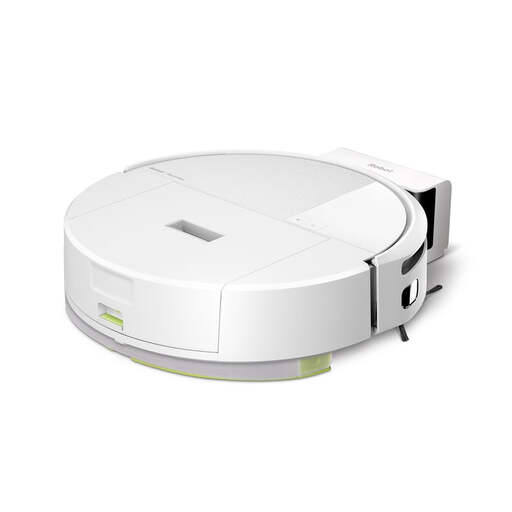
Why this choice suits this profile: With its 7.9 cm height, ClearView LIDAR mapping and Roomba Home app, it’s a good fit for users who want to get started with a connected device and guided setup.
The vacuum, mop and combined modes let you avoid activating the mop on every run. Carpet detection also helps reduce the risk of wetting them.
Advertised suction power of 15,000 Pa, claimed battery life of up to 2 hours, three-level mapping and an anti-tangle multi-surface brush.
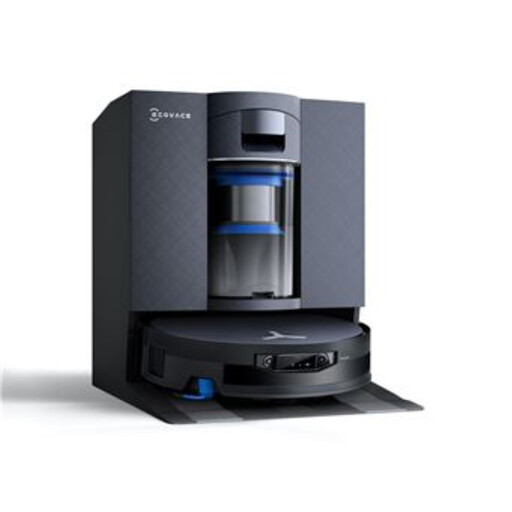
Why this choice suits this profile: Its all-in-one station and advanced mopping and navigation features are aimed at households that want to automate recurring tasks as much as possible.
The dedicated station reduces the amount of handling needed after each cycle. However, you still need to check the tanks, consumables and usage recommendations.
OmniCyclone station, OZMO ROLLER 3.0 automatic mop washing, AIVI 3D 4.0 navigation and ZeroTangle 4.0 anti-tangle system as claimed by the manufacturer.
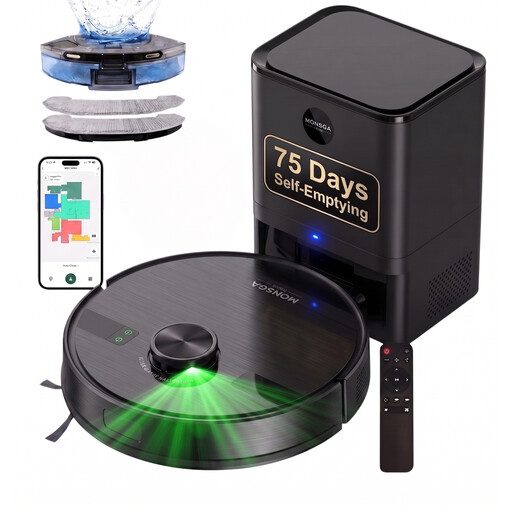
Why this choice suits this profile: Its 4-litre emptying station, LiDAR navigation and claimed battery life of 180 minutes can suit homes with pets, carpets and hard floors.
The large-capacity dustbin prevents you from having to empty it too often. It’s still essential to clear the floor of cables, fragile items and small debris that could block the brushes.
Advertised suction power of 9,000 Pa, control via app, remote control or voice command, and claimed compatibility with hard floors and carpets.
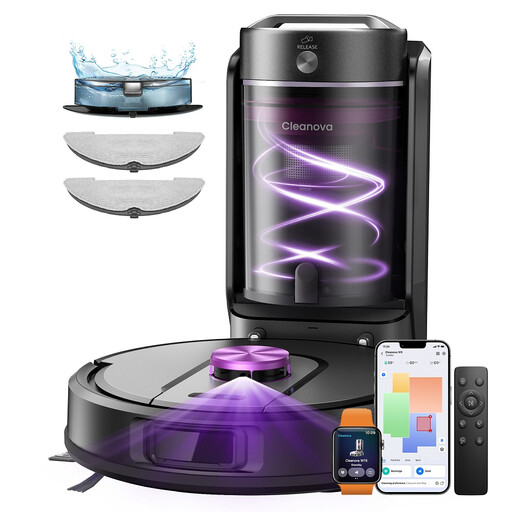
Why this choice suits this profile: Its bagless emptying station and five claimed maps cater to households that want to cut down on consumables and manage multiple spaces.
The bagless station saves you from buying bags regularly, but its multi-cyclonic filters need to be rinsed and then thoroughly dried before being put back in place.
Advertised suction power of 10,000 Pa, claimed battery life of 180 minutes, mapping of five spaces and separate adjustments for suction and water flow.
We’ve put together a comprehensive list, updated in real time, of products that meet these strict selection criteria and European safety regulations.
For the first use, place the base against a wall on a flat, hard floor. Remove cables, toys and fragile items before starting the mapping. The app will then let you name the rooms and schedule cleaning sessions.
A simple routine helps keep the appliance in good condition:
For the garden, the needs are different. A connected robot lawnmower relies on mapping, an app and sometimes perimeter wire-free navigation. Models designed for sloping ground should be compared based on their claimed capacity, wheel type, zone management and safety features. A robot vacuum cannot replace a robot lawnmower: these devices operate in different environments and meet different requirements.
The cost isn’t limited to the purchase price. You also need to factor in electricity, brushes, filters, mop pads and, for some stations, dust bags or compatible cleaning products. A bagless station can reduce certain consumables, but it usually requires more frequent filter cleaning.
It depends on how often you use it, how well you maintain it, the battery and the conditions in your home. To preserve the appliance, avoid standing liquids, sharp objects and cables left on the floor. Before buying, check the warranty terms and the availability of spare parts.
Basic functions may be accessible from the buttons on the robot itself, but mapping, scheduling, no-go zones and voice control generally require the app and a compatible Wi-Fi network. In particular, check whether the model works on the 2.4 GHz band, which is often required by these devices.