
Livraison le jour même ou le lendemain

Qualité garantie

Débloquez vos offres de bienvenue: Livraison GRATUITE | Jusqu'à -80 % | 30 jours d'essai gratuits à JoyPlus
Téléchargez l'application
A computer mouse might seem simple enough to choose… until its shortcomings start to annoy you day after day: clicks that are too loud in a shared space, a battery that needs replacing too often, a cable that tangles, or a shape that doesn't fit your hand properly. Spec sheets often boast about impressively high DPI numbers or RGB lighting, yet these features may not actually address what you need.
Before you buy, it's best to focus on the connection, the feel in your hand, the sensitivity, and any power-related constraints. Here are the criteria to help you decide between a wireless mouse, a wired USB mouse, a Bluetooth mouse, a gaming mouse or an ergonomic mouse.
DPI indicates the sensitivity of the sensor – in other words, how far the cursor moves for a given movement of the mouse. An adjustable DPI mouse lets you tailor this behaviour, but a high number isn't essential for office work.
For emails, documents and browsing, a resolution between 1,000 and 1,600 DPI is usually sufficient. Higher values may appeal to gamers, graphic designers or users working on large screens, but they often require fine-tuning.
A 2.4 GHz mouse with a USB receiver offers a convenient connection, but it uses up a port and typically runs on a battery. A Bluetooth mouse does away with the receiver, which can be handy with a laptop – provided the laptop is compatible.
You also need to distinguish between a battery-powered mouse and a rechargeable mouse. A built-in battery saves you from buying batteries regularly, but it's usually not user-replaceable. For a wireless model, check the claimed battery life, the charging method, and whether you can continue using it with a cable.
An ambidextrous mouse works for both left-handed and right-handed users, but its symmetrical shape may offer less support than a model designed specifically for one hand. A vertical mouse changes the angle of your hand and takes a little getting used to.
Size matters too: a compact mouse is easy to carry around, while a larger model may fit your hand better during long sessions. Consider the dimensions, weight and thumb placement in relation to how you hold the mouse.
For gaming, connection latency and polling rate may matter more. For office work, stability, comfort and battery life usually take priority.
An optical sensor provides reliable tracking for everyday tasks on a clean, flat surface. DPI adjustment buttons let you switch quickly between slow, precise movement and faster navigation.
A polling rate of 1,000 Hz, where stated, means the mouse theoretically reports its position every millisecond. This feature may appeal to gamers, but it doesn't turn an office mouse into a gaming peripheral.
Three buttons – left click, right click and scroll wheel – are enough for most uses. Side buttons can speed up navigation or be assigned to shortcuts. On a gaming mouse, check whether the customisation software is compatible with your system.
RGB mouse lighting is primarily about visual personalisation. It can be synchronised with certain games on compatible models, but it doesn't in itself improve cursor accuracy.
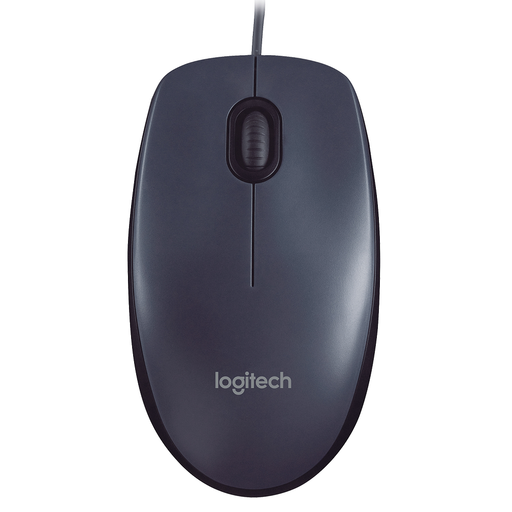
Why this choice suits this profile: this wired USB-A mouse is ideal for studies, office work and a first setup, with no complicated adjustments.
The USB-A connection doesn't rely on a battery or Bluetooth pairing. The 1.5 m cable does, however, need to be compatible with your setup.
1,000 DPI optical sensor, three buttons, ambidextrous shape and claimed driver-free operation.
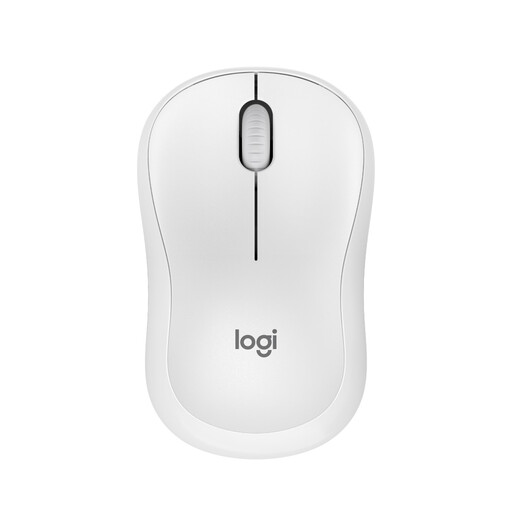
Why this choice suits this profile: its compact size and Bluetooth connection make it suitable for working from home, in the office, and on the go.
It doesn't take up a USB port for a receiver, and its clicks are claimed to reduce noise by 90%. It runs on a battery, not a rechargeable one.
Bluetooth, three buttons, 1,000 DPI and claimed battery life of up to 18 months on one battery.
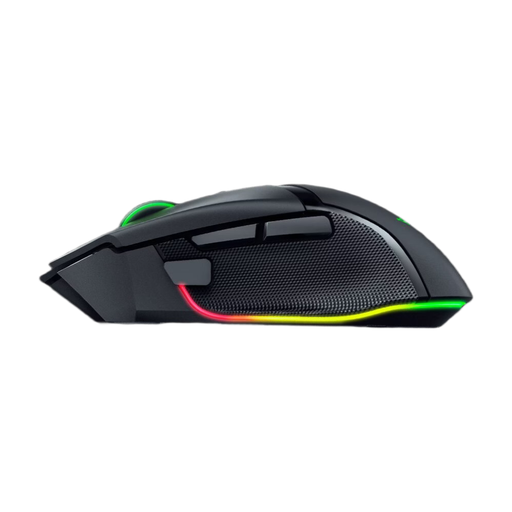
Why this choice suits this profile: this model is aimed at gamers and users who want to fine-tune controls and connectivity.
The adjustments go beyond DPI: 11 programmable controls, five onboard profiles and three connection modes are claimed.
Claimed 30,000 DPI sensor, four-direction scroll wheel, USB-C, Bluetooth, HyperSpeed connection and 13-zone RGB lighting.
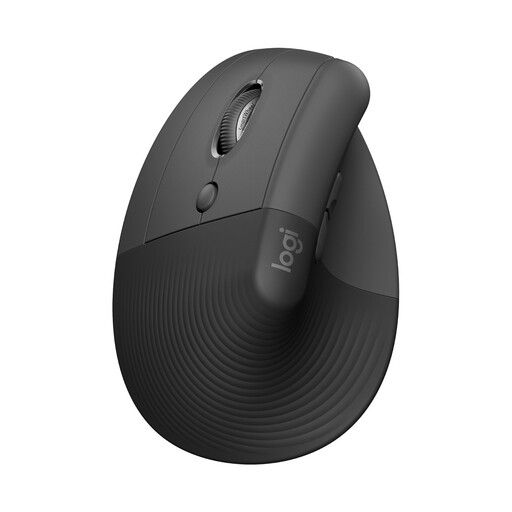
Why this choice suits this profile: its left-handed design and vertical orientation meet the needs of those looking for a different grip for long working days.
The dominant hand and angle are clearly specified: this is not an ambidextrous mouse wrongly presented as an ergonomic model.
57° vertical angle, Bluetooth or Logi Bolt receiver connection, four programmable buttons and claimed battery life of up to 24 months.
We've put together a comprehensive, real-time updated list of products that meet these strict selection criteria and European safety regulations.
No. The computer must have built-in Bluetooth or use a compatible adapter. Also check the supported operating system and whether the mouse has a pairing button.
It depends on how often you use it, how well you look after it, the cable and the switches. To extend its lifespan, clean it with a soft, dry cloth, avoid liquids and don't pull on the USB cable. Models with a built-in battery need to be replaced when the battery loses a significant amount of its capacity.
Yes, if several people work in the same room or if you use your computer in a quiet environment. However, check that only the clicks are claimed to be silent: the scroll wheel and side buttons may still produce a different noise level.