
Livraison le jour même ou le lendemain

Qualité garantie

Débloquez vos offres de bienvenue: Livraison GRATUITE | Jusqu'à -80 % | 30 jours d'essai gratuits à JoyPlus
Téléchargez l'application
Buying computer hardware isn’t just about comparing a price or a frequency highlighted on a product page. Whether you’re building a gaming PC, setting up a home office, or organising family storage, compatibility between the different parts often matters far more than any marketing claims.
Three mistakes crop up time and again:
When building a gaming PC, start by checking the motherboard form factor, the CPU socket, the RAM type and the case dimensions. An AM5 DDR5 motherboard needs a compatible AM5 processor and DDR5 memory sticks. EXPO or XMP profiles can help optimise your setup, but the actual supported frequency depends on both the processor and the firmware.
The case also needs to accommodate the graphics card length, the cooler height and the power supply format. The Cooler Master Elite 302, for example, accepts graphics cards up to 365 mm long when there are no front fans or radiators. Conversely, the Lian Li O11D Mini V2 cases require an SFX or SFX-L power supply, not a standard ATX unit.
A Full HD 120 Hz monitor works well for office tasks, video streaming and casual gaming, offering smoother motion than 60 Hz. For competitive gaming, a 240 Hz gaming monitor can reduce the delay between frames. However, your PC needs to be capable of producing enough frames per second to take advantage of it.
Resolution and refresh rate should therefore be considered together. An RTX 5060 Ti 8 GB graphics card can handle a Full HD setup, or even a higher resolution depending on the game and settings. More demanding in terms of power and space, the RTX 5070 Ti is better suited to builds that can fully exploit its potential. The figures quoted by manufacturers don’t guarantee a specific frame rate in every piece of software.
For a gaming or creative PC, compare the SSD interface with what your motherboard supports. The Lexar NM620 uses PCIe 3.0 x4 and claims up to 3,500 MB/s read speeds, while the Lexar NM790 runs on PCIe 4.0 x4 and reaches up to 7,400 MB/s. These figures refer to sequential speeds: they don’t necessarily reflect everyday performance.
A 4-bay NAS lets you arrange multiple drives in RAID or SHR, but redundancy won’t protect you against accidental deletion, ransomware, or the unit being physically destroyed. An external copy is still essential. For accessories, also check the USB standard, the power delivery rating and the cable supplied. A 20 W USB-C charger, for instance, won’t be enough for all laptops.
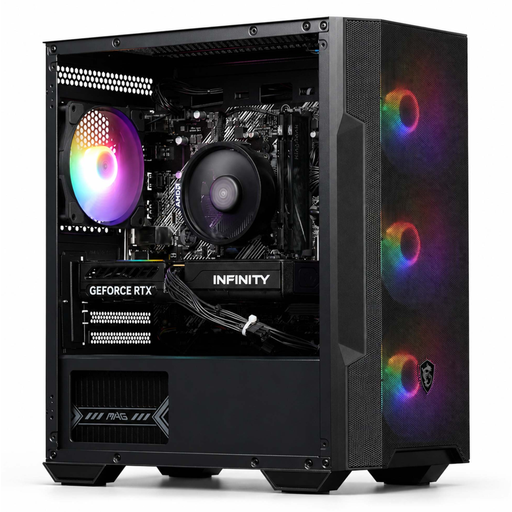
Why this choice suits this profile: This pre-built system saves you from having to pick every component individually. It brings together 16 GB of DDR4, a 480 GB SSD and a graphics card with 8 GB of memory, all in a ready-to-configure setup.
The main parts are already assembled, which reduces the risk of socket, cabling or physical compatibility errors. Still, check the available space before adding extra drives.
6-core, 12-thread processor, 16 GB of DDR4 memory and a USB Wi-Fi adapter included.
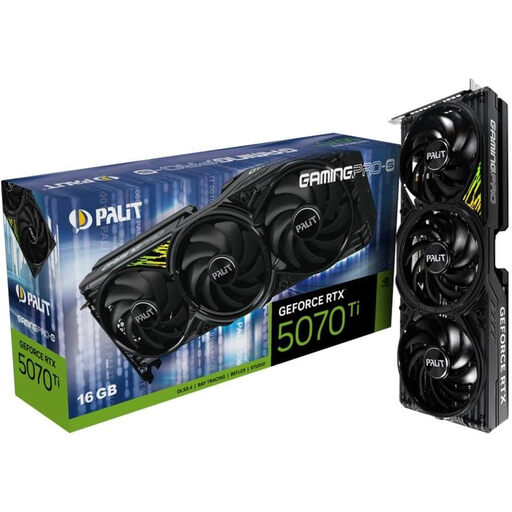
Why this choice suits this profile: With 16 GB of GDDR7 memory and a 256-bit interface, this card is aimed at those who want to build an upgradeable machine for gaming, content creation and demanding graphics applications.
At 331.9 mm long and with a graphics power draw of 300 W, it needs a spacious case and a recommended 750 W power supply. These requirements must be checked before purchase.
16 GB GDDR7, PCIe 5.0 bus and HDMI 2.1b and DisplayPort 2.1b outputs.
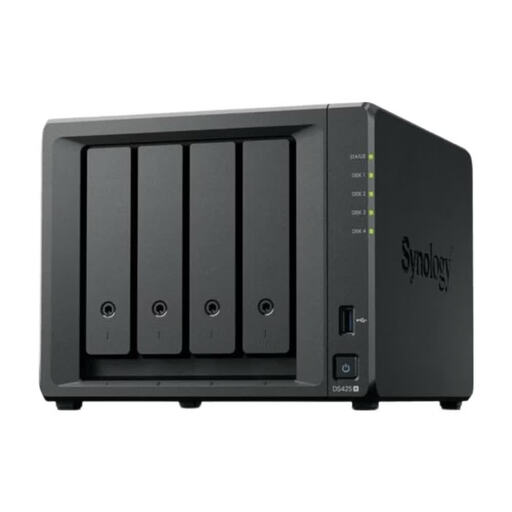
Why this choice suits this profile: This 4-bay NAS is ideal for households and small businesses that want to centralise their files, backups and sharing over the local network.
Its four bays let you choose a setup with redundancy. However, remember to check the list of compatible drives and keep an external backup.
2.5 GbE network port, SATA drive support and synchronisation between multiple sites.
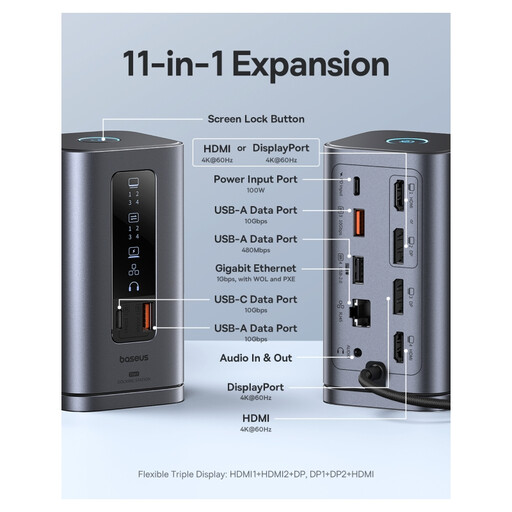
Why this choice suits this profile: This USB-C docking station brings together video outputs, wired networking, card readers, USB ports and audio output to easily create a versatile workstation.
The product page details macOS limitations in multi-monitor mode and notes that an external USB-C PD charger is needed for intensive use.
Two HDMI ports, two DisplayPorts, Gigabit networking and USB-C power delivery up to 100 W.
We’ve curated a comprehensive, real-time updated list of products that meet these strict criteria as well as European safety requirements.
Start by deciding on your target resolution, then choose your graphics card. Next, select a sufficiently powerful processor, at least 16 GB of RAM for modern use, an NVMe SSD and a suitable power supply. The case must be able to fit the graphics card and provide good airflow.
It all depends on the amount of data written, the quality of the components and the conditions of use. An internal SSD should be monitored and backed up regularly. A 64 GB USB stick, like the Kingston DataTraveler Exodia, is fine for transporting files, but shouldn’t be your only location for storing important data.
A Full HD webcam with built-in microphones, an adjustable monitor and a USB-C docking station can make your setup much simpler. Check compatibility with your computer, the number of screens you want and the power required. For a phone or small devices, a 20 W USB-C charger may be enough, provided you use a compatible cable in good condition.