
Livraison le jour même ou le lendemain

Qualité garantie

Débloquez vos offres de bienvenue: Livraison GRATUITE | Jusqu'à -80 % | 30 jours d'essai gratuits à JoyPlus
Téléchargez l'application
A computer desk might seem simple to choose… until you have to set it up. A depth that’s too shallow barely leaves room for the keyboard, an unstable worktop makes the screen wobble, and a poorly designed electric motor can quickly become a daily annoyance. To avoid a disappointing purchase, it’s far better to start with how you’ll use it, the space you have available, and the features that are genuinely useful, rather than being swayed by looks or an endless list of functions.
A 120 x 60 cm desk is enough for a laptop, a monitor and everyday accessories. However, with two monitors on their stands, a large keyboard and a speaker, the surface quickly becomes cluttered. For a more comfortable setup, sizes of 160 x 70 cm or 180 x 80 cm give you more distance and freedom of movement.
Also remember to check the thickness of the worktop, the position of the legs and whether there are any shelves. A particularly bulky frame can significantly reduce the legroom available.
Before buying a height-adjustable desk or an electric sit-stand model, examine its adjustment range, its maximum static load, its stated noise level, its overheating protection and the space needed around the worktop. The memory function lets you quickly recall several heights, but it doesn’t replace a setting that suits your body shape.
If the desk has a USB-C port, also check what it actually does: charge a device, power an accessory, or simply provide a connection. The product sheet and the manual are the most reliable sources on this point.
A thick worktop alone doesn’t guarantee good stability. Adjustable feet, the design of the metal frame and the stated maximum load are far more telling indicators. Cable management also helps keep the space tidy, but you need to check whether cable grommets, hooks or pouches are actually included.
For an electric model, make sure the regulatory information, manual and usage instructions are present. Keep electrical components away from any source of liquid and strictly follow the stated load limits.
A fixed height of 75 or 76 cm works for many users, but not for every body shape. An adjustable desk lets you tailor your working position, provided you allow enough clearance for the worktop to move.
A worktop made from particle board or laminated MDF is easy to maintain. The steel frame adds rigidity, while adjustable feet let you compensate for minor unevenness in the floor. Pay particular attention to the maximum static load, taking into account the weight of the monitor, the tower, monitor arms and any other accessories.
Industrial-style models, especially brown and black desks, often combine a wood-effect surface with a metal base. This combination fits easily into a student or professional interior, but do check the thickness and finish quality of the worktop.
An electric motor requires a few precautions. Avoid blocking the worktop against a wall while it’s moving, protect the power adapter from moisture, and observe the pause times recommended by the manufacturer during prolonged use. An anti-collision function or sensor can reduce the risk of contact with furniture, but it doesn’t replace correct adjustment or supervision while the desk is moving.
Among the genuinely useful accessories are cable management, headphone hooks, removable shelves, storage and charging ports. However, their value depends on your setup: they shouldn’t be just marketing gimmicks.
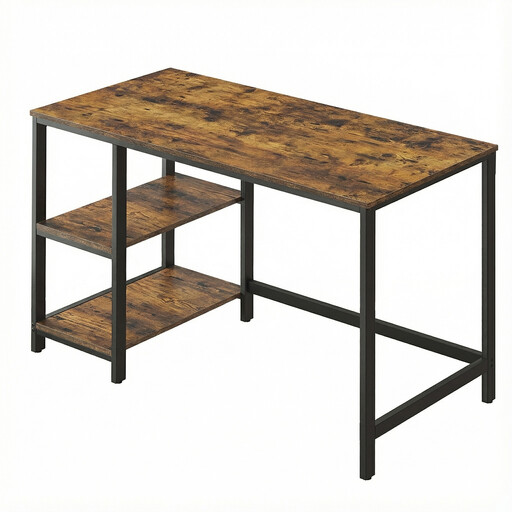
Why this choice suits this profile: Its 120 x 60 cm size is ideal for students and small spaces. The two removable shelves can be fitted on either the left or the right.
The adjustable feet reduce movement on slightly uneven floors, while the storage frees up the worktop.
120 x 60 cm worktop, steel frame, stated load capacity up to 50 kg and removable shelves.
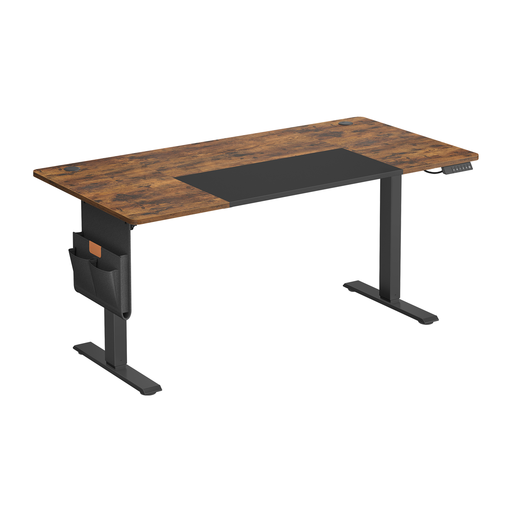
Why this choice suits this profile: Its 160 x 70 cm surface accommodates a full work setup, with electric adjustment, memory function and a USB-C port.
The maximum static load of 70 kg and the instructions to follow during movement are clearly stated, making it easier to set up correctly.
Adjustment from 72 to 120 cm, memory function, USB-C port, cable management and three included hooks.
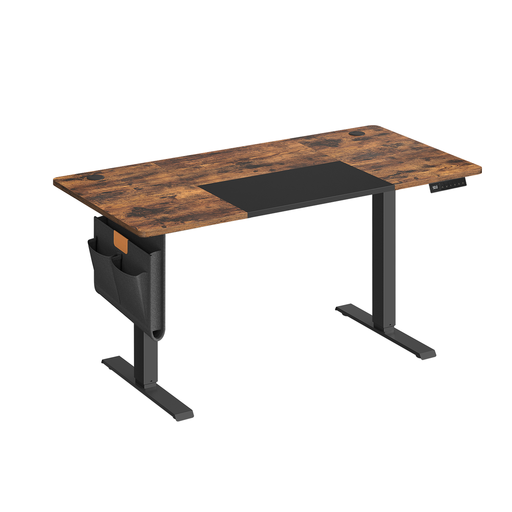
Why this choice suits this profile: The four stored positions make it easy to switch frequently between sitting and standing work, whether you’re working from home or during long screen sessions.
The load limits, overheating protection and restart delay are specified on the product sheet: details to check before installation.
Dimensions of 140 x 60 cm, adjustment from 72 to 120 cm, four presets, USB-C port and storage accessories.
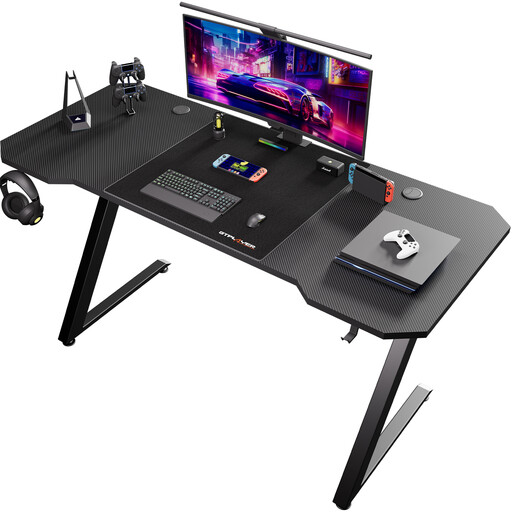
Why this choice suits this profile: This compact gaming desk is aimed at gamers who are short on space and want a textured black surface with a headphone hook.
The dedicated hook stops the headset being left on the worktop. The stated size also lets you check the desk’s exact footprint before buying.
120 x 60 cm surface, carbon fibre effect finish and integrated headphone hook.
We’ve put together a comprehensive, real-time updated selection of products that meet these demanding criteria and European safety standards.
A depth of 60 cm is fine for a laptop or a monitor placed near the edge. For two monitors, a large keyboard or a monitor arm, go for 70 to 80 cm instead, so you have more distance and room for accessories.
Its lifespan depends on the load it carries, how often you adjust it, and whether you follow the manufacturer’s recommendations. Never exceed the stated static load, keep liquids away from electrical components, and let the motor cool down if the overheating protection kicks in.
The motor mainly uses power when the worktop is moving. Use the presets to avoid unnecessary adjustments, unplug the adapter if you’re away for a long time, and don’t leave electrical accessories switched on without reason.