
Livraison le jour même ou le lendemain

Qualité garantie

Débloquez vos offres de bienvenue: Livraison GRATUITE | Jusqu'à -80 % | 30 jours d'essai gratuits à JoyPlus
Téléchargez l'application
A compact keyboard can free up space on your desk, while a well-organised bag makes trips between home, campus and the office much simpler. But buying computer accessories for your PC can throw up a few nasty surprises: misunderstood features, overlooked compatibility, or comfort judged solely from flattering photos.
Here are the criteria to check before you place your order, along with a selection designed for gamers, remote workers, students and mobile professionals.
A 60% gaming keyboard takes up noticeably less space, but it typically does away with the numeric keypad and several dedicated keys. The missing functions are often still accessible via the Fn key. This format is very practical for gaming or setting up a small desk, but it does take some getting used to when entering numbers, using certain shortcuts or working on documents.
Blue switches offer a pronounced tactile bump and a clearly audible click. While some users enjoy them, they can quickly become annoying in a shared space. Red switches are generally linear and require less force to activate, with a keystroke often described as quieter on the product page. The right choice therefore depends mainly on your noise environment and typing habits, not just the word "mechanical".
A lightweight, water-repellent backpack can protect your belongings from moderate rain, but this label does not mean it is fully waterproof. Also remember to check the compartment dimensions, the quality of the zips and the padding around the laptop. A laptop bag intended for work and travel should be chosen based on your machine's actual dimensions, not just the stated screen size.
To choose a mechanical gaming keyboard, start by comparing the following points:
The number of keys alone is not enough to judge a keyboard's responsiveness. The anti-ghosting feature, sometimes referred to as N-Key Rollover in the spec sheet, allows multiple simultaneous key presses to be registered. This is useful in games that rely on combined commands, although it is still best to check the manufacturer's information carefully.
Linear switches are often associated with a smooth, consistent keystroke, while tactile or clicky models offer more feedback under your fingers. For remote work or a shared room, consider the following:
For a 15.6-inch laptop backpack, measure the width, height and depth of your device. Two laptops with the same screen size can have very different dimensions. Also check:
A professional backpack with a USB port can make charging your phone easier when connected to a power bank stored inside. However, the USB port does not supply any power by itself: you will need a compatible power bank and must follow its usage instructions.
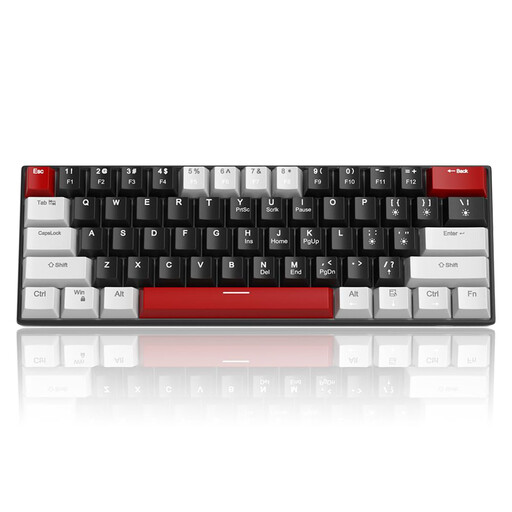
Why this choice suits this profile: Its 61-key format and detachable USB-C cable make it a good first mechanical keyboard for gaming or working on a compact desk.
The product page specifies the QWERTY US layout, wired connection and anti-ghosting support. This helps limit nasty surprises related to compatibility and simultaneous key press handling.
Compact 29 × 10 cm format, blue backlighting with multiple modes and a detachable USB-C cable.

Why this choice suits this profile: This 96% keyboard is aimed at those who want to keep more keys while enjoying versatile connectivity and a CNC-machined aluminium build.
The product page details the 96% format, QWERTY US layout, three connection modes and pre-lubricated HMX Cream Taro linear switches.
Bluetooth, 2.4 GHz or USB-C connection, customisable IPS screen and motorised lift mechanism.
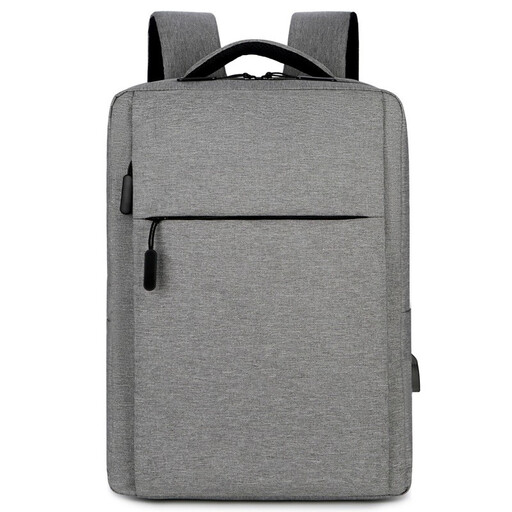
Why this choice suits this profile: Designed for the office, daily commutes and travel, it meets the needs of students and professionals who regularly carry a 15.6-inch laptop.
The description indicates professional use, a 15.6-inch format, lightweight design and splash resistance. Still, check your laptop's exact dimensions before purchasing.
Compartment for laptops up to 15.6 inches, built-in USB port and described as lightweight and water-repellent.
We have put together a comprehensive, real-time updated selection of products that meet these demanding criteria and European safety standards.
With a wired keyboard, simply plug the cable into a working USB port, then check the active layout in your system settings. A USB-C model with a detachable cable should be stored without excessively bending or twisting the cable. For a wireless keyboard, check the pairing procedure, battery level and Bluetooth or 2.4 GHz compatibility with your computer.
Always clean the keyboard when it is unplugged, using a dry or slightly damp cloth, and never submerge the device. As for the bag, avoid overloading it beyond its intended capacity: the combined weight of the laptop, charger and accessories puts constant strain on the stitching and straps.
Yes, but a QWERTY US model requires some adjustment if you usually use an AZERTY keyboard. Shortcuts and accented characters may require changing the software layout or using key combinations.
It depends on the quality of the components, how often it is used, how well it is maintained, and its exposure to dust or liquids. A detachable cable can make replacing that part easier, but it alone does not guarantee a specific lifespan.
No. The port usually acts as a relay between a power bank stored inside the bag and your phone's cable. The power bank, cable and charging power must be chosen separately and used according to their instructions.