
Livraison le jour même ou le lendemain

Qualité garantie

Débloquez vos offres de bienvenue: Livraison GRATUITE | Jusqu'à -80 % | 30 jours d'essai gratuits à JoyPlus
Téléchargez l'application
A compact mechanical gaming keyboard saves desk space, makes travelling easier, and gives your mouse more room to move. But navigating product listings can be confusing when terms are mixed up. 60% format, 75% mechanical keyboard, TKL gaming keyboard, RGB backlighting, tri-mode connection – the differences aren't always obvious.
Before you place an order, focus on three things: the key layout, the type of switch mechanism, and the connectivity. These will determine your day-to-day comfort, compatibility with your devices, and how future-proof your keyboard is.
Some membrane keyboards mimic the tactile feedback of a mechanical model without using real mechanical switches. This is especially true of certain compact formats sold under the label 'mechanical feeling'. For basic office work, this might be enough. However, these keyboards often don't allow you to change the switches or fine-tune the typing feel.
Looking for a hot-swappable keyboard? Make sure the listing explicitly mentions compatibility with mechanical switches and features solder-free replaceable sockets.
A 60% keyboard drastically reduces the footprint, but it usually removes the function row, dedicated arrow keys, and several navigation keys. A 75% mechanical keyboard typically keeps the F-row, arrow keys, and some navigation controls in a more compact chassis. The TKL format, on the other hand, mainly removes the number pad while keeping a layout similar to a standard keyboard.
If you often work with spreadsheets or regularly enter numbers, the lack of a number pad can quickly become frustrating. For gaming on a small desk, however, it frees up valuable space for your mouse.
In the UK, a QWERTY keyboard is standard, but if you're buying a keyboard originally intended for a French market, an AZERTY layout simplifies typing accents and everyday characters. A US QWERTY model is perfectly usable, but the position of letters and symbols won't match UK habits. Also remember to check the layout selected in your operating system: a keyboard printed in QWERTY configured as AZERTY won't produce the characters you expect.
The percentage isn't everything: the actual dimensions are often more telling. Compare the width, depth, and height of the keyboard with your desk, laptop stand, or bag.
Linear switches offer a smooth keystroke, which is particularly enjoyable when pressing keys rapidly during gaming. Tactile switches add a noticeable bump under your finger, while clicky models produce a more distinct sound. The best choice really depends on your environment: in an open-plan office, a shared room, or during late-night sessions, a quieter mechanism will generally be easier to live with.
A hot-swappable keyboard makes it easy to replace compatible switches. However, you'll need to check whether it accepts 3-pin or 5-pin models and whether the keycap size matches the supplied profile.
The 'gasket' mount structure, internal foam, and PBT keycaps all influence the feel and perceived noise level. None of these elements alone will make a keyboard silent: the noise also depends on the switch, your typing force, and the surface the keyboard sits on.
A wired USB-C keyboard offers a direct connection and doesn't need charging. Bluetooth is more convenient with a laptop, tablet, or multiple devices. A tri-mode keyboard usually adds a 2.4 GHz wireless connection via a USB receiver, which is handy for quickly switching between uses.
Always check the stated compatibility with Windows, macOS, Android, iOS, iPadOS, or consoles. General compatibility doesn't guarantee that all function keys or customisation software will work on every system.
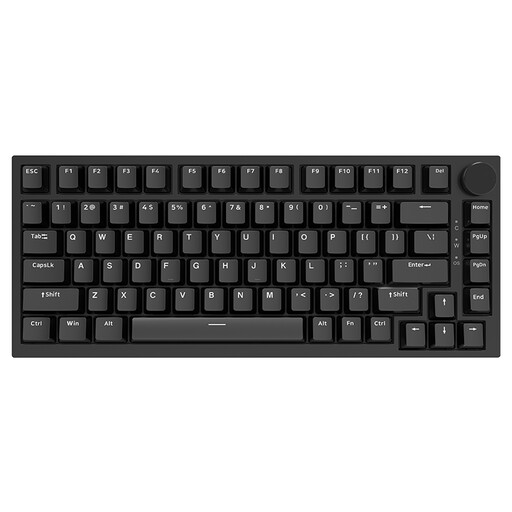
Why this choice suits this profile: Its 75% format keeps the arrow keys and function row while taking up little space. The USB-C connection is perfect for a fixed setup for gaming and working on a PC or Mac.
The listing mentions genuine replaceable linear switches, not a simple mechanical imitation. The US QWERTY layout is still worth checking before purchase.
PBT keycaps, volume wheel, gasket mount structure, RGB backlighting, and replaceable switches.
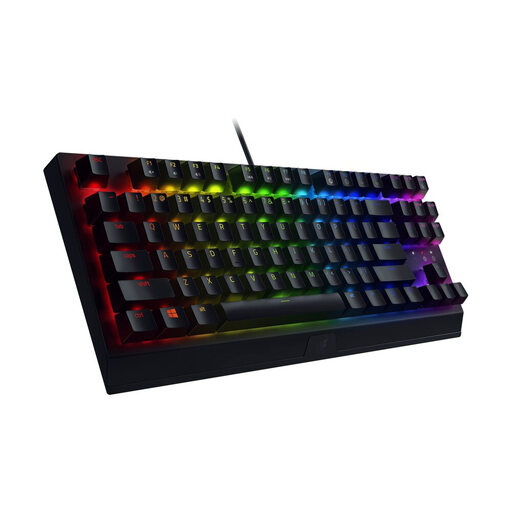
Why this choice suits this profile: This TKL gaming keyboard in AZERTY fits naturally into a French gaming setup, with advanced options for customising keys and lighting.
The listing specifies the TKL format, Razer Green mechanical switches, and the French layout – three details that are all too often missing from generic listings.
Tactile and clicky switches, Razer Chroma RGB lighting with 16.8 million colours, and programmable keys via Synapse 3.
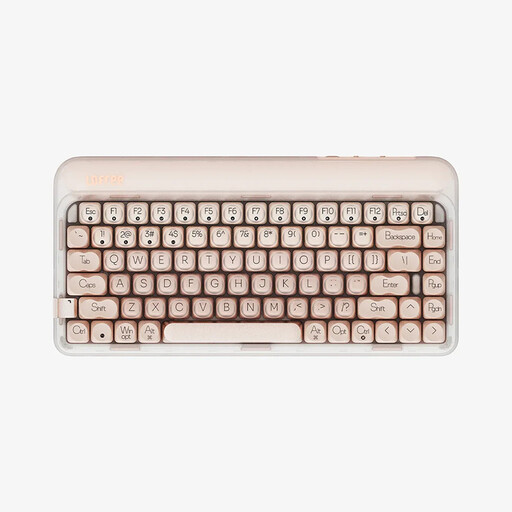
Why this choice suits this profile: The tri-mode connection lets you switch between USB-C cable, Bluetooth, or 2.4 GHz depending on your computer, tablet, or workspace. With 84 keys, this format is comfortable for both remote work and gaming.
All three connection modes are detailed, as is the 4,000 mAh battery. You will still need to remember to charge it and check the US QWERTY layout.
Replaceable linear switches, chassis with sound-dampening foam, Bluetooth 5.3, 2.4 GHz and wired connections, warm white backlighting.
We've put together a comprehensive, real-time updated selection of products that meet these demanding criteria as well as European safety standards.
Yes, if you mainly use letters, the top-row numbers, arrow keys, and function keys. For regularly entering numerical data, a separate number pad might be necessary. The 75% format is generally an excellent compromise for a versatile workstation.
The noise level depends mainly on the switches, stabilisers, keycaps, and the keyboard's design. Clicky models provide very pronounced sound feedback. Linear switches can be quieter, but they aren't silent by nature. Internal foam can dampen some resonance without eliminating the typing noise.
Wired avoids the need for charging and provides a direct connection. Bluetooth is convenient with a laptop, tablet, or multiple devices, but you need to keep an eye on battery life. For switching between gaming and mobility, a tri-mode keyboard combining USB-C, Bluetooth, and 2.4 GHz offers real flexibility: just check that the receiver is included and that each device is properly compatible.