
Livraison le jour même ou le lendemain

Qualité garantie

Débloquez vos offres de bienvenue: Livraison GRATUITE | Jusqu'à -80 % | 30 jours d'essai gratuits à JoyPlus
Téléchargez l'application
Between your monitor, mouse, documents, and the essential cup of coffee, does your desk sometimes feel like a battlefield? For professionals, students, and gamers alike, a compact mechanical keyboard isn't just a stylish gadget: it's a secret weapon for reclaiming precious inches without sacrificing typing quality.
This guide will help you decode the essential features before you buy. We'll then present our selection of models that cater to different needs, whether you're looking for a minimalist office keyboard, an ultra-responsive gaming keyboard, or a portable solution for multitasking across multiple devices.
The market is flooded with options. To make sense of it all, three criteria stand out: layout, switches, and connectivity.
Size is the primary defining feature of a small mechanical keyboard. Layouts are expressed as a percentage of a standard (or full-size) 104-key keyboard.
The true soul of a mechanical keyboard lies in its switches. They define the feel, sound, and responsiveness of every keystroke. On current models, linear switches (usually red) reign supreme.
The choice of connection will depend entirely on your use case.
Here are a few models that stand out for their design and performance, tailored for different user profiles.
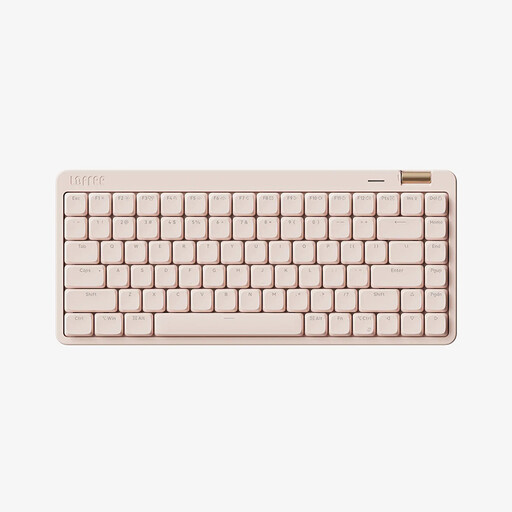
Why it stands out
The Lofree OE921 focuses on elegance and versatility. Its 75% layout retains the essential keys in a compact form factor, while its tri-mode connectivity (Bluetooth 5.4, 2.4G, and wired) makes it a perfect work companion, both at the office and on the go. The aluminium volume knob is a small, premium touch that makes a big difference.
Highlights
Who is it for?
For professionals and creatives who multitask across PCs, Macs, and tablets, and who are looking for a stylish, portable, and incredibly efficient office keyboard.
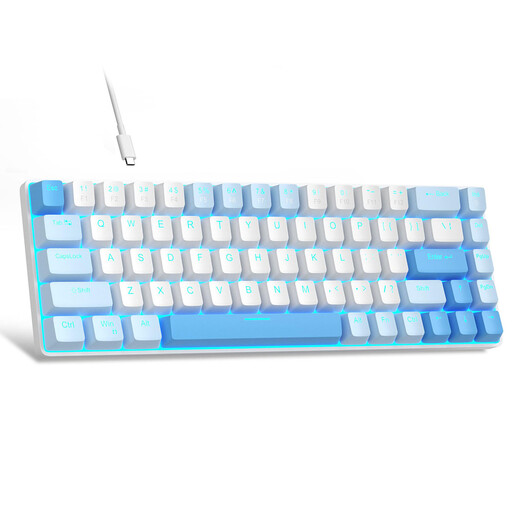
Why it stands out
The MageGee MK-Box is a 60% keyboard that embraces its colourful look and ultra-compact form factor. With its 68 keys, it smartly retains dedicated arrow keys—a real bonus for this layout. Its bold style and rock-bottom price make it an excellent gateway into the world of mechanical keyboards without breaking the bank.
Highlights
Who is it for?
For students, budget-conscious gamers, and anyone looking for a first small mechanical keyboard with a strong personality.
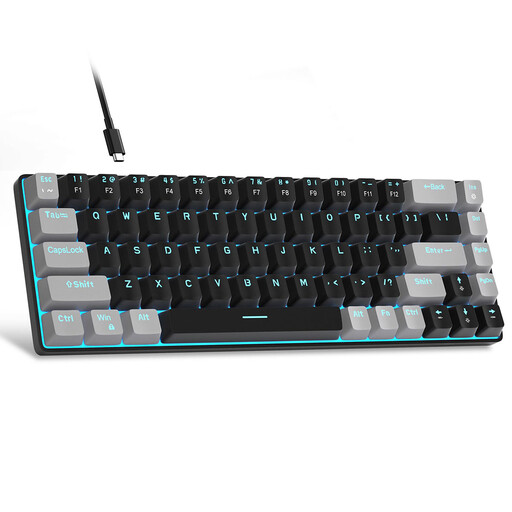
Why it stands out
This version of the MK-Box uses the same effective formula but in a much more discreet black and grey colourway. It fits effortlessly into any office environment. The main difference is under the keycaps: this model uses brown switches for a more tactile typing experience.
Highlights
Who is it for?
For developers, writers, and all professionals who want the efficiency of a compact mechanical keyboard with the reassuring feedback of a tactile keystroke, all in an understated design.
The selection above is just a glimpse of what's available. If you want to discover a wider range of keyboards, mice, and other peripherals to perfect your setup, feel free to browse our complete office equipment category.
1. Why switch to a compact mechanical keyboard? The number one benefit is, of course, saving desk space. This not only allows you to bring your mouse closer to your body's centreline (which is better for ergonomics) but also frees up room. Beyond their size, they offer superior typing quality, durability, and customisation options compared to standard membrane keyboards.
2. What's the real difference between a 60?% and a 75?% layout? To put it simply: the 60% keyboard is the most minimalist. It sacrifices the function keys (F1-F12) and dedicated arrow keys to achieve maximum compactness. The 75% keyboard, on the other hand, is only slightly larger but brings back both of these key sets, making it more intuitive for those who use them frequently and don't want to memorise shortcuts.
3. Is it difficult to use a QWERTY keyboard if you're used to a different layout? All the models featured here use the QWERTY keyboard layout (the international standard). If you swear by a different layout like AZERTY or QWERTZ, a short adjustment period will be needed. Rest assured, most operating systems (Windows, macOS) allow you to configure the keyboard to type special characters and accents easily (for example, by setting the layout to "US-International"). Many developers and tech professionals have already adopted QWERTY, which is often considered more logical for programming.
Selection curated by Joybuy's product specialist.