
Livraison le jour même ou le lendemain

Qualité garantie

Débloquez vos offres de bienvenue: Livraison GRATUITE | Jusqu'à -80 % | 30 jours d'essai gratuits à JoyPlus
Téléchargez l'application
A compact mechanical gaming keyboard frees up space for your mouse, is easier to transport, and works just as well for gaming as it does for work. But a spec sheet packed with numbers won't necessarily tell you whether the keyboard will suit your desk setup or your gaming style.
Three mistakes keep cropping up among shoppers:
The number of keys gives you a good idea of the footprint and the functions available.
Before you decide, measure the available width and depth. Also check the height of the feet, the cable length and whether a wrist rest is included if you use your setup for several hours a day.
Linear switches generally offer a smooth, consistent keystroke, while tactile models give a more noticeable bump at the actuation point. Clicky switches, on the other hand, produce a more pronounced sound – something that can quickly become annoying in a shared office or bedroom.
Actuation force, measured in grams-force, tells you how much pressure is needed to register a keypress. The Keyz Mercury, for example, features red switches at 45 g, an actuation distance of 2 mm and a total travel of 4 mm.
If you want to upgrade your keyboard, look for the term hot-swap. This feature lets you replace compatible switches without soldering. Keyboards with Hall Effect technology detect the key's position using a magnetic field. Some let you adjust the actuation point and offer Rapid Trigger, which speeds up key reset. These features are particularly useful for competitive gaming, but they require compatible software and careful tuning.
A wired USB-C model removes the need for charging and guarantees a stable connection. A wireless mechanical keyboard is more convenient with a laptop, console or multiple devices. Three-mode models typically combine USB, Bluetooth and 2.4 GHz connectivity. Check the claimed battery life, the type of receiver supplied and compatibility with Windows, macOS, PlayStation or Xbox.
A gaming RGB keyboard adds a touch of personalisation, but the options vary widely from one model to another: some only offer preset effects, while others let you configure the lighting key by key. The presence of software, macros, NKRO or anti-ghosting should be confirmed in the product specification.
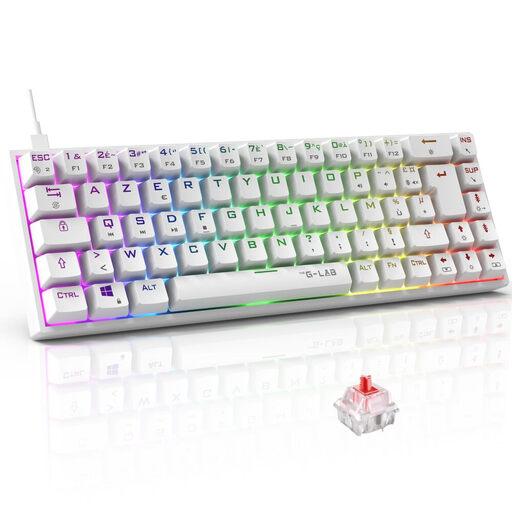
Why this choice suits this profile: Its 65% AZERTY layout and USB connection make it a good first gaming keyboard for PC or console, with a layout that feels familiar to UK users.
The AZERTY layout reduces the learning curve, while the compact size means you're not paying for a number pad you'll hardly ever use.
Outemu red switches at 45 g, RGB backlighting with 18 modes, programmable macros and NKRO anti-ghosting.

Why this choice suits this profile: Its 80% QWERTY US layout is aimed at enthusiasts who want extensive customisation and the ability to switch easily between devices.
Hot-swap lets you replace switches without changing the keyboard, while the three modes give you more freedom when it comes to connectivity.
Bluetooth, 2.4 GHz and USB-C, 4,000 mAh battery, PBT keycaps and programmable wheel.
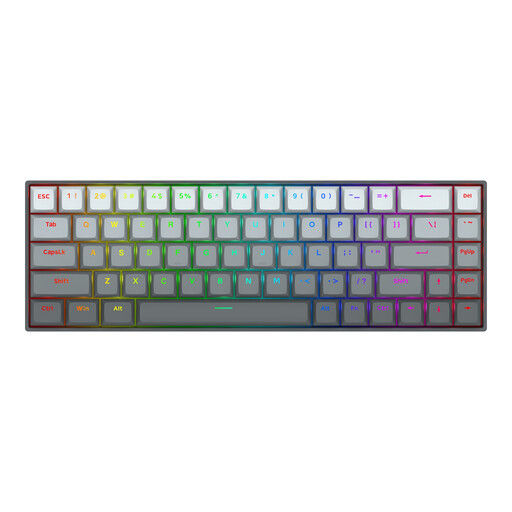
Why this choice suits this profile: This 65% QWERTY US keyboard is aimed at PC gamers who prioritise adjustable actuation points and fast mouse movements.
The spec sheet clearly states an adjustable actuation range of 0.2 mm to 4.0 mm and the inclusion of Rapid Trigger, rather than just a vague promise of speed.
Linear magnetic switches, claimed polling rate of up to 8,000 Hz, aluminium top plate and RGB lighting.
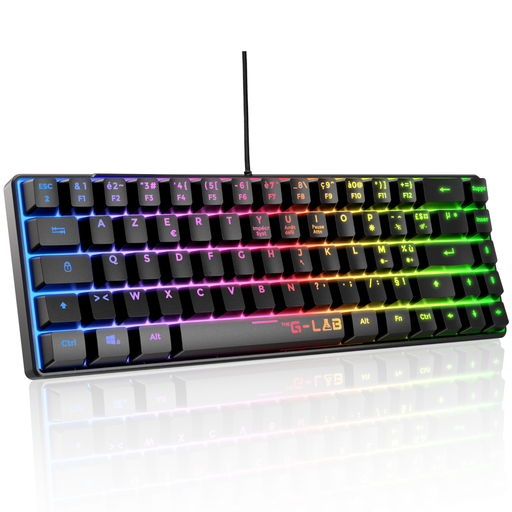
Why this choice suits this profile: Its TKL AZERTY layout keeps 87 keys and suits those who switch between typing, studying and gaming on PC or console.
The TKL format avoids the compromises of a 60% while freeing up space for your mouse. The wired connection also means you're not reliant on a battery.
32 macros, 20 lighting modes, anti-ghosting claimed on 88 keys and compatibility with PC, PS4, PS5 and Xbox.
We've put together a comprehensive, real-time updated list of products that meet these strict selection criteria as well as European safety requirements.
Yes, but secondary functions usually require the Fn key. If you type a lot, often use the arrow keys or regularly rely on shortcuts, a 65%, 75% or TKL format will save you a lot of extra key presses.
AZERTY makes it easier to type French characters and use common shortcuts. QWERTY can work for gamers who are used to it or for users of software configured in English. Always check the actual keycap legends, not just the language selected in the software.
The lifespan depends on the switches, build quality, maintenance and how intensively it's used. Some spec sheets claim tens of millions of keystrokes, but that's a manufacturer specification that alone can't predict the overall longevity of the keyboard. Keep liquids away, unplug the device before cleaning it, and regularly remove dust and debris.