
Livraison le jour même ou le lendemain

Qualité garantie

Débloquez vos offres de bienvenue: Livraison GRATUITE | Jusqu'à -80 % | 30 jours d'essai gratuits à JoyPlus
Téléchargez l'application
A compact gaming keyboard frees up space for your mouse, is easy to transport, and works just as well for PC gaming as it does for office work. But product listings can sometimes make enticing promises without telling you the full story about everyday use. Before you place an order, there are three pitfalls worth paying attention to.
The first concerns the format. A 60% keyboard takes up very little space, but it usually removes the function key row, dedicated arrow keys and the numeric keypad. These commands remain accessible via the Fn key, though it takes a little getting used to. A 75% keyboard keeps more keys in a compact chassis, while a TKL model simply does away with the numeric keypad.
The second pitfall is the layout. A QWERTY keyboard is not the same as a French AZERTY keyboard, even if both can work on a computer set up in France. The position of accented letters, symbols and certain keys changes. So be sure to check for "AZERTY FR" or "QWERTY US" before you buy.
Finally, RGB backlighting alone isn't enough to judge typing quality. You also need to look at the mechanism, how it handles simultaneous key presses, the connection type, and whether you can replace the switches.
Measure the available space on your desk and ask yourself how often you use the F1 to F12 keys, the arrow keys or the numeric keypad.
A mechanical gaming keyboard uses a separate switch under each key. The feel, noise and travel distance vary depending on the model. Semi-mechanical or membrane keyboards can offer quieter typing at a more accessible price, but their feel is different from a true mechanical keyboard.
The hot-swappable feature lets you replace compatible switches without soldering. It makes maintenance and customisation easier, but check the compatibility between the switches, the circuit board and the mounting system.
PBT keycaps are generally less prone to shine than ABS keycaps. However, their lifespan also depends on the overall keyboard design and how intensively you use it.
A wired USB keyboard is simple to set up and never needs recharging. On some models, the Type-C cable also makes it easy to replace the cord. A wireless keyboard offers more freedom, but you need to check the connection type — Bluetooth, 2.4 GHz receiver or both — as well as the stated battery life.
Anti-ghosting limits errors when several keys are pressed at the same time. A specification like "19 keys" or "NKRO" gives you more information than a simple promise of responsiveness.
For an RGB or backlit keyboard, tell the difference between a fixed multi-colour light and genuine per-key settings. If you work in a shared room, also check the stated noise level of the keys.
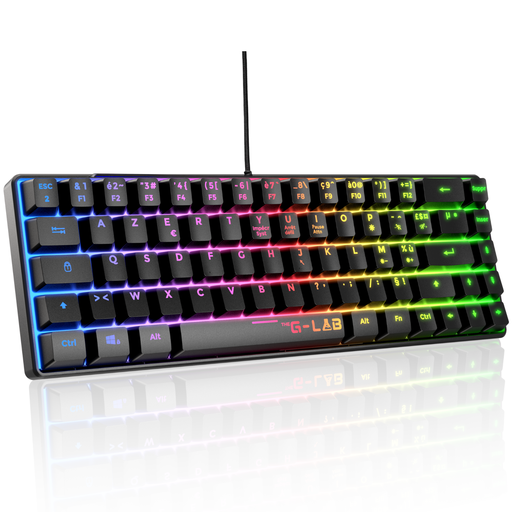
Why this choice suits this profile: This compact wired gaming keyboard focuses on instant setup and an AZERTY layout suited to users in France. Its reduced size easily fits on a small desk and is perfect for a first gaming setup.
The listing clearly states the 60% format, USB connection and AZERTY layout. However, you will need to accept using Fn key combinations for certain functions.
19-key anti-ghosting, fixed multi-colour backlighting, reinforced cable and compatibility with PC, PS4 and PS5.
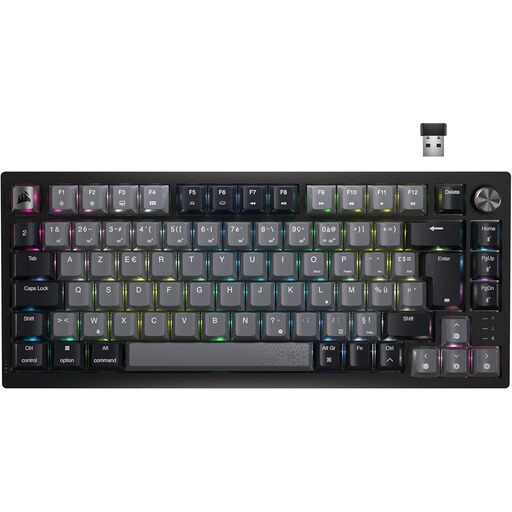
Why this choice suits this profile: Its 75% format keeps 87 keys and is aimed at gamers who want to free up their setup without giving up the essential functions of a PC keyboard.
The listing distinguishes between Bluetooth, USB-C and Wi-Fi connections. You can therefore prioritise mobility or a wired connection depending on the situation.
Corsair MLX Red linear switches, per-key RGB lighting and a dedicated volume wheel.
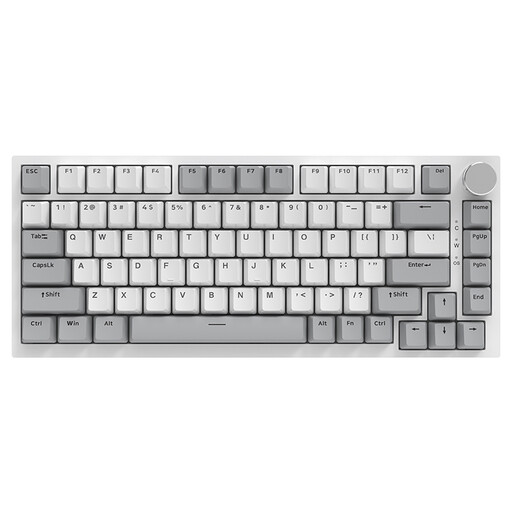
Why this choice suits this profile: It's aimed at users who want to customise their typing experience while keeping the navigation keys in a format narrower than a standard keyboard.
The listing specifies the 75% format, Type-C wired connection and QWERTY US layout. This check avoids nasty surprises when typing in French.
Hot-swappable switches, PBT keycaps, RGB lighting and NKRO support according to the stated specifications.
We've put together a comprehensive, real-time updated list of products that fully meet these strict selection criteria and European safety regulations.
Yes, but you'll need to accept Fn shortcuts to access missing functions and check for the AZERTY layout. For regular use of arrow keys, function keys and accents, a 75% format will generally require less adjustment.
A mechanical keyboard offers a more pronounced typing feel and more customisation options, especially thanks to replaceable switches. A membrane or rubber dome keyboard can be quieter and less expensive. It all depends on the feel you're after, the acceptable noise level and how often you use it.
On a wired model, the lighting draws power from the USB port and doesn't need separate charging. On a wireless model, the intensity and lighting effects can reduce battery life. You can usually turn off the backlighting when you want to prioritise usage time.