
Livraison le jour même ou le lendemain

Qualité garantie

Débloquez vos offres de bienvenue: Livraison GRATUITE | Jusqu'à -80 % | 30 jours d'essai gratuits à JoyPlus
Téléchargez l'application
A cluttered desk is a gamer's worst enemy. When every square inch counts, a standard keyboard becomes an obstacle that hinders mouse movement and compromises gaming comfort. This is where the compact gaming keyboard comes in: the ideal solution to free up space without sacrificing responsiveness or essential features.
This guide is here to help you find the perfect keyboard for your setup and playstyle. From layouts and switch types to key features, we'll break everything down so you can make the right choice.
Before diving into our selection, let's break down the criteria that define a good compact keyboard. Here are the three essential points to check.
What primarily defines a small gaming keyboard is the absence of the number pad. But behind this apparent simplicity lie several layouts:
The typing feel is a central part of the gaming experience.
Beyond the typing experience, other features can enhance your gameplay:
Here is our selection of models that excel at freeing up desk space for gamers.
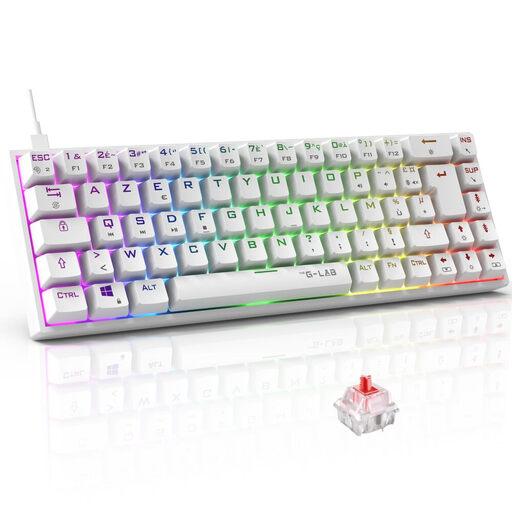
Why it stands out: This mechanical gaming keyboard combines a very compact 65% layout with the performance of Red mechanical switches. Known for their fast and linear activation, they require only a 45g actuation force. It also integrates full NKRO anti-ghosting technology, ensuring no keystroke is lost, even when actions are chained at high speed.
Pros:
Who is it for? For demanding gamers who want mechanical responsiveness in an ultra-compact form factor, without compromising on RGB customisation.
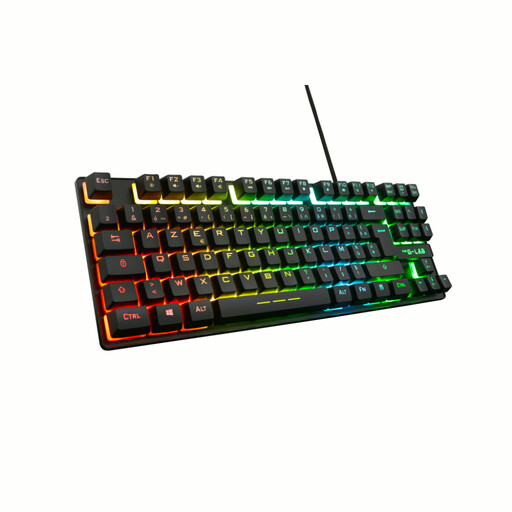
Why it stands out: The Keyz Caesium is a TKL gaming keyboard that prioritises quiet keystrokes with its membrane technology. Its numpad-free layout frees up space and ensures an easy transition if you're coming from a standard keyboard. It offers 26-key anti-ghosting to cover the most common in-game key combinations.
Pros:
Who is it for? For gamers looking for a quiet and compact gaming keyboard on a budget, without sacrificing practical features like macros or RGB.
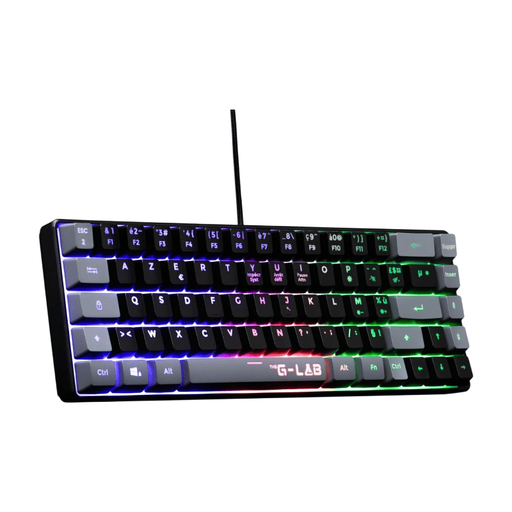
Why it stands out: This model features an ultra-compact 60% layout and semi-mechanical key technology. It offers a more tactile feel than a standard membrane while remaining quiet. With a feather-light weight of 430g, it's easy to transport. Installation is instant (plug-and-play), and it's compatible with PCs and the latest generation of consoles.
Pros:
Who is it for? For the mobile gamer or anyone with a tiny desk looking for a simple and effective plug-and-play solution.
Performance isn't everything: style counts too! For those who want a setup that truly stands out with a splash of colour, other options are available.
If you're drawn to original designs, explore our collection of cute blue keyboards for a setup that's like no other.
Absolutely. A compact gaming keyboard is perfectly suitable for office work. TKL models are particularly versatile, as they retain all the keys useful for productivity, except for the number pad. The 60% and 65% layouts require a short adjustment period to master the "Fn" key and its shortcuts, but they are just as functional for daily use.
The difference lies in the keys that are sacrificed for compactness. A TKL (Tenkeyless) keyboard simply removes the number pad on the right. A 60% keyboard goes further by also removing the function key row (F1-F12) and the navigation cluster (arrow keys, Insert, Delete, etc.). These functions remain accessible via key combinations.
Yes, The G-Lab keyboards featured in this selection, such as the Keyz Titanium, Keyz Caesium TKL, and Keyz Hydrogen, are compatible with the PS5, as well as with PC, PS4, and Xbox consoles. They are instantly recognised (plug-and-play) for basic input functions, allowing you to navigate menus or chat in games without any configuration.