
Livraison le jour même ou le lendemain

Qualité garantie

Débloquez vos offres de bienvenue: Livraison GRATUITE | Jusqu'à -80 % | 30 jours d'essai gratuits à JoyPlus
Téléchargez l'application
A tangle of cables on your desk, overloaded wall outlets, and devices charging at a snail's pace. If this scenario sounds familiar, a charging station is the perfect solution. However, the market is saturated with products whose alluring marketing promises often hide nasty surprises. To avoid buyer's remorse, it's best to know the most common pitfalls before you check out.
As a Product Specialist at Joybuy, my role is to cut through the noise and help you see things more clearly. Here, I'll share the key things to watch out for and the criteria you should never overlook.
The packaging often promises the world, but the reality can be disappointing. Here are three common mistakes, often made by buyers tricked by overly clever marketing.
To avoid these disappointments, a few key technical specifications are all you need to judge a station's true quality and performance.
Don't just rely on the total wattage. Check the maximum power per port, especially for the USB-C ports intended for laptops. A port labelled PD 100W guarantees it can deliver that power to a single compatible device.
For powerful, multi-port stations, look for GaN (Gallium Nitride) technology. A GaN charger is more efficient at converting energy, which means it generates less heat. The result: it's smaller, safer, and more durable than a traditional silicon-based charger of the same wattage.
The number of ports is important, but their type is even more so. A good modern station should offer:
If you primarily use products from a single brand, a specialised solution can greatly simplify your daily routine.
To move from theory to practice, here is our selection of products that meet these requirements, tailored for different types of users.
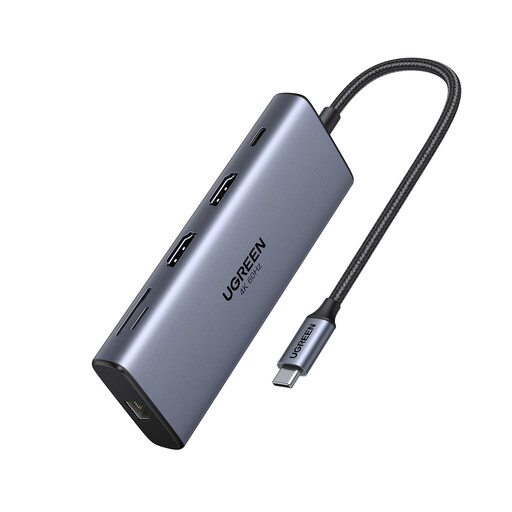
Why it's the right choice: The perfect solution for turning a simple laptop into a true workstation. This USB-C hub centralises everything: charging, dual 4K display output, and connecting all your peripherals (hard drives, memory cards...) through a single cable.
It has a dedicated 100W PD port, ensuring the laptop receives sufficient power even when other ports are in use, thus avoiding the notorious shared-power trap.
Extensive connectivity (10 ports including 2x 4K@60Hz HDMI, Gigabit Ethernet). Fast data transfer up to 10 Gbps via USB 3.2 ports.

Why it's the right choice: The ideal solution for anyone looking for a sleek, compact stand to charge their iPhone, Apple Watch, and AirPods trio. Its foldable design also makes it a perfect travel companion to avoid tangled cables.
Qi2 certified, this charger guarantees fast 15W wireless charging for your iPhone and flawless compatibility. No more falling for the slow, unreliable "compatible" charger trap. The Anker design also ensures excellent heat management.
Fast charging for iPhone (15W) and Apple Watch. Foldable and ultra-portable design, ideal for travel. 40W power adapter and cable included.
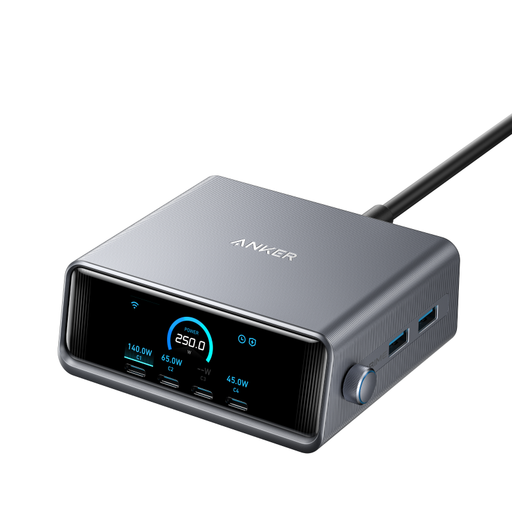
Why it's the right choice: For those who juggle an army of power-hungry devices (two laptops, a tablet, a smartphone...). This desktop station is a powerhouse that centralises all your charging with intelligent power management.
With its 250W of total power and smart distribution, it can charge two MacBook Pros at full speed simultaneously. Its LCD screen displays the power delivered to each port in real-time, offering complete transparency to avoid any nasty surprises.
Colossal 250W power output. GaNPrime technology for maximum efficiency and safety. LCD screen for full, real-time control over your charging.
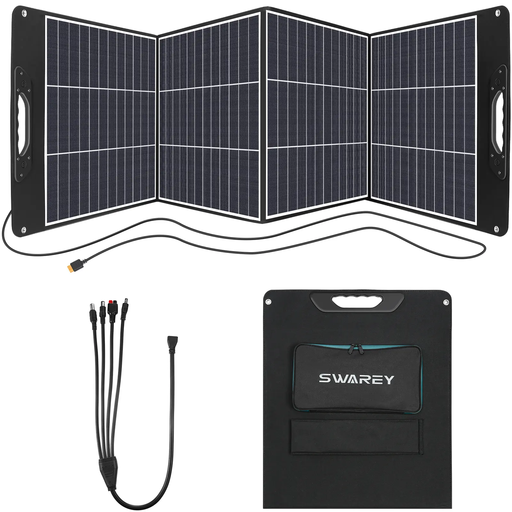
Why it's the right choice: For anyone who needs power autonomy far from any outlets: while camping, in a van, or simply as a backup solution. This portable solar panel can power your devices directly or recharge a high-capacity power bank.
Far from being a gimmicky solar panel, this model features high-efficiency (23%) monocrystalline cells and delivers a true 200W of power under optimal conditions. That's enough to recharge a proper portable power station.
High 200W power output. Comprehensive connectivity (USB-C, QC3.0, XT60) with included adapters for maximum compatibility. Foldable design with adjustable kickstands to optimise the angle to the sun.
We have curated a comprehensive, up-to-date selection of products that meet our strict selection criteria and European safety standards.
What is the lifespan of a charging station? The lifespan depends on its build quality and your usage. A well-made model, especially a GaN charger that manages heat better, can work flawlessly for 3 to 5 years, or even longer. Conversely, a low-end station that constantly overheats may show signs of failure in less than a year.
Is a GaN charging station really better? Yes, and in several key ways. GaN technology offers better energy efficiency, which means less heat is generated. This allows for more compact chargers at the same wattage, while also improving the lifespan of the components. The advantage is particularly noticeable on a high-power multi-port charger or fast charger.
Can I leave my devices plugged into a charging station overnight? Yes, with modern, certified equipment, there's no problem at all. Quality charging stations, just like your smartphones and computers, have built-in protection circuits that cut off power once the battery is full to prevent overcharging. For complete peace of mind, check that your station has safety certifications (for overvoltage, overheating, short circuits).