
Livraison le jour même ou le lendemain

Qualité garantie

Débloquez vos offres de bienvenue: Livraison GRATUITE | Jusqu'à -80 % | 30 jours d'essai gratuits à JoyPlus
Téléchargez l'application
Keeping your car, even if it's not the newest model, is often both a smart and sentimental choice. The problem is, the lack of a modern multimedia system can quickly turn daily commutes into a chore. Navigating with your smartphone propped on the passenger seat, frantically managing calls on speakerphone, or giving up on your favourite playlists?— these are frustrations many drivers know all too well.
Installing a CarPlay screen with a dash cam can seem like the perfect solution to modernise your vehicle cost-effectively. But be warned?— the market is flooded with products whose flattering spec sheets often hide deal-breaking flaws. To avoid falling into this trap and making a purchase you'll quickly regret, it's essential to know the most common pitfalls.
The 3 Pitfalls to Avoid When Buying a Smart Display:
To make an informed choice, don't be mesmerised by the screen size alone. Three technical parameters are fundamental to ensuring a smooth experience and a product that will go the distance.
The quality of your daily experience depends on the device's ability to connect quickly and, most importantly, maintain that connection.
The dash cam function is your impartial witness on the road, so its quality is non-negotiable.
To get audio from your GPS or music to play through your vehicle's speakers, the screen needs to communicate with your car stereo. Here are the most reliable options:
Instead of an endless catalogue, we've selected three products that meet specific needs while avoiding the pitfalls we've just described.

Why we chose it: For those seeking a truly effective all-in-one solution. This model combines a large, responsive screen with a high-performing front and rear camera duo. It's ideal for a complete and safety-focused upgrade for any vehicle.
It features dual-band Wi-Fi for a stable wireless link and a true native 4K front camera that ensures usable recordings. The 64GB memory card is included, so there are no unpleasant surprises upon arrival.
A complete 2-in-1 solution with a 4K front and 1080p rear camera. Ready to use right out of the box.
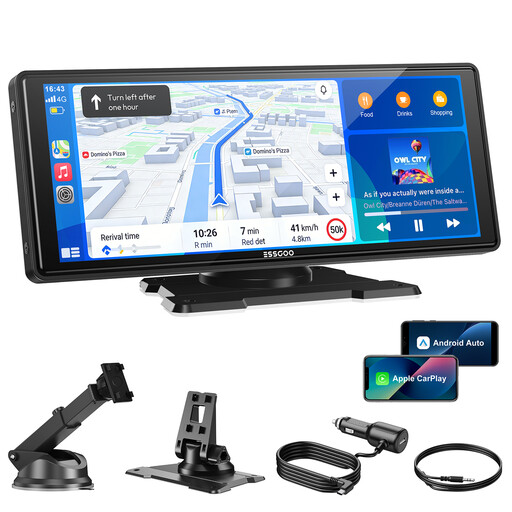
Why we chose it: Perfect for those who primarily want a large screen for navigation and multimedia. If you already own a dash cam or this feature isn't a priority, this model gets straight to the point: a beautiful display and reliable connectivity.
It forgoes a camera to focus on robust connectivity, featuring dual-band Wi-Fi and Bluetooth 5.3. No more frustrating disconnections. No false promises, just the essentials.
A large 10.26-inch HD screen (1600x600) for excellent viewing comfort. It remains compatible with a rear camera, which can be purchased separately.
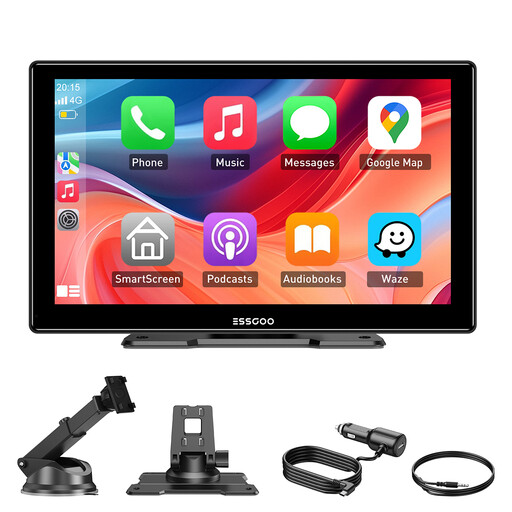
Why we chose it: The ideal solution for smaller car interiors or for those seeking a more discreet screen. This 9-inch model packs all the essential connectivity features into a compact form factor that doesn't obstruct your field of view.
Its more compact size allows for a sturdier mount that won't vibrate at the first pothole. It focuses on the essentials: a reliable wireless connection and a quality HD IPS screen, without getting bogged down in unnecessary gadgets.
Its compact 9-inch form factor fits anywhere. Installation is versatile thanks to the two included mounts (for the dashboard and windscreen).
We've put together a complete selection of products that meet our quality charter and current safety standards.
No, most of these devices are designed for "plug-and-play" installation. You just need to attach the mount (suction cup for the windscreen or adhesive for the dashboard), plug the power supply into the cigarette lighter socket (12V/24V), and pair your phone. Installing the rear camera requires a bit more elbow grease to run the cable to the back of the car, but it's still well within the reach of a casual DIYer.
It all depends on how you connect it to your car stereo. For optimal quality, prioritise a wired connection via the AUX output, which guarantees a pure, lossless audio signal. If your car doesn't have one, connecting to your car stereo via Bluetooth is an excellent alternative. The FM transmitter remains a backup solution, but its sound quality will largely depend on radio interference in your area.
No, and that's the whole point of loop recording. The camera continuously records in short segments (e.g., 1, 3, or 5 minutes). Once the memory card is full, the system automatically overwrites the oldest file with the newest one. This way, you always have the last few minutes of your drive recorded. And don't worry, important files (generated when the G-sensor detects an impact, for example) are automatically locked to prevent them from being erased.