
Livraison le jour même ou le lendemain

Qualité garantie

Débloquez vos offres de bienvenue: Livraison GRATUITE | Jusqu'à -80 % | 30 jours d'essai gratuits à JoyPlus
Téléchargez l'application
Is your car a trusted road companion, but its media system is seriously showing its age? The lack of a large-screen GPS, music streaming, or hands-free calls can quickly turn your drives into a frustrating and less safe experience. Rest assured, you don't need to buy a new vehicle or undertake a complex and prohibitively expensive installation to enjoy the best of in-car technology.
The arrival of portable CarPlay screen solutions and wireless adapters has completely changed the game. These clever devices allow you to integrate Apple CarPlay and Android Auto onto any dashboard, in minutes and with zero effort. This guide is here to help you navigate the options and choose the perfect solution for your needs and budget.
To ensure you make the right choice, let's review the few criteria that truly set the models apart. Here are the essential points to consider.
The first question to ask yourself relates to your vehicle's current setup.
Most modern portable screens offer a wireless connection via Bluetooth and Wi-Fi, which is much more convenient for daily use. After the initial pairing, your phone will automatically connect to the screen every time you start the car.
To stream audio, you have several options:
Some screens go far beyond simply mirroring your smartphone. A model with an integrated CarPlay with a backup camera adds a real safety bonus for parking manoeuvres. Others even include a front-facing camera (Dashcam) to record the road, offering an all-in-one solution that combines entertainment and peace of mind behind the wheel.
To help you make an informed choice, we have vetted several popular options on the market. Here is our selection.

What sets it apart This model is a true all-in-one solution, combining a large 10.26-inch touchscreen with a complete video recording system. It includes a 4K front camera and comes with a 1080P rear camera, enough to transform any vehicle into a modern, connected, and secure cockpit.
Key Features
Who is it for? For drivers who want to modernise their vehicle with a complete solution, combining navigation, multimedia, and safety (video recording, parking assist), without having to juggle multiple devices.
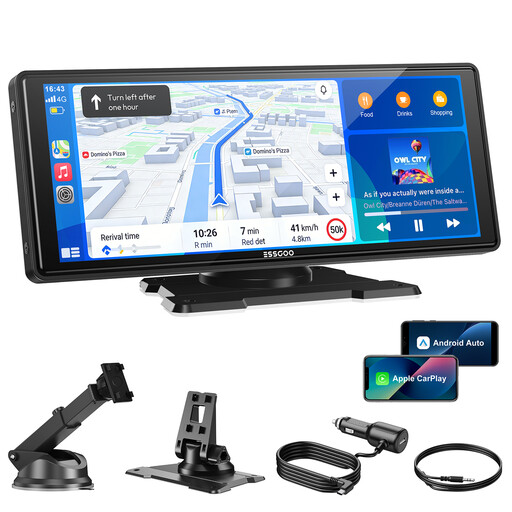
What sets it apart This model is all about performance and connection stability. Equipped with dual-band Wi-Fi (2.4GHz/5GHz) and Bluetooth 5.3, it ensures a fast and flawless wireless link with your smartphone. It is also compatible with OTA (Over-The-Air) updates, ensuring your device is always up-to-date with the latest features and optimisations.
Key Features
Who is it for? For those who prioritise a stable, high-performance wireless connection and are looking for a future-proof device. This is the option to consider if you don't need a built-in Dashcam.

What sets it apart The OTTOCAST Mini is not a screen, but an ultra-compact wireless CarPlay adapter. Its mission: to transform an existing wired CarPlay system into a 100% wireless experience. Its tiny size allows it to blend in seamlessly in the cabin.
Key Features
Who is it for? For drivers who already have wired CarPlay and simply want to ditch the cable for maximum convenience in their daily routine.
While you're getting your car ready for sunny days, why not take a look at our other current selections? Discover our collection of loose long-sleeve summer tops to complete your style.
Yes, Apple CarPlay can work wirelessly. Some recent vehicles include it as a standard feature. For all others, you can either opt for a compatible portable CarPlay screen or add a wireless CarPlay adapter if your car already has the wired version.
Installation is a breeze and requires no technical skills:
The portable screens featured in this guide are universal: they are compatible with almost all vehicles because they operate independently and plug into a simple 12V-24V socket. However, if you are considering a universal CarPlay head unit (which replaces your current car stereo), compatibility will depend on the size of the slot (1-DIN or 2-DIN format) and your vehicle's specific wiring. In this case, it is crucial to check the specifications carefully before any purchase.