
Livraison le jour même ou le lendemain

Qualité garantie

Débloquez vos offres de bienvenue: Livraison GRATUITE | Jusqu'à -80 % | 30 jours d'essai gratuits à JoyPlus
Téléchargez l'application
By the Joybuy Editorial Team, July 23, 2026
Your car may be a faithful road companion, but is its multimedia system showing its age? Do you dream of having a large screen for Waze or Maps, listening to Spotify, and making hands-free calls, but the thought of a complex and expensive installation is holding you back? And because safety on the road is paramount, adding a dashboard camera (dashcam) now seems essential.
The solution is here: the CarPlay display with an integrated dashcam. These all-in-one devices, also known as portable car stereos or external displays, can modernise any vehicle's interior in just a few minutes. They simply plug into the cigarette lighter socket and offer the features of a new car without any permanent modifications.
This guide is designed to help you see things more clearly and choose the system that will transform your drives in 2026 by demystifying the essential technical features.
To make the right choice, let's review the key criteria that will make all the difference in your daily use.
The main advantage of these displays is their simplicity. Opting for a model with wireless CarPlay and Android Auto is, quite simply, a game-changer. After the initial Bluetooth and Wi-Fi pairing, your smartphone automatically connects to the display as soon as you start the ignition. No more cables cluttering up your dashboard. You get instant access to your navigation apps, music, and calls without even taking your phone out of your pocket or bag. However, remember to check for compatibility with your operating system version (iOS or Android).
A CarPlay display with a dashcam is also an investment in your safety. The camera resolution is therefore a crucial factor.
Simplicity is key. A good portable car stereo should be installed in a flash. Most models attach to the dashboard or windscreen with a suction cup or adhesive mount and are powered simply by the 12V-24V socket. A 10-inch screen (about 25 cm) offers excellent viewing comfort for navigation without obstructing your field of view. Finally, take a look at the audio output options: a connection via an AUX cable or Bluetooth to the car's speakers will always provide better sound than the display's small built-in speaker or an FM transmitter, which is often prone to interference.
We have selected two models that are a perfect match for those who want to add CarPlay to their car while also getting a video recording system.

Highlights
This model is the very definition of an all-in-one solution. It combines a large 10.26-inch HD touchscreen with a complete recording system: a 4K front dashcam and a waterproof 1080p reversing camera. The best part? A 64?GB memory card is included, so it's ready to use right out of the box with no hidden costs.
Pros
Who is it for? Ideal for drivers looking for a single, integrated solution to modernise their vehicle with navigation, multimedia, and a complete video security system, without having to juggle multiple devices.
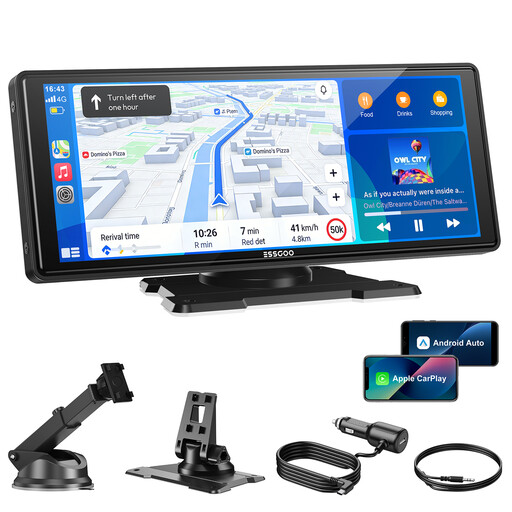
Highlights
The focus here is on a flawless multimedia experience. It features cutting-edge wireless connectivity with dual-band Wi-Fi (2.4G/5G), ensuring a faster, more stable connection for streaming and navigation. It also benefits from over-the-air (OTA) software updates, ensuring your device stays effortlessly up-to-date. While it doesn't have a built-in dashcam, it is compatible with an add-on reversing camera (sold separately).
Pros
Who is it for? Perfect for users who prioritise an ultra-smooth and responsive wireless CarPlay and Android Auto experience above all else. A smart choice if you already have a dashcam or prefer to choose your reversing camera separately.
Not convinced by these models? Looking for other accessories to give your car a modern upgrade? Explore our full selection to find the perfect fit.
Absolutely. The vast majority of these portable displays are universal multimedia systems. As long as your vehicle (car, SUV, van, etc.) has a cigarette lighter socket (12V or 24V), it can be installed. This is the easiest way to add CarPlay to an older car without altering its original setup.
Yes, thanks to the loop recording feature. The camera records non-stop onto the memory card. Once the card is full, the system automatically overwrites the oldest footage to free up space. Rest assured, important recordings (triggered by an impact detected by the G-sensor or locked by you) are protected and will not be deleted.
You have several options for playing sound: