
Livraison le jour même ou le lendemain

Qualité garantie

Débloquez vos offres de bienvenue: Livraison GRATUITE | Jusqu'à -80 % | 30 jours d'essai gratuits à JoyPlus
Téléchargez l'application
Frustrated with your car's wired CarPlay? Dream of launching YouTube or Netflix for your passengers without replacing the head unit, or simply want to say goodbye to the USB cable? You're not alone. More and more drivers are looking for a simple, cost-effective solution to modernise their in-car experience.
This guide is here to help. Whether you need a simple CarPlay adapter to go wireless, a smart CarPlay box to turn your screen into an Android tablet, or a portable CarPlay screen for a non-equipped vehicle, we'll break down the essential criteria to help you make the right choice.
As a Product Advisor for Joybuy, my mission is to provide you with clear, practical information to help you find the perfect device for your needs.
Before diving into our selection, here are the key points to check to ensure you make the right choice.
First step: understand the difference between these three product categories.
This is a crucial step that should not be overlooked. For an adapter or AI box to work, your vehicle must be factory-equipped with wired CarPlay. These devices rely on the existing CarPlay protocol to communicate with the car.
Be cautious: some manufacturers, particularly BMW and Tesla, use proprietary systems that are rarely compatible. Likewise, aftermarket head units (those not original to the car) can cause issues. Always read the product description and reviews carefully before purchasing.
For an AI box, the smoothness of the experience depends directly on its performance. Here are the specs to look out for:
Here are a few products that cater to different use cases, selected for their relevance and features.
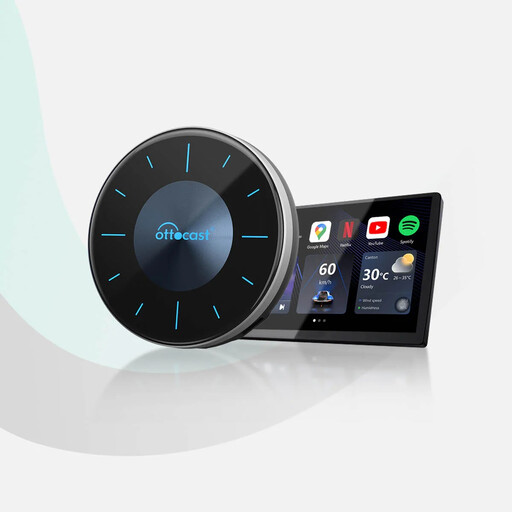
Why it stands out: Much more than a simple adapter, the OTTOCAST P3 transforms your car's screen into a complete multimedia ecosystem running Android 12. Its key feature? Its HDMI output, which allows you to stream video to a rear monitor while the driver keeps navigation on the front screen.
Pros:
Who is it for? For drivers already equipped with wired CarPlay who want to unlock their screen's full potential and turn it into an Android tablet with advanced features like dual display.
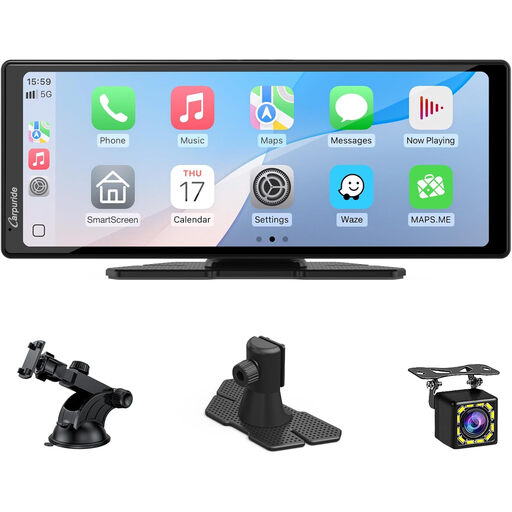
Why it stands out: This solution is designed for vehicles without a factory screen. It's an all-in-one system that requires no complex installation. Its large 10.26-inch touchscreen offers excellent visibility, and it comes with a backup camera, making it a comprehensive safety and multimedia upgrade.
Pros:
Who is it for? Ideal for owners of older vehicles or professional fleets that lack a built-in screen and are looking for a modern, complete, and non-invasive solution.
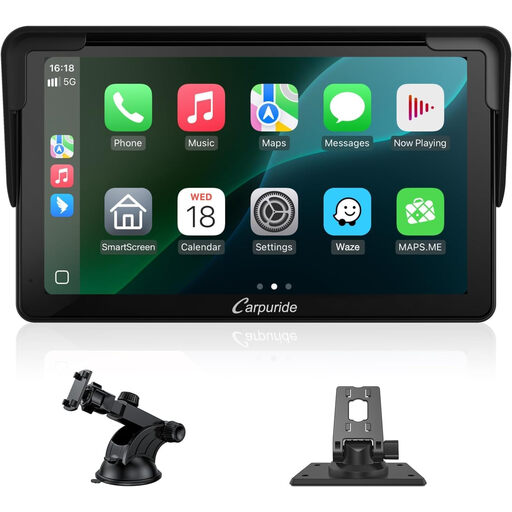
Why it stands out: It offers the essential features of its larger 10.26-inch sibling but in a more compact and discreet form factor. A great option for those who want a less obtrusive device on their dashboard.
Pros:
Who is it for? An excellent option for those looking for a portable and discreet solution, or for those on a tighter budget, without sacrificing modern connectivity.
Your car is now ready for the road, equipped with the latest technology. And if you're inspired to upgrade your personal space for sports or leisure, Joybuy offers a vast selection of items. For example, take a look at our range of Boxing Stands to set up your home training corner.
1. Can you watch YouTube or Netflix on your car screen with a CarPlay box? Yes, but only with a CarPlay AI box like the OTTOCAST P3. These boxes run a full Android system, allowing you to install streaming apps from the Google Play Store. A simple wireless adapter does not allow this, as the standard CarPlay ecosystem blocks video apps for obvious safety reasons.
2. Is a wireless CarPlay adapter compatible with all cars? No. The absolute requirement is that your vehicle must already be equipped with factory-installed wired CarPlay. If your car only has Bluetooth or a standard USB port without CarPlay, these adapters will not work. It is therefore essential to check the compatibility list provided by the manufacturer.
3. What is the difference between a CarPlay box and a portable CarPlay screen? A CarPlay box (whether a simple adapter or an AI box) is a module that plugs into your car's existing multimedia system to expand its functions. It uses the screen already built into the car. In contrast, a portable CarPlay screen is a completely standalone device with its own screen, processor, and speakers. It mounts on the dashboard and provides a turnkey solution for cars that are not factory-equipped.