
Livraison le jour même ou le lendemain

Qualité garantie

Débloquez vos offres de bienvenue: Livraison GRATUITE | Jusqu'à -80 % | 30 jours d'essai gratuits à JoyPlus
Téléchargez l'application
Replacing the cartridges on a PIXMA printer seems straightforward… until you receive an incompatible reference, a different capacity, or photo paper that doesn’t suit your device. For individuals, students, families and remote workers, the Canon PG-545L and CL-546 cartridge pack can be very handy, provided you check a few things before placing your order.
Canon references can sometimes look very alike. A black PG-545L cartridge should not be confused with a PG-510, a standard PG-545, or any other reference in the PIXMA range. The same goes for the colour CL-546 cartridge, which is not interchangeable with a CL-511.
Such confusion can stop your printer from recognising the cartridge or lead to incomplete prints. Before ordering, note down the reference printed on your old cartridge or check your printer’s manual.
The name ‘PIXMA’ covers many models. A cartridge that works with a PIXMA MG2450 won’t necessarily suit another Canon printer. The Canon pack’s product page specifically lists compatibility with the PIXMA MG2450.
So compare your printer’s full model number with the compatibility list provided by the manufacturer or seller. This step is especially important for online purchases.
Some packs contain only the two cartridges, while others also include photo paper. A price that looks good may turn out to be less so if you have to buy the paper separately or quickly replace a lower-capacity cartridge.
The pack featured here brings together both Canon cartridges and 50 sheets of 10 × 15 cm photo paper. It’s suitable for everyday printing as well as small photo prints at home.
The Canon pack includes a black PG-545L cartridge and a colour CL-546 cartridge, the latter containing cyan, magenta and yellow inks. The product page lists the reference 8287B009 and states compatibility with the PIXMA range, particularly the MG2450.
To avoid any mistakes, check:
Original Canon cartridges are designed to work with compatible printers from the brand. That doesn’t mean all references are interchangeable, though – your printer’s exact model remains the deciding factor.
The PG-545L is generally the preferred choice if you regularly print black documents, homework, invoices or remote-working materials. The colour CL-546 cartridge is better suited to graphs, illustrations and occasional photos.
Actual yield depends on page density, print settings and how often you run head cleaning cycles. A page filled with large blocks of colour will naturally use more ink than a document made up mostly of text.
The paper supplied measures 10 × 15 cm, a very common size for family photos, holiday memories and small prints. Make sure your printer accepts this size and adjust the tray guides correctly.
To avoid jams and marks, keep the sheets in their packaging, away from moisture and direct light. Load them in the direction shown in the manual, then select ‘photo paper’ in the print settings.
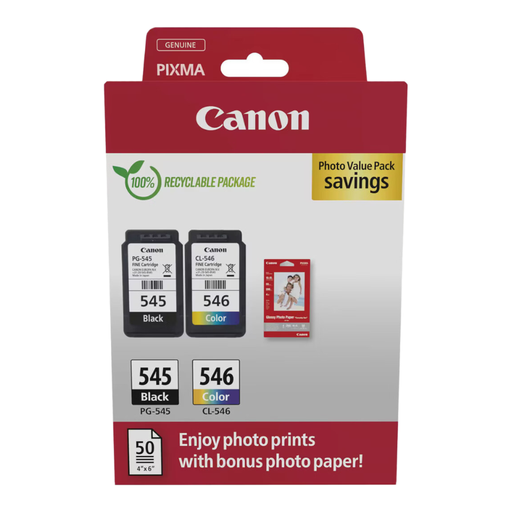
Why this choice suits this profile: a single pack brings together black ink, colour ink and 50 photo sheets. A simple formula for a first order.
The contents are clearly detailed: black PG-545L cartridge, colour CL-546 cartridge and 10 × 15 cm photo paper. You still need to confirm compatibility with your PIXMA model, though.
Two original Canon cartridges and 50 photo sheets combined in a single pack.
Why this choice suits this profile: those looking for regular, reliable consumables can opt for an original Canon reference, accompanied by a photo kit suited to small-format prints.
The reference for both cartridges and the quantity of paper are specified, making it easy to compare with a separate purchase.
Original Canon black and colour ink, with 10 × 15 cm photo paper in the same package.
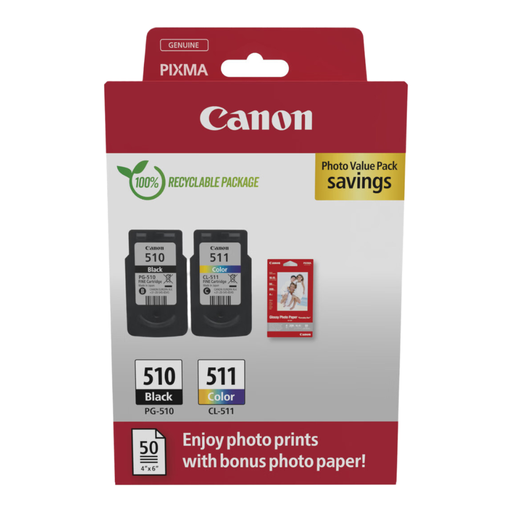
Why this choice suits this profile: this option is only for owners of a PIXMA compatible with PG-510 and CL-511 cartridges, particularly some older models. It does not replace a PG-545L/CL-546 pack.
The mention PG-510/CL-511 reminds you that a similar reference is not necessarily compatible. Check the manual before ordering.
A pack separating the black and colour cartridges, with yields stated according to the ISO/IEC 24711 standard.
To replace the consumables, open the cover and wait for the holder to move into the correct position. Remove the used cartridge, unpack the new one without touching the electrical contacts, then install the PG-545L in the black slot and the CL-546 in the colour slot. Then run a test print.
Store new cartridges in their sealed packaging, away from heat, moisture and direct sunlight. Once opened, it is recommended to use them within six months. Do not dismantle the cartridges or attempt to refill them.
The product page does list the PIXMA MG2450. However, check the model printed on your printer and the compatibility list before purchasing, especially if the full reference doesn’t match exactly.
The lifespan depends on print volume, page coverage and the frequency of automatic cleaning cycles. A cartridge used mainly for text will generally last longer than one used to print large colour photos.
Yes. This pack contains 50 sheets of 10 × 15 cm photo paper. Select the appropriate paper type in the print driver and adjust the tray guides before starting your print job.