
Livraison le jour même ou le lendemain

Qualité garantie

Débloquez vos offres de bienvenue: Livraison GRATUITE | Jusqu'à -80 % | 30 jours d'essai gratuits à JoyPlus
Téléchargez l'application
Bluetooth wireless earbuds make commuting, work calls, workouts and moments of relaxation easier. However, some features highlighted in product descriptions can be misleading. Battery life quoted with the case does not mean continuous listening time, while water-resistance certification does not mean the earbuds can be submerged.
Before buying wireless Bluetooth earbuds, three common pitfalls deserve your attention:
When comparing Bluetooth earbuds with long battery life, always distinguish between three figures:
Usage conditions can reduce the advertised battery life: high volume, frequent calls, ANC switched on, audio codec or connection to two devices. Fast charging is particularly convenient for everyday use. For example, the Edifier X1 Lite product page states 15 minutes of charging for around 1 h 30 of listening, while the JBL Tune 530BT claims 5 hours after 5 minutes of charging. These figures are based on the manufacturers’ specifications and may vary depending on the settings.
A USB-C charging case lets you use the chargers you already have at home. Some premium models also offer wireless charging, but this feature does not necessarily justify a higher price, depending on your needs.
In-ear earbuds generally provide better isolation from external noise while remaining compact. However, they require ear tips suited to the shape of your ears. An unsuitable size can cause pressure, an unstable fit or less consistent audio reproduction.
Ear-hook models, such as the Huawei FreeClip, avoid inserting an earbud into the ear canal. They may suit people who want to remain aware of their surroundings, but their passive isolation does not match that of an in-ear model.
On-ear headphones, such as the JBL Tune 530BT, cover the ear without ear tips. They are often appreciated for long listening sessions, but their design is less discreet. Their resistance to moisture should also be checked before using them outdoors.
Bluetooth 5.3, Bluetooth 5.4 and Bluetooth 6 refer to different generations of connectivity, but these specifications alone are not enough to predict the quality of the user experience. Instead, check the features that are genuinely useful:
For gaming, the Edifier X1 Lite’s stated 60 ms latency may be suitable for occasional use. However, gamers who are sensitive to delays should check that low-latency mode is compatible with their device and app.

Why this choice suits this profile: This in-ear model makes a great first pair for commuting, watching videos and handling everyday calls. It offers Bluetooth 5.4 connectivity and a customisation app.
The product page distinguishes between the total 26 hours of battery life and the 15 minute fast-charge time, making it easier to compare the figures fairly.
Bluetooth 5.4, IP54 rating, low-latency mode rated at 60 ms and charging case included.
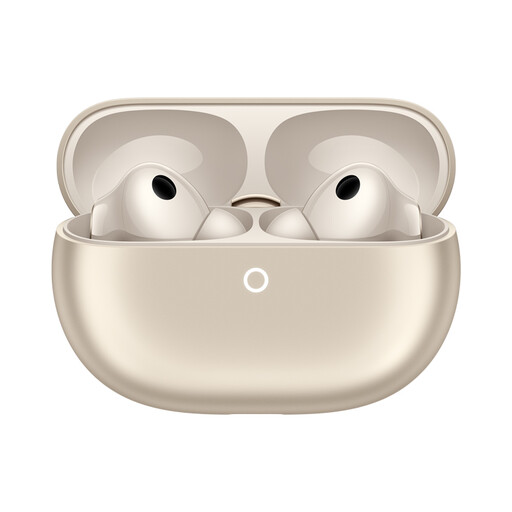
Why this choice suits this profile: Users looking for ANC, two-device connectivity and wireless charging get a comprehensive set of advanced features, compatible with iOS and Android.
Battery life is specified both with and without ANC, as well as according to the audio mode. There is no need to rely on one general figure.
ANC, transparency mode, dual connectivity, USB-C or wireless charging, IP57 rating for the earbuds and IP54 for the case.
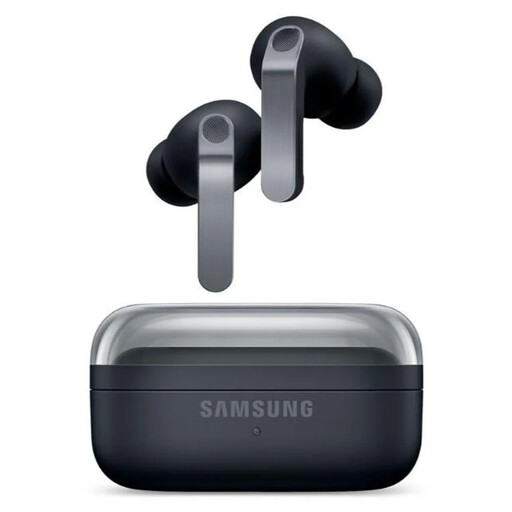
Why this choice suits this profile: This model is designed for Samsung users who want to combine calls, music, gaming and integration with several Galaxy devices.
The product page separates battery life with ANC switched on and off. It also specifies that the IP57 rating covers splashes, not swimming.
Two-speaker system, adaptive ANC, six stated microphones, spatial audio, USB-C and wireless charging.
We have put together a complete, real-time updated list of products that fully meet these strict selection criteria and European safety regulations.
Start by charging the earbuds and their case, then open the case and switch on Bluetooth in your phone’s settings. Next, select the model name from the list of available devices. When pairing for the first time, you may need to press and hold the case button or touch-sensitive area for a few seconds. Once pairing is complete, the earbuds will usually reconnect automatically.
It depends on the battery, how often they are recharged, heat and ANC usage. To help preserve the built-in battery, avoid extreme temperatures, use a suitable charger and do not leave a damaged product charging. A model’s lifespan is not determined solely by its stated battery life: the condition of the batteries after several hundred cycles also matters.
Yes. Active ANC puts additional demand on the microphones and audio processing. Manufacturers therefore often state two battery-life figures: one with ANC switched on and one without ANC. If you mainly use your earbuds in a quiet environment, switching this feature off can reduce the number of recharges and extend listening time between visits to the case.