
Livraison le jour même ou le lendemain

Qualité garantie

Débloquez vos offres de bienvenue: Livraison GRATUITE | Jusqu'à -80 % | 30 jours d'essai gratuits à JoyPlus
Téléchargez l'application
Bluetooth wireless earbuds have come a long way, but product listings do not always tell you everything. Advertised battery life may include the recharges provided by the case, “noise reduction” may be limited to calls, and a newer Bluetooth connection does not guarantee a perfect experience with all your devices.
Before ordering true wireless earbuds, take the time to check three essential factors: how you will actually use them, comfort and measurable specifications. This approach helps you avoid unpleasant surprises, whether you are looking for a pair for commuting, sport, calls or gaming.
The terms ENC, “microphone noise reduction” and ANC do not refer to the same function.
A model advertised as featuring ENC may therefore be effective for calls in a moderately noisy environment, without offering an ANC mode suitable for underground journeys or flights.
A claim such as “30 or 40 hours” often refers to the combined battery life of the earbuds and the charging case. You should distinguish between:
Long-battery-life Bluetooth earbuds cannot be compared directly when measurement conditions differ. For a working day, focus particularly on usage time per charge and whether quick charging is available.
Even well-equipped wireless in-ear earbuds can become uncomfortable if the ear tips do not suit the shape of your ears. A poor fit also reduces passive isolation and may encourage you to turn up the volume.
For sport, check the protection rating. For example, IPX4 indicates resistance to water splashes, but does not mean the product can be immersed. An IP55 model offers different protection against dust and splashes, so always check the instructions to understand the usage limitations.
Bluetooth 5.3 or 5.4 can contribute to a modern, stable connection, but compatibility also depends on the phone, computer or console you use. In particular, check:
Multipoint connection is particularly useful in the office, while a dedicated low-latency connection is often better suited to gaming.
The driver size, supported codecs and customisable equaliser offer some useful indications, but they are not enough to predict everyone’s preferences. With wireless in-ear earbuds, choosing the right ear tips remains crucial.
For listening to music, choose a model whose app allows you to adjust the sound profile, when this function is available. For calls, check the number of microphones and the advertised voice noise reduction function, without treating it as a guarantee of results in every environment.
USB-C earbuds are convenient if you already use this type of cable for your phone or computer. However, check whether the cable is included, whether wireless charging is available and whether the case displays its battery level accurately.
After use, store the earbuds in their case, clean the grilles with a dry cloth and avoid charging a wet device. Listening at a moderate volume can also help protect your hearing comfort.
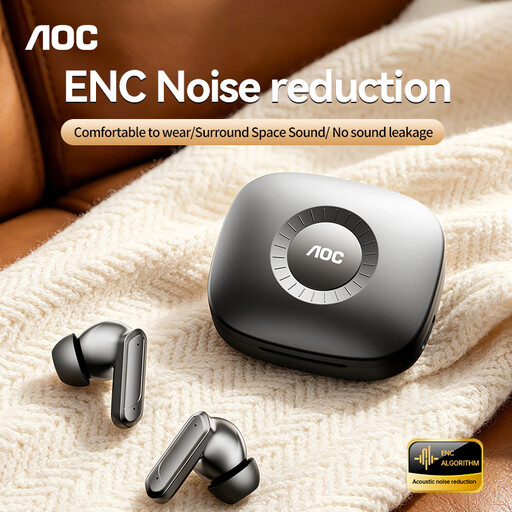
Why this choice suits this profile : this model offers Bluetooth 5.4, touch controls, a USB-C case and advertised standby time of up to 20 hours. A sensible option for a first pair designed for music and everyday calls.
The listing distinguishes call noise reduction from ANC, helping you avoid confusing the two functions.
Bluetooth 5.4, touch controls and USB-C charging.
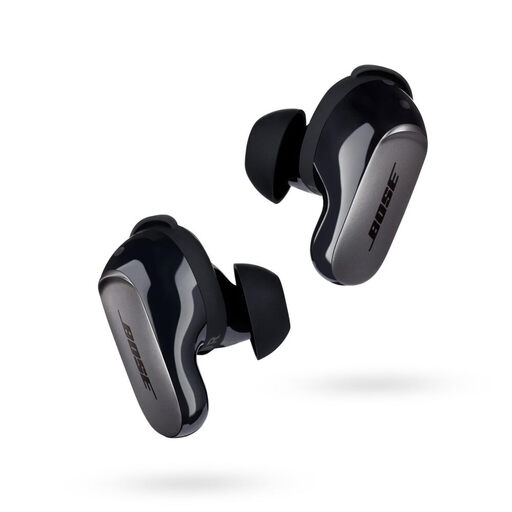
Why this choice suits this profile : the listing mentions active ANC, three listening modes, a spatial audio function and nine combinations of ear tips and stability bands. This package is aimed at users who pay particular attention to comfort and are frequently on the move.
Quiet, Aware and Immersion modes let you choose between isolation and awareness of your surroundings.
Bluetooth 5.3, active ANC and a USB-C case providing up to three additional recharges, according to the advertised specifications.
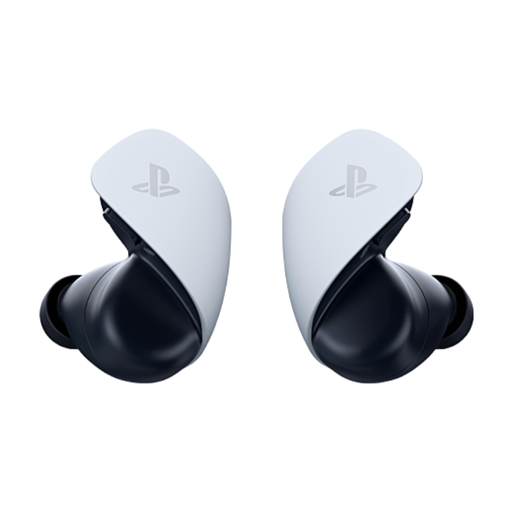
Why this choice suits this profile : designed for PS5, PlayStation Portal, computers and compatible mobile devices, this model combines PlayStation Link with Bluetooth. The listing states up to 5 hours of battery life per charge and up to 10 hours with the case.
Compatibility and both connection modes are clearly stated, reducing the risk of buying a Bluetooth model that would not work with a console.
Advertised low-latency PlayStation Link connection, built-in microphones and USB-C charging.
We have put together a complete, real-time selection of products that meet these strict criteria and European safety regulations.
Charge the earbuds, then open their case. Turn on Bluetooth in your phone’s settings and select the model name when it appears. If the device is not shown, put the earbuds back in their case, press and hold the pairing button as instructed in the manual, and disable any previous connection on another device.
This depends on the built-in battery, how often they are recharged, exposure to moisture and how well they are maintained. Lithium-ion batteries gradually lose capacity over time. Avoid heat, impacts and leaving the battery fully discharged for long periods. When buying a new product, also remember the legal guarantee of conformity applicable in France.
Yes, enabling active noise cancellation can reduce battery life compared with standard Bluetooth mode. The difference varies depending on the model and settings used. If you regularly commute, compare the advertised battery life with ANC enabled and check whether quick charging is available, rather than relying solely on the overall figure stated for the case.