
Livraison le jour même ou le lendemain

Qualité garantie

Débloquez vos offres de bienvenue: Livraison GRATUITE | Jusqu'à -80 % | 30 jours d'essai gratuits à JoyPlus
Téléchargez l'application
You want to improve the sound from your computer, console or living room, but all the spec sheets start to look the same, don’t they? Between the stated power output, the “Hi-Res” certification, the wireless connection and the promises of immersion, it’s all too easy to pay for features you’ll never actually use day to day.
To choose from the range of Bluetooth speakers and gaming headsets, start by working out how you’ll use them: listening to music, working at a computer, gaming across several consoles or watching films with a portable Full HD projector. Here are the key points to check before you buy, along with a selection tailored to different needs.
A high wattage figure doesn’t guarantee balanced sound. The actual performance depends on the number and design of the drivers, the cabinet construction and the digital signal processing. A compact desktop speaker can be perfectly adequate for close-up listening, whereas a 2.1 system with a subwoofer will be better suited to filling a living room.
Bluetooth is convenient, but it can introduce noticeable latency in games or films. For gaming, check for a USB connection, a dedicated wireless transmitter or an AUX input. The Bluetooth LDAC codec can improve audio bitrate on compatible Android devices, but it doesn’t replace full compatibility with every console.
A headset marketed as “multi-platform” may rely on different connection methods depending on the device. A 3.5 mm jack will generally work with a compatible controller, whereas a 2.4 GHz link will often require a USB transmitter. For a headset for PS5, Xbox and PC, check the supported devices and included accessories separately.
For a computer audio system, a combination of Bluetooth, USB-C and AUX offers plenty of flexibility. USB can carry audio and sometimes reduce latency, AUX remains a simple and reliable option, while Bluetooth makes it easy to listen from your phone.
On consoles, the rules vary depending on the ecosystem:
The Hi-Res Audio label indicates support for specifications defined by manufacturers or relevant organisations. However, it doesn’t guarantee a better experience on its own: quality also depends on the source, the file and the device you’re using. For a high-resolution wireless speaker, look closely at the stated sampling rate, the available inputs and the supported codec.
Bluetooth LDAC can achieve a theoretical bitrate of 990 kb/s with compatible devices. This feature can be worthwhile with certain Android smartphones. However, it isn’t always available on iPhone, console or computer.
For a headset, consider the weight, the shape of the ear cushions, the headband adjustment and whether the microphone is removable or foldable. Noise cancellation can be useful in a shared home, but the passive isolation provided by the ear cushions also plays an important role.
For a speaker, start by measuring the available space on your desk. A gaming PC speaker with RGB lighting can add a stylish touch, but the orientation of the drivers and your listening distance will generally have a much bigger impact on how the sound is perceived.
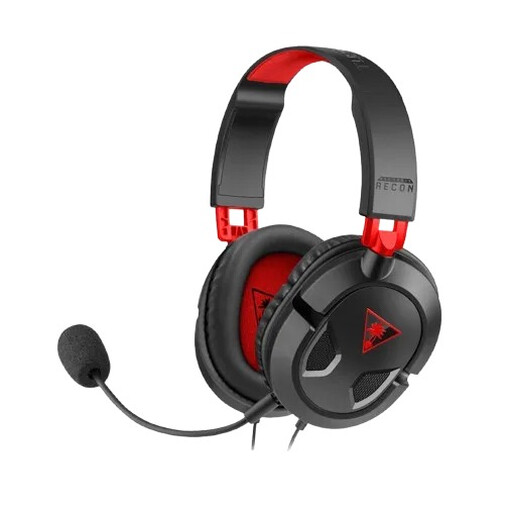
Why this pick suits this profile: Its 3.5 mm jack works for gamers who want to plug their headset directly into a PC, controller or mobile device without worrying about battery life.
The wired connection eliminates the battery life and latency issues associated with wireless.
40 mm drivers, removable microphone, volume control and mic mute directly on the cable.
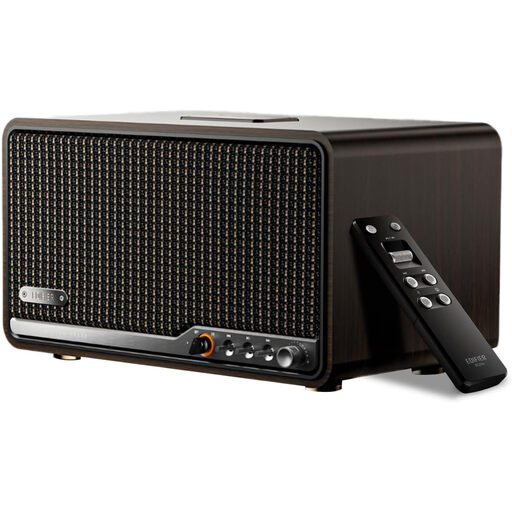
Why this pick suits this profile: This desktop or living room speaker combines a stereo design, a stated RMS power of 80 W and multiple audio sources.
USB-C and AUX inputs are added alongside Bluetooth 5.4, so you’re not reliant on a single wireless source.
Stated support for 24-bit/96 kHz, LDAC, AirPlay 2 and stereo pairing.
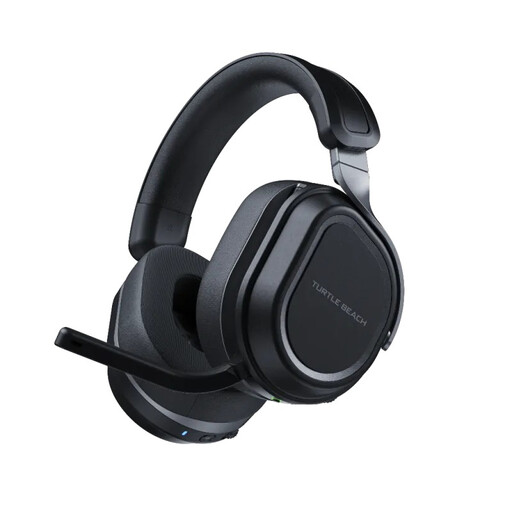
Why this pick suits this profile: It’s aimed at gamers who switch between PC, console and phone and want a versatile wireless gaming headset.
The two USB transmitters and Bluetooth 5.2 make it easy to separate use across PC, console and mobile.
Two 60 mm drivers, simultaneous 2.4 GHz and Bluetooth connections, stated battery life of up to 80 hours.
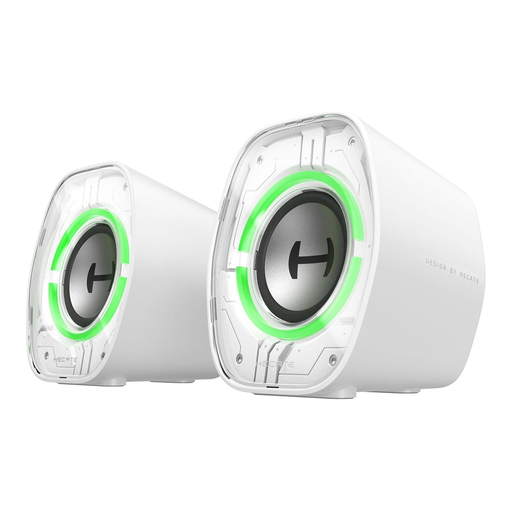
Why this pick suits this profile: Its compact design was made for shallow desks, with easily accessible controls and a slightly angled orientation.
The three connection modes — Bluetooth, USB-C/USB-A and AUX — stop you from being limited to a single device.
2.5-inch full-range driver, nine RGB lighting modes and dedicated audio modes for music, games and films.
We’ve put together a comprehensive, real-time updated list of products that meet these demanding selection criteria and European safety regulations.
A compact gaming PC speaker with USB-C, AUX and Bluetooth will work perfectly on a desk, especially if it’s angled to direct the sound towards you. For more demanding music listening, look instead at stereo separation, frequency response and Hi-Res Audio support.
Not necessarily with the same connection method. A multi-platform gaming headset can work on PS5, PC, Xbox and Switch, but the required transmitters and cables may vary. Check the product page and make sure explicit Xbox compatibility is stated before ordering.
It depends on how often you use it, how well you look after it, the battery and the physical stresses the device is put under. Avoid moisture, knocks and prolonged listening at high volume. On a wireless model, a standard USB-C connection and a replaceable or well-maintained battery can help with long-term use.