Joybuy Insights

How to Choose the Right Bluetooth Speaker: A Buyer’s Guide

Choosing a Bluetooth speaker can quickly become overwhelming. Faced with a jungle of models and marketing promises, it's hard to know where to start. A poor choice has immediate consequences: disappointing sound quality, a battery that doesn't last, or a device that dies at the first sign of rain. As expert editors, our mission is to help you see things more clearly. We'll break down the pitfalls to avoid and the criteria that truly matter to make the right choice.

The 3 Pitfalls to Avoid Before Buying a Wireless Speaker

The technical jargon on product sheets can be confusing. Here are the 3 classic mistakes to avoid so you don't regret your purchase.

  1. Getting Fooled by Watts (W): Manufacturers love to highlight spectacular Peak Power figures. The problem is, this number only represents a theoretical peak, held for a fraction of a second. The only figure that really matters is RMS (Root Mean Square) power. It measures the average power the speaker can deliver continuously without distortion. Simply put: a 20W RMS speaker will often sound louder and clearer than a model that boasts 100W of peak power on its box.
  2. Confusing "Water-Resistant" with "Waterproof": Terms like "water-resistant" or "waterproof" are often a marketing catch-all. The only reliable benchmark is the IP (Ingress Protection) rating. A certified waterproof speaker with an IP67 rating, for example, is completely protected against dust and can withstand immersion in up to 1?meter of water for 30?minutes. In contrast, an IPX4 certification only guarantees protection against splashes. You definitely can't drop it in the pool! Don't pay a premium for superficial durability.
  3. Believing the Advertised Battery Life: The battery life claimed by brands is almost always measured in a lab: volume at 50%, with light shows (RGB speaker) turned off, and without using the power bank function. Under real-world conditions, especially with a party speaker pushed to full volume, you can expect the battery life to be 30% to 50% lower than the initial promise.

The Technical Specs That Make a Difference

Once you've navigated the marketing traps, let's focus on the three criteria that truly make a difference in day-to-day use.

Connectivity: It's Not All About Bluetooth

A good speaker should adapt to your devices, not the other way around.

  • Bluetooth Version: Recent versions (Bluetooth 5.3 and newer) provide a more stable connection, better range, and reduced latency. This is a crucial detail for a PC gaming speaker, where any audio/video lag is a deal-breaker.
  • Wired Connectivity: The presence of a USB port (preferably USB-C) and an auxiliary input (3.5mm jack) is a real bonus for versatility. A wireless USB speaker can be powered and receive audio through a single cable, which greatly simplifies its setup as a computer speaker. The jack input remains the universal solution for connecting any audio source, even older ones.

Audio Quality: Watts Aren't Everything

Good sound isn't just a matter of power.

  • Drivers: A well-designed audio architecture should separate different frequencies. The presence of dedicated tweeters for highs and woofers (or passive radiators) for lows is the sign of a high-quality design, worthy of a Hi-Fi speaker.
  • Audio Codecs: For audiophiles, compatibility with high-resolution codecs like LDAC or aptX HD is a prerequisite. These technologies transmit a much higher quality audio signal over Bluetooth, for a listening experience that's close to a wired connection.

Design and Ergonomics: The Right Form for Every Function

A speaker's design isn't just about aesthetics; it should primarily serve your needs.

  • For the Desk: For a desk, a compact and slightly angled desk speaker is ideal. It directs sound straight to your ears and reduces unwanted surface reflections.
  • For the Outdoors: For outdoor use, a powerful portable speaker needs to check several boxes: rugged construction, a practical carrying handle, and a high waterproof rating (IP67 minimum) to survive trips to the beach or poolside parties.

Top Bluetooth Speaker Picks

Instead of an endless catalogue, we've matched user profiles with models that check all the right boxes.
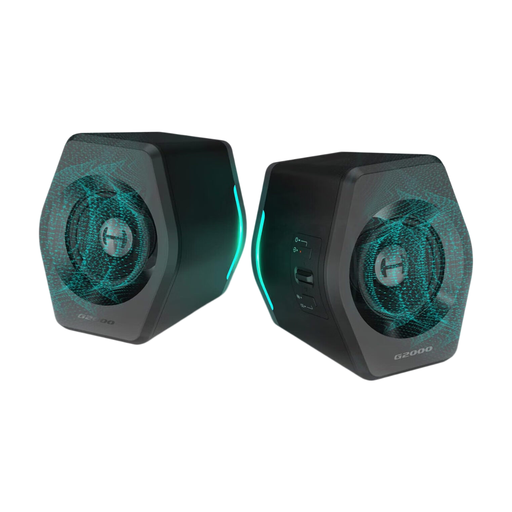
IDEAL FOR: THE IMMERSIVE GAMING SETUP
EDIFIER G2000 32W PC Gaming Computer Speakers

EDIFIER G2000 32W PC Gaming Computer Speakers

Why we chose it: Built for gaming, this kit combines spatial audio (via its software) and customizable RGB lighting effects for maximum immersion. Its compact size is a plus for keeping your desk uncluttered.

The pitfall it avoids

Instead of relying on raw power, it focuses on DSP sound processing and virtual 7.1 surround sound (via software) for precise positional audio, which is essential for gaming.

Its key strength

Its triple connectivity (Bluetooth 5.3, USB, 3.5mm AUX) ensures near-universal compatibility with PCs, Macs, consoles, smartphones, and more.
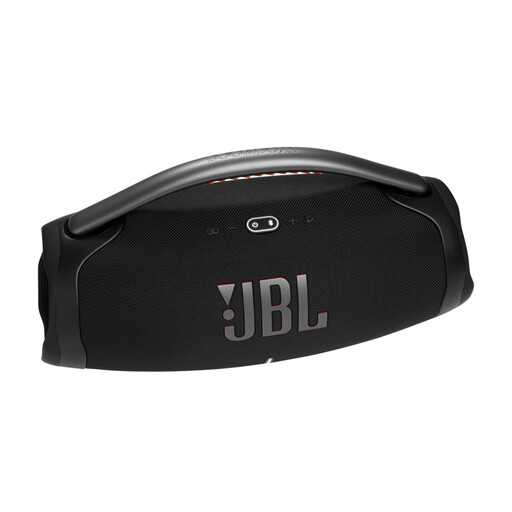
IDEAL FOR: THE PARTY HOST
JBL Boombox 3 Speaker, Black, 180W

JBL Boombox 3 Speaker, Black, 180W

Why we chose it: This is THE benchmark for powerful portable speakers. With its rock-solid construction, massive handle, and an audio punch capable of filling large spaces, it's ready for parties, both indoors and out.

The pitfall it avoids

No vague marketing here: the IP67 certification is genuine and guarantees total protection against dust and immersion, far more than a simple "splash resistance."

Its key strength

Its marathon battery life (up to 24 hours) and its power bank function (via USB-A) make it the perfect companion for long days that turn into long nights.
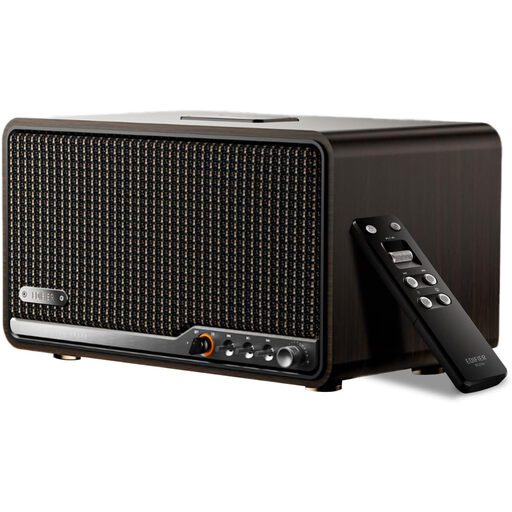
IDEAL FOR: HIGH-FIDELITY LISTENING
Edifier S300 Hi-Fi Tabletop Speaker, Hi-Res Audio

Edifier S300 Hi-Fi Tabletop Speaker, Hi-Res Audio

Why we chose it: For those who put sound quality above all else. With its wood-panel design, Hi-Res Audio certification, and LDAC compatibility, this is a true pair of Hi-Fi speakers for the living room or office.

The pitfall it avoids

It doesn't just advertise high power (80W RMS); it backs it up with a serious audio architecture (Class-D amp, planar diaphragm tweeters, mid-bass drivers) and meaningful certifications.

Its key strength

The fully wireless connection between the two speakers (via KleerNet technology) is its ace in the hole: true stereo sound, without a single messy cable between them.

Looking for More Options?

Explore our full selection of products that meet our quality charter and current standards.

Your Questions, Our Answers

How many watts do I need for a Bluetooth speaker?

The ideal wattage depends on your use case. For near-field listening (at a desk, in a small bedroom), 10 to 20W RMS is more than enough. To fill a 20-30 m? living room with sound, aim for 30 to 50W RMS. Finally, for a party speaker or outdoor use, 60W RMS and above is recommended to ensure you have enough headroom and distortion-free sound.

How do I connect a Bluetooth speaker to a PC?

Most modern PCs have built-in Bluetooth.

  1. Turn on your speaker and activate its pairing mode (usually by pressing and holding a button).
  2. On Windows, go to Settings > Bluetooth & devices > Add device. On macOS, go to System Preferences > Bluetooth.
  3. Select your speaker from the list to complete the pairing. If your PC doesn't have Bluetooth, don't worry: you can always use an auxiliary cable (3.5mm jack) or a USB cable if the speaker supports it.

What is the lifespan of a Bluetooth speaker?

A quality speaker can last for many years. The weakest link is always the lithium-ion battery. It typically starts to show signs of wear after 3 to 5 years, depending on your usage and the number of charge cycles. Of course, the build quality, waterproofing, and the care you take will also play a crucial role in its longevity.