
Livraison le jour même ou le lendemain

Qualité garantie

Débloquez vos offres de bienvenue: Livraison GRATUITE | Jusqu'à -80 % | 30 jours d'essai gratuits à JoyPlus
Téléchargez l'application
A Bluetooth headset can accompany you on your daily commute, remote meetings, gaming sessions or listening sessions at home. But a product page full of promises doesn’t always guarantee an experience that suits your habits. Advertised battery life, noise cancellation or compatibility can spring a few nasty surprises in everyday use.
Here are the points to check before choosing a wireless headset, a wired headset or Bluetooth earphones, with a selection tailored to several user profiles in the UK.
The listening time stated by the manufacturer often depends on volume level, connection type and which features are active. Active noise cancellation, frequent calls and multipoint mode can all reduce the advertised battery life.
So check:
A Bluetooth headset with noise cancellation uses microphones and electronic processing to reduce certain ambient noises. This feature is particularly useful on public transport or in shared spaces, but it doesn’t replace total isolation and won’t guarantee silence in every situation.
An over-ear design, with cushions that surround your ears, also helps to block out external sounds. For walking or cycling, an open-back or bone-conduction model can instead help you stay more aware of your surroundings, depending on the features stated by the manufacturer.
A headset that’s great for listening to music isn’t necessarily the best choice for video calls. For remote working, compare the microphone type, the presence of ambient noise reduction and the dedicated call controls.
Connectivity also deserves some attention:
An on-ear headset rests directly on your ears and is generally compact. An over-ear model wraps around them, which can improve comfort during long sessions, but also increases bulk. For travel, a fold-flat headset or wireless earphones stored in their case take up less space.
Also consider the weight, headband adjustment, pressure from the ear cushions and whether they can be replaced. A headset intended for remote working and worn for several hours needs to stay securely in place without squeezing your ears too tightly.
Compare the stated figures with the way you’ll actually use it. Some manufacturers give different battery life depending on whether noise cancellation is on or off. The Sony WH-CH720N, for example, claims up to 50 hours without ANC and up to 35 hours with this feature activated, according to the product data provided.
A wired model like the Logitech H111 doesn’t need charging. It uses two separate 3.5 mm jacks – one for audio and one for the microphone. This setup is best suited to computers with separate ports.
Before ordering, check the supported devices and compatible Bluetooth profiles. On some models, multipoint lets you connect two devices at once, but not all features may be available with every phone or computer.
For calls, go for a built-in or boom microphone that’s clearly described in the spec sheet. A headset with a dedicated microphone can be easier to position than a compact model where the microphone is on the cable.
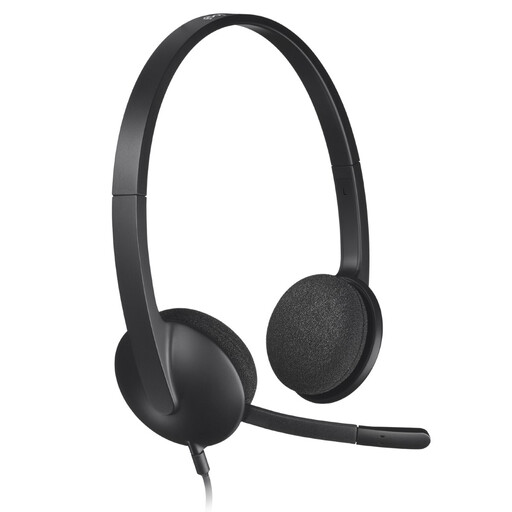
Why this choice suits this profile: Its USB connection and plug-and-play functionality make it a simple option for calls, online classes and everyday use on PC or Mac.
It avoids charging and any potential Bluetooth pairing issues. With its 1.8 m cable, it gives you plenty of room to move around at your desk.
USB connection, microphone with ambient noise reduction, adjustable headband and swivelling ear cushions.
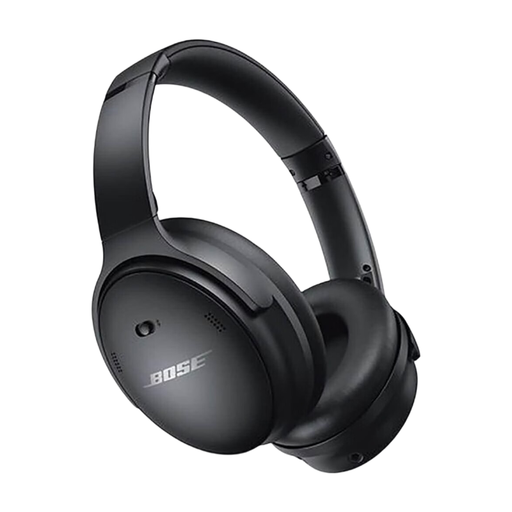
Why this choice suits this profile: Its over-ear design, Quiet and Aware modes, and wired listening option meet the expectations of versatile, extended use.
The spec sheet states up to 24 hours of battery life and a 15-minute fast charge for around 3 hours of listening. The headset can also be used with an audio cable.
Bluetooth, active noise cancellation, companion app for adjustments, and fold-flat design with carry case included.
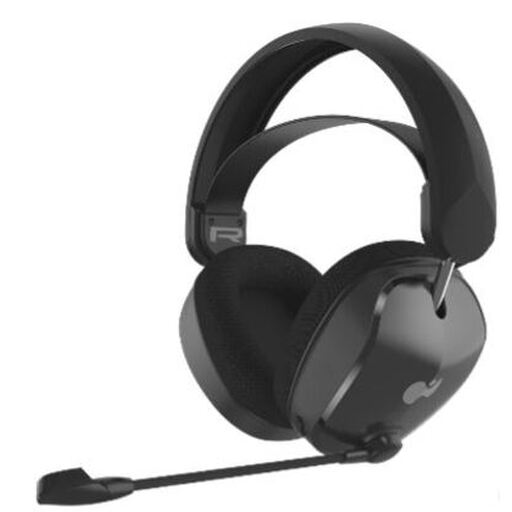
Why this choice suits this profile: This wireless gaming headset is aimed at Xbox players who want a Bluetooth or dongle connection, plus a microphone to communicate with their team.
Its dual connectivity means you’re not tied to a single device. However, do check compatibility with your console and the required connection method.
50 mm drivers, bidirectional microphone with mute function, and claimed battery life of up to 40 hours.
We’ve put together a comprehensive, real-time updated list of products that meet these strict selection criteria and European safety requirements.
To keep your gear and yourself comfortable:
Check compatibility with your devices, included accessories and warranty terms on the product page before ordering.
Turn on Bluetooth on your phone, switch on the headset and hold down the pairing button if needed. Then select the product name from the list of available devices. Once paired, the headset for your smartphone will usually reconnect automatically on subsequent uses.
Lifespan depends on the battery, how often you charge it, listening volume and maintenance. A wired model avoids battery wear, while a Bluetooth headset can remain practical for several years if the connectors, ear cushions and hinges are handled with care.
Bluetooth is convenient for travel and avoids the hassle of a cable. A wired headset doesn’t need charging and can offer more direct compatibility with certain computers, consoles or audio systems. So the right choice really depends on your devices and your daily use.