
Livraison le jour même ou le lendemain

Qualité garantie

Débloquez vos offres de bienvenue: Livraison GRATUITE | Jusqu'à -80 % | 30 jours d'essai gratuits à JoyPlus
Téléchargez l'application
With wireless earbuds, Bluetooth headphones, speakers and TV audio solutions to choose from, it can be hard to know where to start. A product page full of promises doesn’t guarantee that a device will suit the way you use it. Comfort, compatibility and available connections often matter far more than a headline figure.
Here are some of the most common pitfalls, and the things to check before buying a Bluetooth audio device for home, work, leisure or travel.
Battery life is usually measured under specific conditions, with the volume set to a moderate level and certain features switched off. Active noise cancellation, calls, built-in lighting and multipoint connectivity can all significantly reduce listening time. Check whether the figure refers to a single charge or the combined battery life of the earbuds and their charging case.
Whether you’re looking at a portable Bluetooth speaker or a TV soundbar, the wattage alone won’t tell you how good it sounds. Placement, room size, whether there’s a subwoofer and the available settings all play an important part too. High power may even be unnecessary or excessive in a small room.
A device may have Bluetooth and still be awkward to use with your set-up. An older TV may need an optical output, a computer could benefit from a USB microphone, and a hi-fi system without wireless connectivity can be upgraded with a Bluetooth audio adapter. Remember to check which cables are included, the charging method and whether any apps are needed to use the device.
Bluetooth 5.3, 5.4 or 6.0 indicates the generation of the connection, but it isn’t enough to predict sound quality. Check the supported profiles and connection stability. If you’re watching videos or gaming, look for a low-latency mode too.
Codecs can also make a difference. The Edifier M60, for example, supports the LDAC codec, enabling wireless transmission of up to 24 bits/96 kHz with some compatible Android devices. This falls into the high-resolution audio category, but you’ll only be able to use the feature if both your source and playback device support the codec.
Compare the earbuds’ battery life separately from the extra listening time provided by the case. The Buds 6 Play offer up to 7.5 hours of listening on a single charge and up to 36 hours with the case. Their IPX4 rating applies only to the earbuds, not the charging case.
For headphones with noise cancellation, focus on battery life with the feature switched on. The Sony WH-CH720N offers up to 35 hours with active noise cancellation, compared with up to 50 hours without it. This makes it easier to compare models realistically, rather than relying on figures that paint too rosy a picture.
An IPX4 rating doesn’t mean a product can be submerged in water. It indicates limited protection against water splashes, under the conditions specified by the manufacturer. For sports or outdoor use, check the exact rating and take care to protect the case, connectors and controls.
Comfort matters just as much. Weight, fit, pressure on your ears and the shape of the ear tips can turn an appealing set of specifications into a purchase that’s soon left at the back of a drawer. Open-ear designs, such as some clip-on earbuds, let you stay aware of your surroundings, but generally block out less ambient noise.
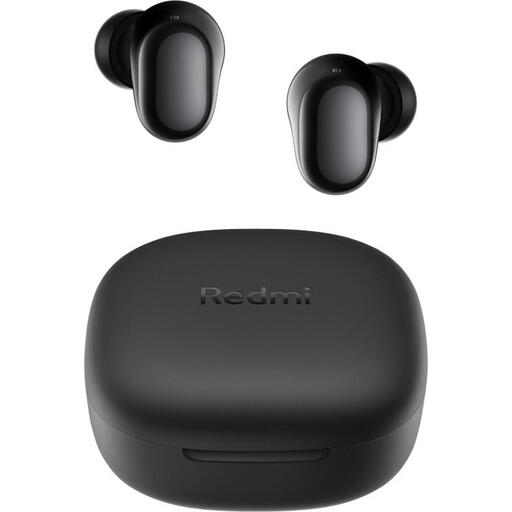
Why this is a good match for you: Compact and easy to carry, these wireless earbuds are suited to commuting, calls and everyday listening. They charge via USB-C and come with several sizes of ear tips.
The product details distinguish battery life per charge from total battery life with the case, and clarify that the IPX4 rating doesn’t apply to the case.
Bluetooth 5.4, 10 mm dynamic driver and up to 36 hours of battery life with the case.
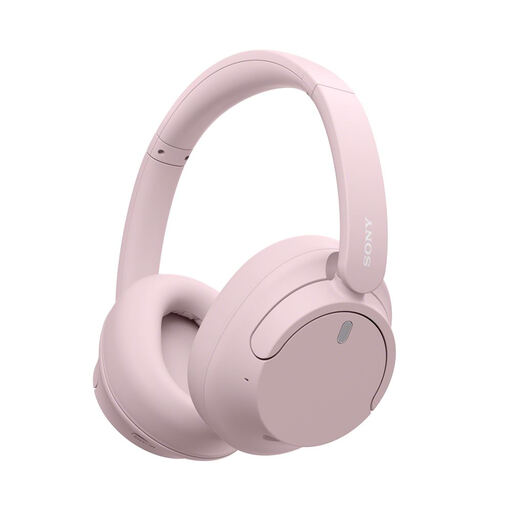
Why this is a good match for you: The over-ear design is well suited to travel, working from home and longer listening sessions. Several modes let you adjust how the headphones handle background noise.
Battery life is stated both with and without active noise cancellation, giving you a more realistic idea of how the headphones will perform day to day.
Bluetooth multipoint, a 3.5 mm jack and up to 50 hours of stated listening time.
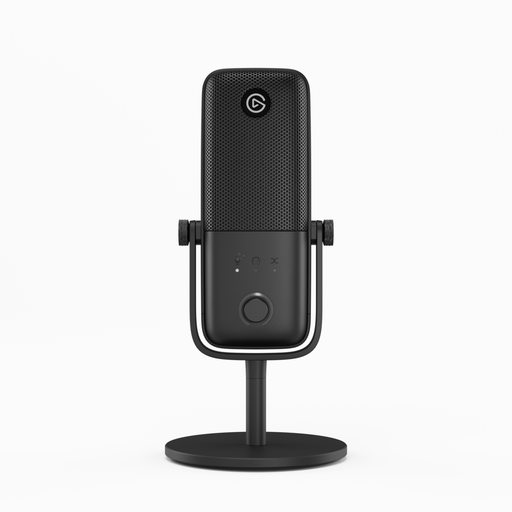
Why this is a good match for you: This wired USB microphone is designed for content creators, gamers and anyone who regularly records their voice on a computer.
USB connectivity and automatic recognition save you from fiddly set-up. Clipguard 2.0 is described as protection against clipping when the volume peaks.
Easy-to-reach volume, gain and mute controls, plus an Auto Gain feature.

Why this is a good match for you: This 2.0 TV soundbar is a good fit for smaller spaces where you want to keep clutter to a minimum while enjoying audio modes for films, music and TV programmes.
The product details clarify that a separate subwoofer isn’t included and list the HDMI ARC, optical, USB, AUX and Bluetooth connections.
Dolby Atmos and DTS Virtual:X decoding, room calibration and an 81 cm width.
We’ve brought together a comprehensive, regularly updated selection of products that meet these strict criteria while complying with European safety regulations.
Switch on Bluetooth in your TV’s settings, put your headphones or soundbar into pairing mode, then select its name from the list of available devices. If your TV doesn’t support Bluetooth, you can connect a Bluetooth audio adapter to a compatible output. For a soundbar, HDMI ARC or optical connectivity usually makes for a more stable set-up.
It depends on the battery, the number of charging cycles, exposure to moisture and how well you look after them. Avoid extreme temperatures, don’t force the connectors and put the earbuds back in their case after use. A model with a replaceable case or readily available accessories may stay practical for longer.
No. Bluetooth provides a wireless connection, but audio quality depends on the codec supported by both the source and the audio device. To enjoy high-resolution audio, check which codec is used, what certification is claimed and whether the phone, computer or player you’ll connect is compatible.