
Livraison le jour même ou le lendemain

Qualité garantie

Débloquez vos offres de bienvenue: Livraison GRATUITE | Jusqu'à -80 % | 30 jours d'essai gratuits à JoyPlus
Téléchargez l'application
A black ergonomic office chair fits easily into a home office, a shared workspace, a student bedroom or a gaming setup. But a good look alone won’t keep you comfortable for hours on end. Between the promises of comfort, the carefully staged photos and the sometimes incomplete spec sheets, certain details can quickly become annoying in daily use.
Before you place an order, check the adjustment range, the type of lumbar support, the quality of the upholstery and the actual footprint of the chair. Here are the criteria to review when comparing an ergonomic office chair, a gaming chair or a comfortable computer chair, without letting design be your only guide.
A high backrest or a prominent headrest does not guarantee that the chair will support your back properly. The lumbar support needs to sit at the right height and, ideally, be adjustable. A fixed backrest can work perfectly well for some users, but it offers less flexibility to adapt your position.
The same goes for the headrest: it is only truly useful if its height and angle match your body shape. It should not push your head forward when you are working at your screen.
A seat that is too narrow, too deep or poorly adjusted can become uncomfortable, even with a chair that seems generously padded. Compare the seat dimensions with those of your desk and check the maximum static load stated by the manufacturer. This figure is more reliable than a simple impression of sturdiness.
Also consider the space available around your desk: a gaming chair with a footrest needs more room behind it when tilted or extended.
Faux leather and synthetic upholstery are generally easy to wipe clean, but they can retain more heat. A breathable mesh office chair allows air to circulate, which is a welcome advantage in a heated room or during long sessions.
Padded fabric, on the other hand, feels softer but requires more care if it gets stained. The right choice therefore depends as much on your environment as on your habits.
An adjustable office chair must at least allow you to set the seat height to match your desk. Adjustable or fold-down armrests help align your arms and let you slide the chair under the desk.
Also examine the tilt mechanism. A tiltable office chair can support working, reading or taking breaks, provided the backrest stays stable in the intended positions. The stated angles describe a mechanical function: they do not guarantee the same level of comfort for every body shape.
Lumbar support can be built into the backrest or adjusted independently. In either case, check its position and the range of adjustment available. For prolonged use, choose a seat that is wide enough and foam that will hold its shape over time.
An office chair with a headrest can suit people who switch between work and relaxation. However, make sure you keep your screen at a suitable distance and avoid working with your chin constantly raised.
A stable base, castors suited to your floor and a properly locked gas lift all contribute to safer use. Always respect the maximum weight stated on the product page. Do not sit on the armrests and never stand on the seat.
Some models claim certifications or testing, such as the SGS and BIFMA references listed for the SIHOO M18 Pro. These apply to the product described: they should not be interpreted as a general guarantee valid for all chairs.
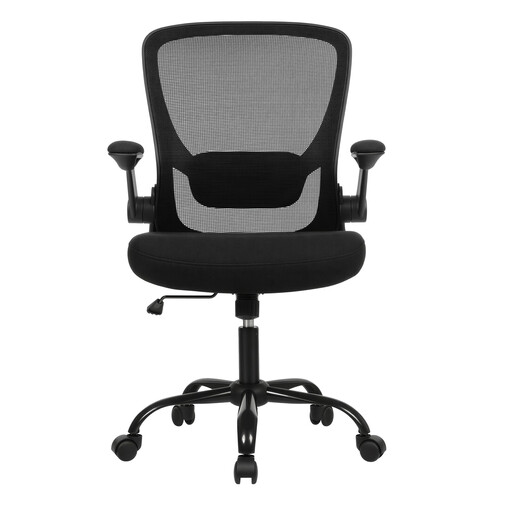
Why this choice suits this profile: Its essential adjustments and fold-down armrests make it a good first piece of equipment for home working or studying, with a footprint that is easy to manage under a desk.
The product page lists adjustable height, padded lumbar support, a tilt function and breathable fabric upholstery.
Dimensions of 66 × 60 × 99-107 cm, stated maximum load of 120 kg and fold-down armrests.
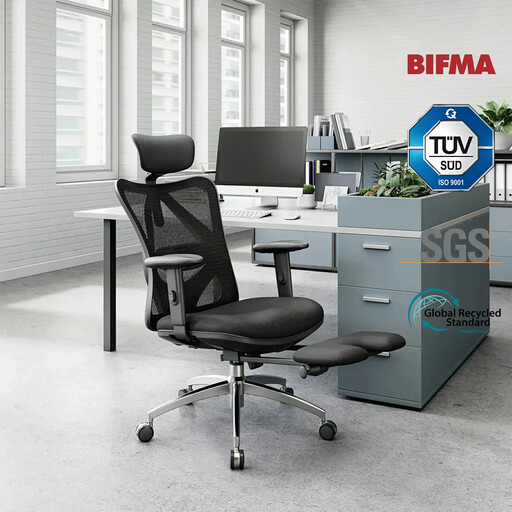
Why this choice suits this profile: It is aimed at users who want plenty of adjustments for working, reading or taking a break, without sacrificing a sleek black design.
The mesh backrest promotes air circulation, while the lumbar support, headrest, height, tilt and armrests are all adjustable.
Adjustable footrest, waterfall-edge seat, aluminium base and recommended maximum load of 150 kg.
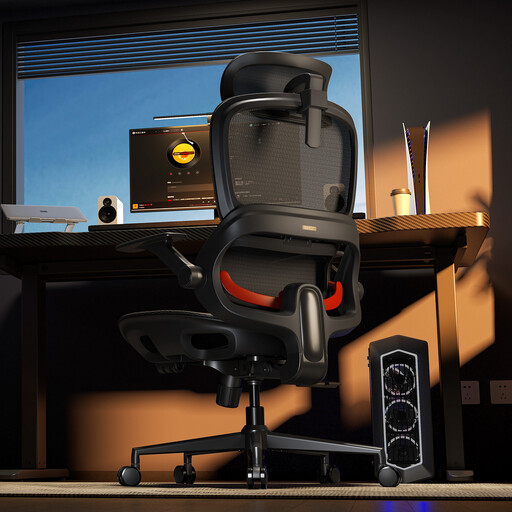
Why this choice suits this profile: Its footrest and three tilt positions suit those who switch between video calls, relaxation and long sessions at the computer.
The mesh backrest and seat limit heat build-up, while the lumbar support follows the movements described on the product page.
Wide headrest, fold-down armrests, reinforced base and stated tilt angles of 110°, 123° and 135°.
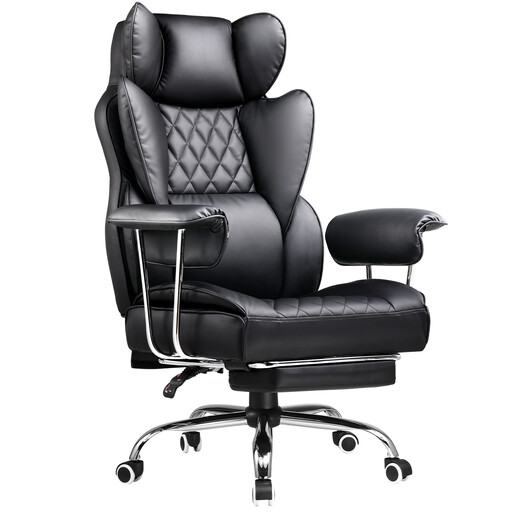
Why this choice suits this profile: Its gaming chair format, high backrest, lumbar support and retractable footrest target gaming setups as well as extended breaks.
The built-in footrest saves you buying a separate accessory, while the tilting backrest lets you adapt your position for each activity.
High backrest, tilt function, 360° rotation and a structure described as suitable for both office and gaming use.
We have selected a comprehensive list, updated in real time, of products that meet these demanding criteria and European safety requirements.
Set the height so that your feet are flat on the floor and your knees are comfortably bent. Then position the lumbar support at the level of your lower back, and adjust the armrests to keep your shoulders relaxed. The top of your screen should be at a height that stops you from constantly tilting your head.
It depends on how often you use it, the weight it supports, the quality of the components and how well you maintain it. Regularly check the screws, the tilt mechanism, the gas lift and the castors. Respecting the maximum load and avoiding sudden movements helps preserve the structure.
The chair generally does not consume electricity, unless it includes a specific feature not mentioned here. Its running cost mainly depends on maintenance, any replacement of castors or the gas lift, and the lifespan of the materials. Mesh can be a good choice in a warm room, while fabric or synthetic upholstery suit other maintenance priorities.