
Livraison le jour même ou le lendemain

Qualité garantie

Débloquez vos offres de bienvenue: Livraison GRATUITE | Jusqu'à -80 % | 30 jours d'essai gratuits à JoyPlus
Téléchargez l'application
As a gamer, there's nothing more frustrating than a controller dying mid-game. The era of disposable AA batteries feels increasingly distant, as gamers focused on convenience and smart investments are overwhelmingly shifting to sustainable charging solutions. An Xbox controller charging station is no longer just an accessory; it's a central component for a seamless gaming experience and a well-organized gaming setup.
However, with a dizzying array of options on the market, how do you find the right one? From simple chargers to multifunctional stations, making an informed decision is crucial. This guide is designed to give you clear benchmarks for identifying the accessory that truly fits your gaming habits.
Before diving into specific models, a few objective criteria can help you filter the options and avoid buyer's remorse.
Your first step should always be to check the station's compatibility with your controllers. Xbox Series X|S and Xbox One controllers have slightly different dimensions and battery covers. A good charging station should be explicitly compatible with your model or, ideally, with multiple generations.
Furthermore, the charging method is a critical point. Most high-performance stations do not recharge AA batteries. They work with a specific rechargeable Xbox controller battery pack, which is included with the accessory. These battery packs replace the original batteries and cover, enabling charging by simply placing the controller on the dock. It's a convenient solution that eliminates the need to handle cables every time.
Your choice will depend on how you've organized your gaming space.
A quality charging station should offer modern connectivity, like USB-C, which is becoming the standard. Also, ensure the product has protections against overcharging and overheating to preserve the lifespan of your controllers and their batteries. The inclusion of non-slip pads is a small detail that guarantees the stability of the entire unit.
Keeping these criteria in mind, here are two options that meet different but complementary needs.
FIXED Dual Wireless Controller Charging Dock for Xbox
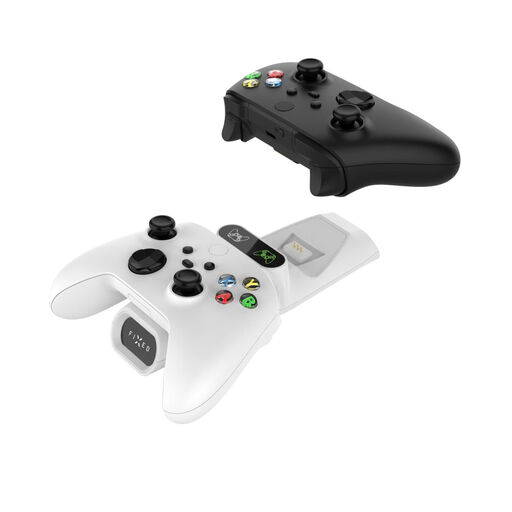
Why We Recommend It
This Xbox charging stand focuses on the essentials: efficiently charging two controllers simultaneously. It comes with two rechargeable battery packs and matching battery covers, making it a complete, out-of-the-box solution. Simply replace the original batteries, and charging begins as soon as the controller is placed on the dock. Its broad compatibility (Xbox Series X|S, Xbox One, Elite) makes it a future-proof choice.
Pros
Who Is This Product For? This charger is for gamers looking for a simple, reliable, and discreet solution to never run out of battery again. It fits perfectly into a minimalist gaming environment where the console and games are already organized.
FIXED Multifunction Docking Station for Xbox Series X and S
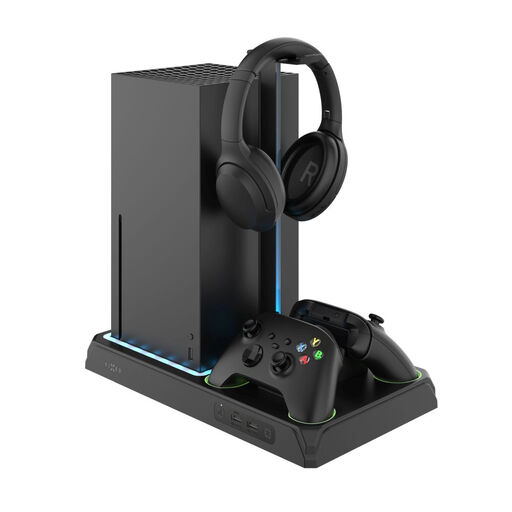
Why We Recommend It
This Xbox docking station is much more than a simple charger. It's a true organizational hub for your Xbox ecosystem. It holds your console (Series X or S) vertically, incorporates a charger for Xbox Series X controllers (and other models), a fan to help with heat dissipation, storage for 12 games, and a headset stand. The customizable LED lighting adds a welcome aesthetic touch.
Pros
Who Is This Product For? This stand is aimed at gamers who want to optimize and centralize their setup. It's the ideal solution for those short on space or who simply want a clean, organized, and functional gaming environment where every accessory has its place.
The two products featured here cover common needs, from simple charging to complete organization. If your setup or expectations are different, there is a wide variety of accessories designed for the Xbox ecosystem. To discover other models of chargers, stands, or batteries, you can explore our full selection of video game and console accessories.
No, it's not required. Many third-party charging stations, like the ones featured, provide their own battery packs designed to integrate perfectly with their contact-based charging system. These solutions are often more convenient than the official 'Play & Charge' kit, which requires plugging a cable into the controller.
The usefulness of a fan depends on your usage and environment. For very long gaming sessions (several hours at a time) or if your console is in a poorly ventilated cabinet, a fan can help dissipate heat more effectively and potentially contribute to the longevity of the components. For moderate use in an open space, it's not an essential accessory, but it remains a nice bonus.
Yes, provided the dual Xbox controller charger is designed for it. Models like the FIXED station are compatible with both generations, as the included battery packs and covers are adapted for the different models. It is always recommended to check the product's compatibility list before purchasing.