
Livraison le jour même ou le lendemain

Qualité garantie

Débloquez vos offres de bienvenue: Livraison GRATUITE | Jusqu'à -80 % | 30 jours d'essai gratuits à JoyPlus
Téléchargez l'application
Whether you're a demanding gamer, a developer cranking out lines of code, or simply an enthusiast of fine mechanical hardware, choosing the right keyboard is crucial. A wireless mechanical keyboard combines the tactile pleasure of mechanical typing with the freedom of a wireless connection, creating a clean, minimalist setup with maximum flexibility.
With an overwhelming number of options on the market, it can be tough to know where to start. This guide is here to cut through the noise and give you the keys to choosing the perfect model for your needs, whether it's for gaming, work, or ultimate customisation.
Before diving into our top picks, let's review the key factors that will guide your decision.
Your keyboard's size directly impacts your ergonomics and the amount of desk space you have available.
The main appeal of a mechanical keyboard is, of course, the typing feel. This is determined entirely by the switches located under the keycaps. There are three main types?:
The hot-swappable feature is a game-changer?: it allows you to change switches without any soldering. This is a key advantage for anyone who wants to experiment with different typing feels or replace a faulty switch, and it's the perfect gateway into the world of custom mechanical keyboards.
Modern wireless keyboards almost always offer triple-mode connectivity?:
We have selected three models that stand out from the crowd for their features, design, and value for money.
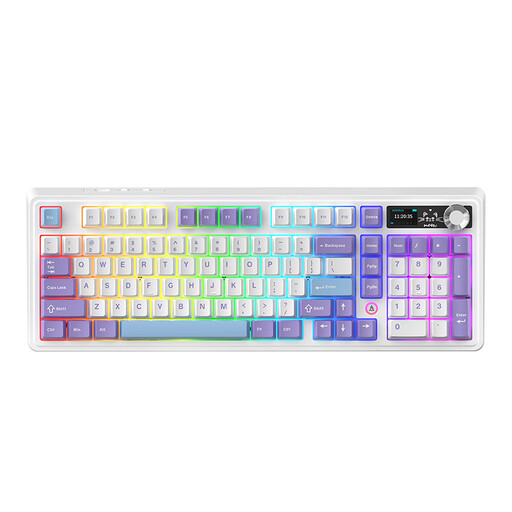
Why it stands out
The AJAZZ AK980 V2 is an exceptionally well-equipped model in a 98?% layout. It packs features usually found only on much pricier keyboards, such as a customisable TFT screen and a metal volume knob. Its gasket-mount structure, combined with five layers of sound-dampening foam, ensures a soft and remarkably muted typing experience.
Advantages
Who is it for??
For users looking for a feature-rich, near-full-size keyboard without the bulk of a full-size model. It is equally suited for professionals seeking productivity and gamers who appreciate a high-performance RGB mechanical keyboard.

Why it stands out
The KEYSME Lunar 01 stands out with its space-exploration-inspired design and highly refined acoustics. Its gasket-mount structure with dual silicone dampening produces a deep, satisfying sound (the famous "thock" sought by enthusiasts). Unique details, like the music-reactive light bar and small magnetic rockets, make it a true decorative piece for your desk.
Advantages
Who is it for??
For custom mechanical keyboard enthusiasts and users looking for a premium typing experience with a design that stands out from the ordinary. Its TKL form factor also makes it an excellent gaming keyboard.
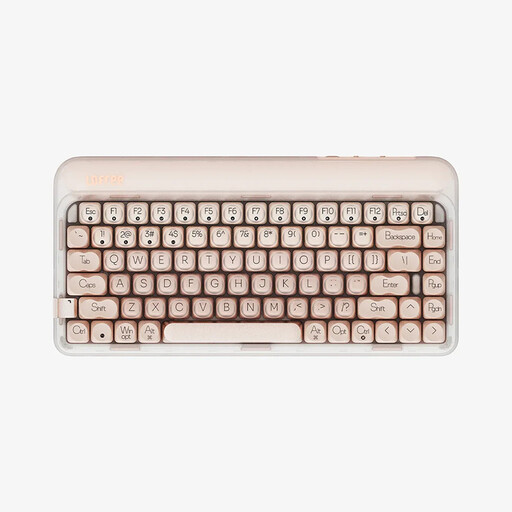
Why it stands out
The Lofree OE914 focuses entirely on a compact design and a soft, quiet typing experience. Its 75?% layout is ideal for minimalist desks. The internal structure, with its multiple dampening layers, absorbs vibrations and noise for a much more muted typing feel than a standard mechanical keyboard.
Advantages
Who is it for??
For digital nomads, those working in shared spaces, or anyone seeking a minimalist and quiet desk setup. Its understated aesthetic and warm white backlighting make it an elegant choice, just as comfortable for work as for a casual gaming session.
A wireless keyboard means freedom... until the battery dies. If battery life is a key criterion for your keyboard, it's just as important for your other devices. Is your laptop or smartphone battery starting to fade?? To give them a new lease on life, check out our selection of replacement batteries.
Absolutely, as long as you use the right connection mode. The 2.4?GHz connection via the USB dongle offers nearly imperceptible latency, equivalent to that of a wired keyboard. This is the preferred mode for competitive gaming. Bluetooth, while very versatile, introduces slightly higher latency, making it better suited for less demanding games or office work.
Regular maintenance is the secret to longevity. A soft brush or a can of compressed air can dislodge dust from between the keys. For a deep clean, remove the keycaps using a dedicated keycap puller and clean them with soapy water. Be careful to let them dry completely before putting them back on?