
Livraison le jour même ou le lendemain

Qualité garantie

Débloquez vos offres de bienvenue: Livraison GRATUITE | Jusqu'à -80 % | 30 jours d'essai gratuits à JoyPlus
Téléchargez l'application
Tired of cables getting tangled at the worst possible moment mid-game?? Dreaming of a clean desk setup without sacrificing the responsiveness essential for competitive play?? Switching to a wireless mechanical gaming keyboard is the obvious next step, but with the overwhelming number of options on the market, making a choice can quickly become a headache.
This guide is here to help you see things more clearly. As the Head of Product Recommendations at Joybuy, my mission is to break down the spec sheets to bring you a curated selection designed for real-world use. Whether you're a hardcore gamer, a content creator, or a professional in search of peak performance, we've analysed the options for you.
Before diving into our top picks, let's review the key criteria that will help you make the right choice.
The days when wireless was synonymous with latency are long gone. Today, three main options coexist:
The size of your keyboard directly impacts your ergonomics and the available space on your desk.
Customisation is also an increasingly important factor. A hot-swappable mechanical keyboard allows you to change the switches without any soldering. This is your gateway into the fascinating world of custom keyboards, letting you fine-tune the typing feel (linear, tactile, clicky) to your exact preferences.
Always check the keyboard's compatibility with your operating systems. Most recent models work perfectly on PC, PS5, and Mac. Finally, aesthetics matter. An RGB gaming keyboard offers customisable lighting effects to match the rest of your setup, while other models opt for a more understated and elegant white or monochrome backlight.
Here are the models that caught our eye, each standing out with features designed to meet the needs of different user profiles.

Why it stands out?: The AJAZZ AK980 V2 is much more than just a keyboard. With its 98% layout that retains a compact number pad, its customisable TFT screen, and its metal control knob, it positions itself as a true command centre for your desk. Its gasket-mount structure and multiple layers of sound-dampening foam ensure a muted and exceptionally pleasant typing experience.
Key Features?:
Who is it for?? For tech enthusiasts, content creators, and gamers looking for a high-performance, feature-rich, and highly customisable keyboard that can effortlessly switch from intense gaming to productivity tasks.
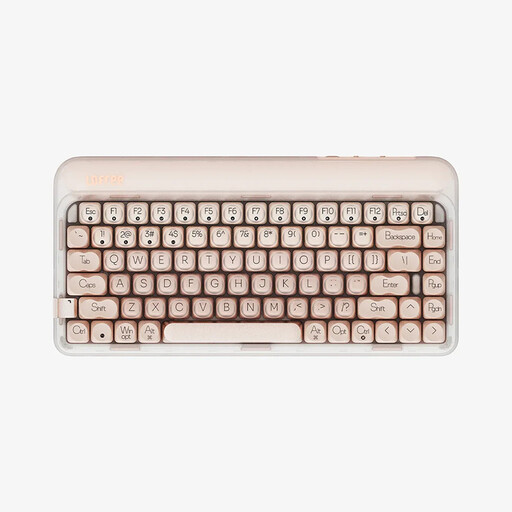
Why it stands out?: The Lofree OE914 focuses on a refined design and a premium typing experience. Its compact 75% layout is ideal for optimising workspace, while its warm-coloured monochrome LED backlighting offers a more understated and professional aesthetic than a traditional RGB gaming keyboard. The pre-lubed linear switches and an internal structure designed to dampen sound make it an excellent companion for long typing sessions.
Key Features?:
Who is it for?? For users who split their time between work and play, developers, writers, and anyone who appreciates minimalist design, a comfortable typing experience, and the flexibility of a modern, compact wireless keyboard.
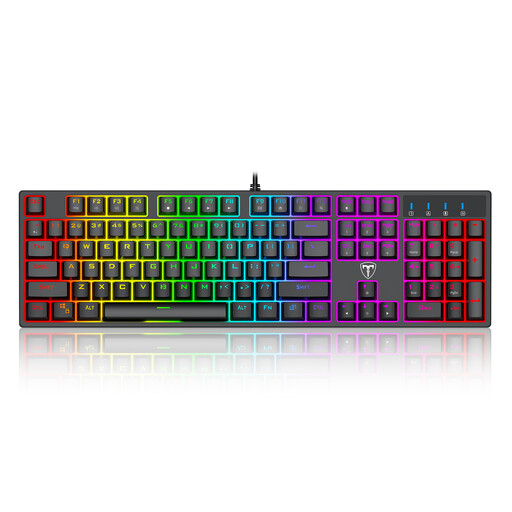
Why it stands out?: Although our guide focuses on wireless options, we felt it was important to include a wired option that serves as an excellent entry point into the world of mechanical keyboards. This model gets straight to the point: responsive mechanical switches (Blue, clicky type), full anti-ghosting, and customisable backlighting, all in a classic 100% layout.
Key Features?:
Who is it for?? For gamers new to mechanical keyboards, those on a budget, or anyone who simply prefers the absolute reliability of a wired connection without compromising on essential gaming features.
Your desk is now equipped for performance. If your professional activities include presentations, a dedicated tool can make all the difference. To discover solutions that will help you captivate your audience with seamless delivery, explore our selection of USB presenters.
Yes. With modern 2.4 GHz wireless technology, the latency (or input lag) has become so low (often 1?ms) that it's imperceptible to humans. Professional gamers regularly use wireless peripherals in competitions, which is a testament to their reliability and performance. Bluetooth may have slightly higher latency, making it better suited for office work or less competitive games.
Each colour corresponds to a different typing feel?:
Absolutely. The keyboards featured here often come in a QWERTY (US standard) layout. Your operating system (Windows or macOS) allows you to select your preferred keyboard layout, regardless of what is printed on the keycaps. This means you can set your system to "French (AZERTY)" and type as you normally would on a French keyboard. For those who aren't touch typists, keycap stickers are also available.