
Livraison le jour même ou le lendemain

Qualité garantie

Débloquez vos offres de bienvenue: Livraison GRATUITE | Jusqu'à -80 % | 30 jours d'essai gratuits à JoyPlus
Téléchargez l'application
In Valorant or CS2, a close match is won or lost in a split second. One imprecise movement, the slightest hint of latency, and your shot misses its mark. Choosing a high-performance wireless gaming mouse is therefore critical. The only problem: the market is a jungle of complex spec sheets and marketing claims designed to confuse you.
As the Head of Product Recommendations at Joybuy, my mission is to help you see things more clearly. Let's forget the jargon and focus on what truly matters for improving your performance. We'll scrutinize the most common traps and the essential criteria for making an informed choice.
Buying a mouse for competitive gaming can quickly become an uphill battle. Be wary of these three arguments, hammered home by brands, which sometimes hide deal-breaking flaws.
For a pro gaming mouse, three characteristics are non-negotiable. They determine the responsiveness, precision, and reliability of your in-game weapon.
Weight is a key factor for maneuverability. A lightweight gaming mouse (generally under 80 grams) facilitates the wide, rapid movements essential in FPS games. Ultralight models (under 60 grams) take this logic to the extreme. However, the ideal weight remains a very personal matter, depending on your grip style (palm, claw, fingertip). A well-designed ergonomic gaming mouse, even at 79?g, will often offer better control and superior comfort than a poorly balanced 55?g model.
The sensor is the component that translates your hand's movement into cursor movement. Rather than focusing on the maximum DPI, look at the sensor model. References like the PAW3395 or PAW3950 are safe bets, renowned for their reliability and flawless tracking, even during lightning-fast flicks (measured in IPS). A good sensor guarantees 1:1 tracking without spinouts, parasitic hardware acceleration, or smoothing that would pollute your muscle memory.
The polling rate, measured in Hertz (Hz), indicates how often the mouse reports its position to the computer. The standard for a high-performance wireless mouse is 1000 Hz (which translates to a 1 ms response time). Recently, 8000 Hz models (or 8K polling rate mice) have appeared. They promise superior motion fluidity but require a beefy PC setup to take advantage of, and the difference is only truly perceptible to a handful of top-tier players. For the vast majority of competitors, 1000 Hz remains a reliable and perfectly responsive standard.
Because every gamer is unique, we've selected three models for three distinct profiles, based on the objective performance criteria we've just detailed.
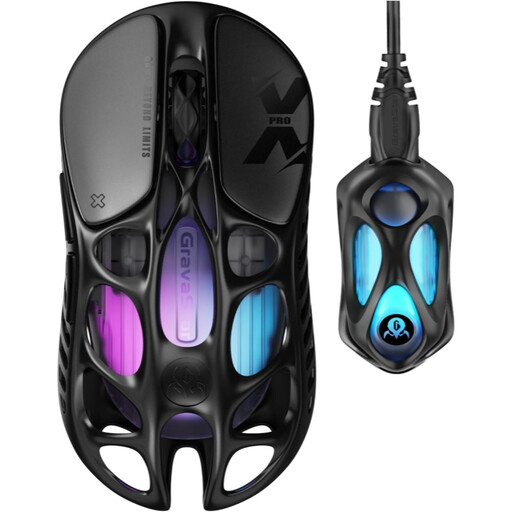
Why it's a match: Designed for pure performance, this mouse combines a featherlight weight of 49 grams with a cutting-edge PAW3950 sensor and an 8000 Hz polling rate. It's the ultimate tool for players who chase every last millisecond.
It doesn't sacrifice durability for lightness, thanks to its magnesium alloy chassis. The 8000 Hz polling rate is a tangible advantage here, not just a marketing gimmick.
The combination of a featherlight weight (49 g) and an 8000 Hz polling rate offers unparalleled responsiveness and fluidity in the most demanding games.
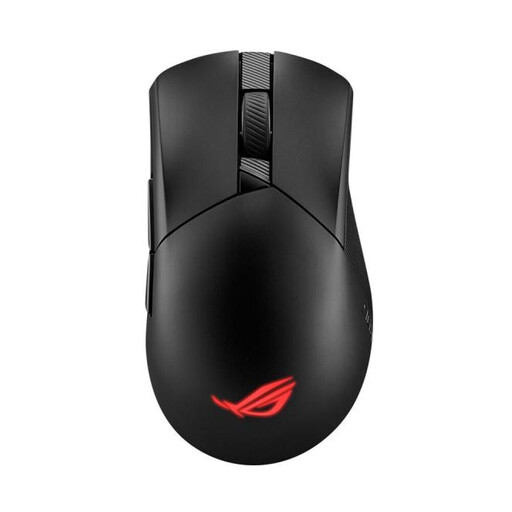
Why it's a match: This model offers a remarkable balance of performance and comfort. Its proven asymmetrical ergonomic shape, well-distributed 79-gram weight, and tri-mode connectivity make it just as comfortable for gaming as it is for office work.
It integrates a high-performance sensor (36,000 DPI) but focuses on long-term reliability and comfort, avoiding extremes that can compromise versatility. The ROG SpeedNova wireless technology ensures a stable connection.
The hot-swappable switch sockets (Push-Fit Switch Socket II) allow you to customize the click feel and significantly extend the mouse's lifespan.
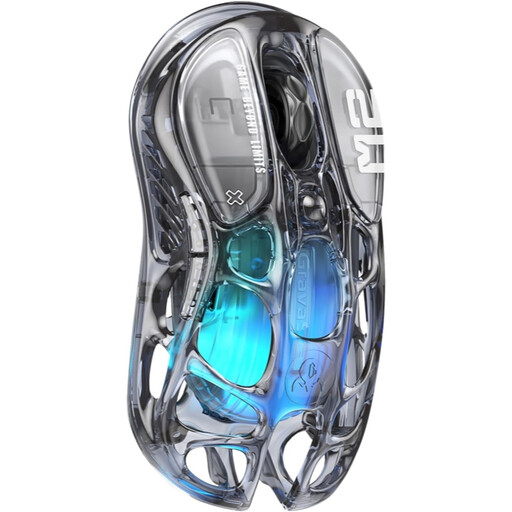
Why it's a match: For those whose setup is a statement piece, this mouse combines a bold aesthetic with its transparent shell and customizable RGB gaming mouse lighting, with perfectly respectable gaming performance.
Its design is not a mere gimmick. It's paired with quality components like the PAW3395 sensor and a controlled weight of 79 g, proving that style and performance can coexist without compromise.
A unique transparent design that reveals the internal components, combined with tri-mode connectivity (2.4GHz/Bluetooth/Wired) for maximum versatility.
Certain games or playstyles, like MMOs, require more programmable buttons. If you need more thumb controls, we've selected models that cater specifically to this need.
Is an 8000 Hz polling rate really useful? For the vast majority of players, including those at a high competitive level, the difference between 1000 Hz and 8000 Hz is barely perceptible. An 8000 Hz rate reduces latency from 1 ms to 0.125 ms, which can offer a marginal advantage to professional players. It requires a very high refresh rate monitor (240 Hz and above) and a powerful PC setup to truly benefit from it. For most of us, 1000 Hz is the gold standard and is more than sufficient.
Is an ultralight mouse necessarily more fragile? Not necessarily. Durability depends more on the materials used and the structural design than on weight alone. High-end models use magnesium alloys or high-quality plastics with internal reinforcements to ensure rigidity while remaining very light. You should be most wary of entry-level models that achieve their low weight by using thin, brittle plastics.
How do I choose the right DPI setting? The DPI (Dots Per Inch) setting is primarily a matter of personal preference. There is no "right" or "wrong" DPI. Most FPS players prefer a low DPI (between 400 and 1600) combined with an adjusted in-game sensitivity to allow for large, precise arm movements. We recommend starting around 800 DPI and adjusting the sensitivity in your games until you find the setting that feels most natural and effective for you.