
Livraison le jour même ou le lendemain

Qualité garantie

Débloquez vos offres de bienvenue: Livraison GRATUITE | Jusqu'à -80 % | 30 jours d'essai gratuits à JoyPlus
Téléchargez l'application
Choosing a high-performance wireless gaming mouse can quickly become a daunting task. Between latency, weight, ergonomics, and sensor precision, there are many criteria to consider. The goal is simple: enjoy the freedom of wireless without sacrificing the responsiveness essential for competitive play.
In this guide, we break down the technical specifications that truly matter and present a selection of models that stand out in 2026. You'll find a variety of options for every type of player, whether you're an FPS enthusiast seeking absolute lightness or a click marathoner looking for ultimate comfort.
Before diving into our selection, here are a few key points to keep in mind to help you make an informed decision.
Weight is a decisive factor for many gamers. An ultra-lightweight gaming mouse (usually under 60 grams) allows for quick, sweeping movements, a major advantage in fast-paced shooters (FPS). Conversely, a heavier model can offer a better sense of stability and control.
Ergonomics are just as crucial. An ergonomic gaming mouse is designed to fit the shape of your hand and reduce wrist fatigue. The shape of the mouse should match your grip style?:
The real engine of a mouse is its sensor and connection. Here's the jargon you need to master?:
Programmable buttons allow you to assign macros or shortcuts, a decisive advantage in many games (MMOs, MOBAs). RGB gaming mouse lighting is primarily cosmetic, but it can also serve as an indicator for battery level or the active DPI profile.
Here are three models that excel in their respective categories and target distinct player profiles.
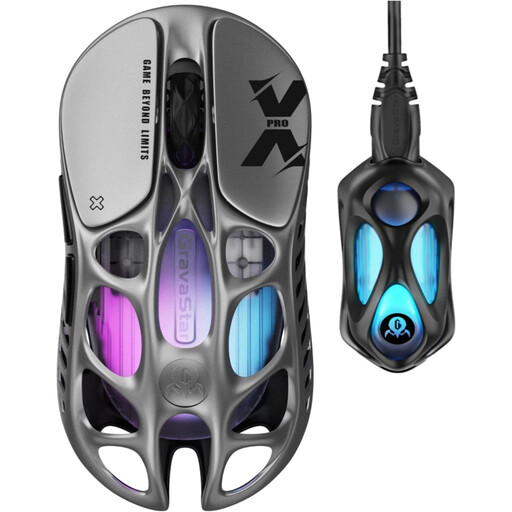
Why it stands out?? The GravaStar Mercury X Pro makes a strong impression with its bold design and a spec sheet entirely focused on pure performance. Its hollowed-out magnesium alloy shell allows it to achieve a feather-light weight of 49 grams, making it an ultra-lightweight gaming mouse built for speed. Its 8K dongle ensures a 8000?Hz polling rate, guaranteeing top-tier responsiveness.
Highlights?:
Who is it for?? This model is aimed at competitive gamers, especially in FPS titles, who are looking for the lightest and most responsive mouse on the market to maximise their precision and reaction speed.
See the GravaStar Mercury X Pro
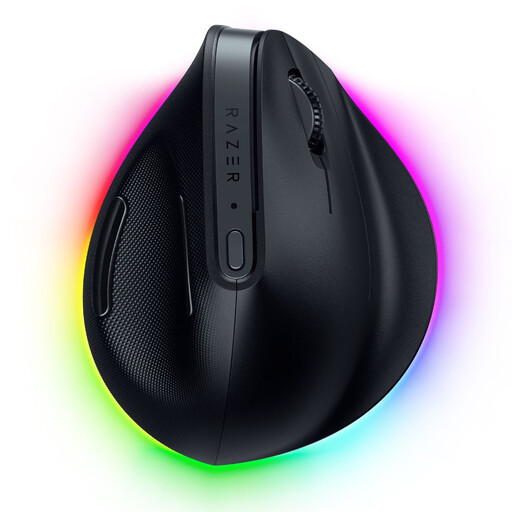
Why it stands out?? The Razer Pro Click V2 takes a different approach from the race to be the lightest, focusing entirely on being a vertical ergonomic gaming mouse. Its unique shape keeps the wrist in a natural "handshake" position, drastically reducing strain during long sessions. Although its 150?g weight makes it less suited for frantic movements, it packs high-performance gaming components like the Focus Pro 30K sensor.
Highlights?:
Who is it for?? Ideal for professionals, creators, and gamers who spend long hours in front of their PC and want to prevent fatigue or wrist pain, without compromising on precision.
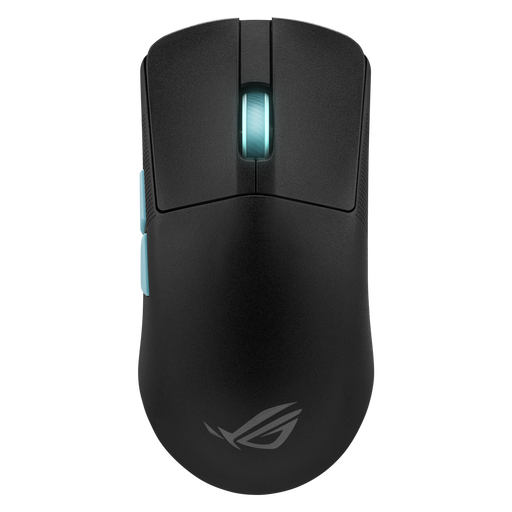
Why it stands out?? The result of a collaboration with the experts behind the Aim Lab training software, the ROG Harp Ace is a pro gaming mouse designed to shatter your records. Its software analyses your playstyle to suggest custom-tailored settings. At 54 grams, it's an excellent mouse for FPS, combining lightness, a comfortable ambidextrous shape, and a high-precision sensor.
Highlights?:
Who is it for?? FPS players looking to methodically optimise their performance. It's a formidably versatile tool that will suit a wide range of gamers thanks to its low weight and symmetrical shape.
Our selection focuses heavily on lightness and ergonomics. If your playstyle, especially in MMOs or MOBAs, requires an array of programmable buttons to manage your skills and macros, other models might be a better fit for you.
Discover our full range to find that perfect mouse.
Explore our selection of computer mice with side buttons
1. Is a wireless gaming mouse as high-performance as a wired mouse?? Yes, absolutely. Modern 2.4?GHz wireless technologies (like Razer HyperSpeed or ROG SpeedNova) offer such low latency that it's impossible for a human to tell the difference from a wired connection. For gaming, always use the provided 2.4?GHz dongle and reserve the much less responsive Bluetooth for office work.
2. What are DPI and Polling Rate??DPI (Dots Per Inch) expresses the sensor's sensitivity. The higher the DPI, the faster the cursor moves on the screen for the same hand movement. The Polling Rate, measured in Hertz (Hz), is how often the mouse communicates with the computer. A high rate (1000?Hz or more) ensures smoother tracking and reduced latency.
3. How do I choose the weight of a gaming mouse?? The choice of weight is highly personal. An ultra-lightweight gaming mouse (under 60?g) is often favoured in fast-paced games like FPS, as it requires less effort for large, sweeping movements. Conversely, heavier mice can offer a feeling of better stability and control for some players. There's no absolute rule: it all depends on your preferences and playstyle.