
Livraison le jour même ou le lendemain

Qualité garantie

Débloquez vos offres de bienvenue: Livraison GRATUITE | Jusqu'à -80 % | 30 jours d'essai gratuits à JoyPlus
Téléchargez l'application
Finding the perfect wireless gaming mouse can be a real challenge. Latency, weight, sensor precision, number of buttons… for demanding gamers, the devil is in the details. This guide is here to cut through the noise: we've analysed the essential criteria to help you find THE model tailored to your playstyle and ambitions. It's time to cut the cord and unleash your potential, without sacrificing a shred of responsiveness.
Before diving into our selection, let's review the key points that will guide your choice.
For first-person shooter (FPS) games, a lightweight gaming mouse is practically a must-have. It allows for swifter movements and reduces fatigue over long sessions. A model is generally considered lightweight if it's under 80 grams. Ergonomics are just as crucial: the shape of the mouse must fit your grip style (palm, claw, or fingertip) to ensure absolute comfort, even after hours of play.
The sensor is the heart of the mouse. Its sensitivity, measured in DPI (dots per inch), determines the cursor's speed. Be warned, a race for high DPI isn't necessarily a guarantee of performance. The key is to have a wide enough adjustment range to switch between broad strokes and surgical precision. The polling rate, measured in hertz (Hz), is the number of times per second the mouse reports its position to the computer. Today, a rate of 1000?Hz (a 1?ms response time) has become the gold standard for any self-respecting pro gaming mouse.
Wireless technology has made huge leaps. A 2.4?GHz connection via a USB dongle ensures near-zero latency, a prerequisite for competitive gaming. Many models also add Bluetooth connectivity, which is more versatile for switching between a PC, laptop, or tablet. Keep an eye on the advertised battery life so you don't run out of power mid-game. Models with fast charging or the ability to play while wired during a recharge are a real bonus.
We've selected three models that stand out from the crowd, each with a distinct specialisation.
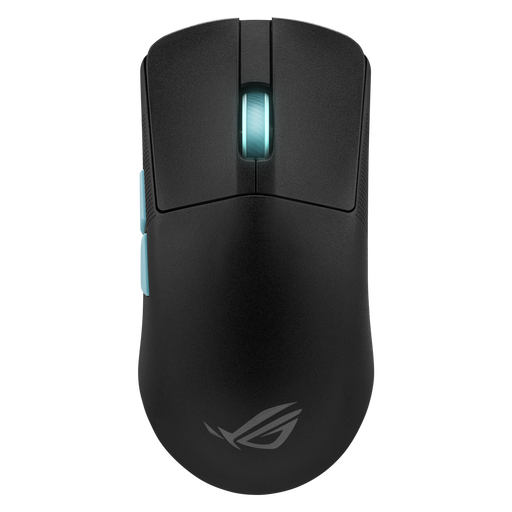
Why it stands out: Born from a collaboration with Aim Lab, the famous FPS training platform, this mouse is a formidable weapon. Its featherlight weight of 54 grams and its optimisation software make it the perfect ally for FPS players seeking absolute precision.
Key features:
Who is it for? Ideal for FPS and Battle Royale competitors who rely on lightness and surgical precision to dominate the battlefield.
View the Asus ROG Harp Ace Aim Lab Edition
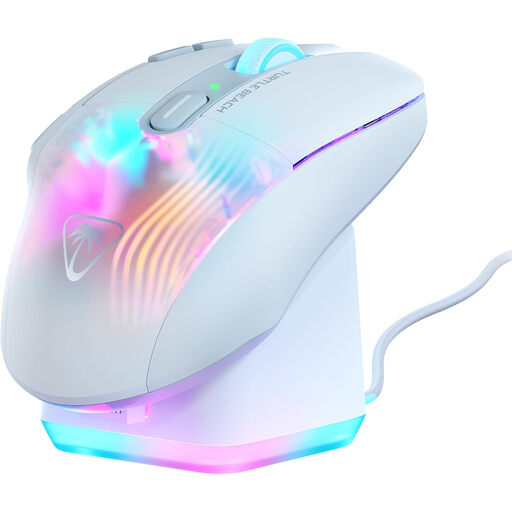
Why it stands out: The Kone XP Air is all about versatility and customisation. With its 10 physical buttons and Easy-Shift[+] technology, it offers up to 29 programmable functions. This is a major asset for MMO and RPG games where shortcuts are king.
Key features:
Who is it for? Perfect for fans of MMOs, MOBAs, and RPGs who want an arsenal of macros and skills at their fingertips, all in a comfortable and luminous package.
View the Turtle Beach Kone XP Air
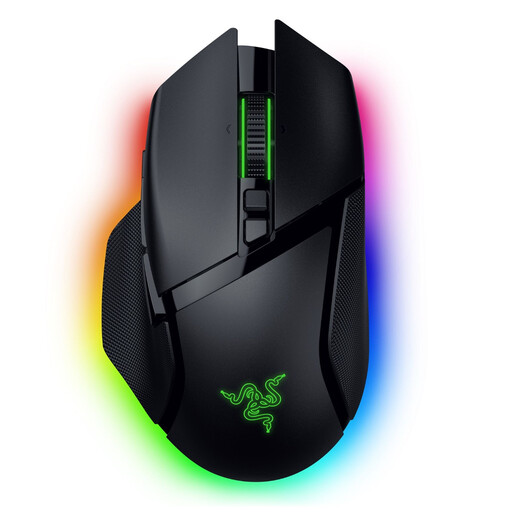
Why it stands out: The Basilisk V3 Pro is a true showcase of Razer's expertise. Its HyperScroll smart-reel wheel and 13-zone Chroma RGB lighting make it an ultra-immersive and incredibly versatile model.
Key features:
Who is it for? For the all-around gamer who demands maximum customisation, both in function and form, and is looking for an ergonomic mouse that can excel in any genre.
View the Razer Basilisk V3 Pro 35K
Our selection focuses on highly specialised models. If you haven't found what you're looking for or simply want to explore other options, feel free to browse our full catalogue.
? Explore our entire collection of wireless mice
1. Is a wireless gaming mouse really as fast as a wired one? Absolutely. Today's 2.4?GHz wireless technologies (like Razer HyperSpeed or ROG SpeedNova) guarantee 1?ms response times. Simply put, the latency is imperceptible and identical to that of a good wired model. Pro-level wireless gaming has been a reality for years.
2. Is DPI really that important? DPI (dots per inch) defines the sensor's sensitivity. A high DPI means the cursor will travel a long distance on-screen for a small hand movement. A low DPI favours precision. The key isn't the race for the highest number, but having a reliable sensor and a wide enough settings range to find YOUR ideal sensitivity.
3. How can I properly maintain my mouse to make it last as long as possible? A few simple steps: regularly clean the sensor and feet with a soft, dry cloth (never use liquid!). For the battery, follow the manufacturer's advice and avoid leaving it constantly charging if not necessary. And most importantly, don't lose the USB dongle