
Livraison le jour même ou le lendemain

Qualité garantie

Débloquez vos offres de bienvenue: Livraison GRATUITE | Jusqu'à -80 % | 30 jours d'essai gratuits à JoyPlus
Téléchargez l'application
Does your mouse cable get tangled in the heat of battle?? Do you dream of more freedom of movement without sacrificing performance?? Switching to a wireless gaming mouse is a natural evolution for many gamers. But with all the different technologies, sensors, and shapes, it's easy to get lost.
This guide is here to help you make sense of it all. We'll break down the key criteria and present our 2026 selection, featuring models suited for every profile, from the casual player to the hardcore competitor.
Before diving into our selection, let's review the key points that will guide your choice.
At the heart of the wireless experience, two main technologies compete.
A mouse's performance relies on this inseparable trio:
Comfort is paramount, especially during long gaming sessions. Ergonomics depend on the mouse's shape and your grip style (palm, claw, or fingertip). Customisation also extends to the buttons: a programmable gaming mouse allows you to assign macros or shortcuts, a decisive advantage in MMOs and MOBAs. Finally, RGB lighting perfects the aesthetics of your setup and often syncs with your other peripherals.
Here are three models that stand out for their specs and market positioning.
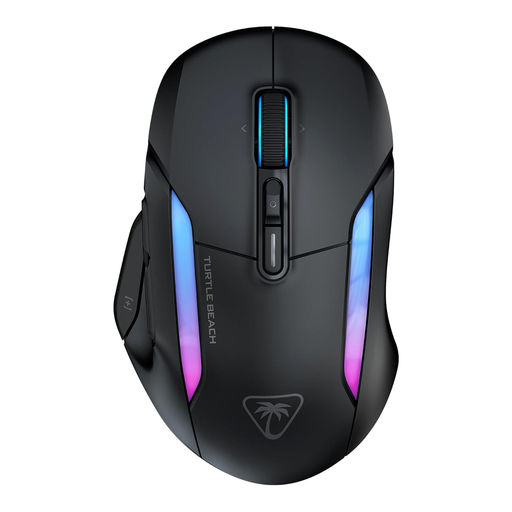
Why it stands out: The Kone II Air bets big on versatility and customisation. Its dual 2.4?GHz and Bluetooth connectivity makes it just as comfortable for gaming as it is for office work. Its 4D wheel and Easy-Shift[+] technology multiply the number of accessible commands, making it a true Swiss Army knife for gamers.
Key Features:
Who is it for?? The versatile gamer looking for a wireless PC mouse that is as high-performing in-game (especially for RPGs and MMOs) as it is practical for daily use. Its long battery life on Bluetooth and extensive customisation options make it a prime ally.
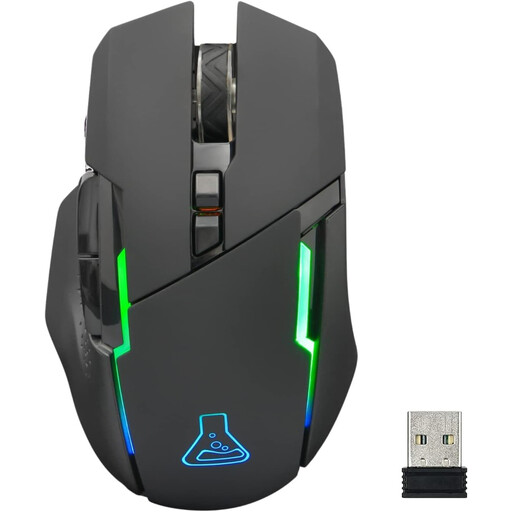
Why it stands out: The Kult Caesium establishes itself as a highly accessible option that doesn't sacrifice the essentials. It offers a responsive wireless connection, RGB lighting, and multi-platform compatibility, all in a lightweight and ergonomic package.
Key Features:
Who is it for?? Gamers on a tight budget or those taking their first steps into PC and console gaming. It's the smart choice for anyone looking for an effective, lightweight, and stylish mouse without breaking the bank.
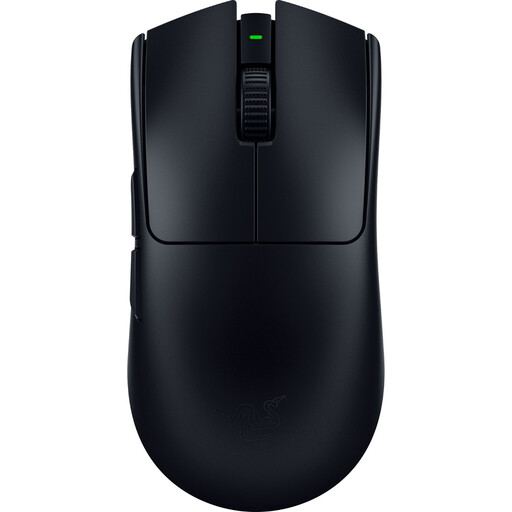
Why it stands out: Built for competition, the Viper V3 Pro is a powerhouse of pure performance. Its feather-light 54-gram weight, state-of-the-art sensor, and 8000?Hz HyperPolling technology make it a formidable weapon of precision, designed to reduce latency to its absolute minimum.
Key Features:
Who is it for?? Competitive gamers and e-sports enthusiasts, especially for FPS titles. If every millisecond counts for you and lightness is an obsession to maximise your speed and precision, this model is made for you.
The models featured here cover different use cases, but the market is vast. If your playstyle, especially in MMOs or MOBAs, demands a flood of commands, specialised models are available.
? Discover our selection of gaming mice with extra buttons to find the right model for your macros.
1. Is a wireless gaming mouse as responsive as a wired one?? Yes, modern 2.4?GHz wireless technologies offer latency and polling rates that are entirely comparable to those of wired mice. For competitive use, the difference is now imperceptible to the vast majority of players.
2. How important is DPI for a gaming mouse?? DPI measures the sensor's sensitivity. A high value is not synonymous with better performance. The key is to choose a mouse with a quality sensor capable of precise tracking without hardware acceleration. Most pro players use sensitivity settings between 400 and 1600 DPI, then adjust sensitivity directly in-game.
3. How can I extend my gaming mouse's battery life?? A few simple tips can help optimise battery life. The most effective is to reduce the intensity of the RGB lighting, or even disable it completely. Lowering the polling rate from 1000?Hz to 500?Hz, for example, can also make a difference. Finally, remember to turn off the mouse when you're not using it for an extended period.