
Livraison le jour même ou le lendemain

Qualité garantie

Débloquez vos offres de bienvenue: Livraison GRATUITE | Jusqu'à -80 % | 30 jours d'essai gratuits à JoyPlus
Téléchargez l'application
For a PC gamer, the choice of mouse is paramount. Imperceptible latency, surgical precision, and ergonomics built for marathon sessions are non-negotiable criteria. Forget the old myths: the era when a wireless gaming mouse was synonymous with compromise is long gone. Today's technology offers total freedom of movement without ever sacrificing performance. This guide is designed to break down the market and help you find that perfect gem—the one that will elevate your playstyle.
Before diving into our selection, let's review the key points to ensure you make the right choice.
Weight is a decisive factor. A lightweight gaming mouse (typically under the 80-gram mark) is often favoured by FPS players, as it allows for swift, sweeping movements with less fatigue. Conversely, a heavier mouse can provide a sense of stability and control highly valued in strategy games (RTS) or MMOs. Finally, the ergonomics (right-handed, left-handed, or ambidextrous) must perfectly match your grip style (palm, claw, fingertip) to ensure optimal comfort, even after hours of play.
The sensor is the engine of your mouse. The performance of an optical mouse is primarily measured by its sensitivity, expressed in DPI (Dots Per Inch). A high DPI count (beyond 16,000) means the cursor will fly across the screen with minimal hand movement. But beware of marketing hype: astronomical numbers can hide what's truly important. A sensor's true quality lies in its ability to handle the most abrupt movements (speed in IPS) and lightning-fast accelerations (in Gs) without ever spinning out. For a pro gaming mouse, tracking reliability takes precedence over the DPI race.
Most modern wireless mice offer dual connectivity. The 2.4 GHz connection, via a USB dongle, guarantees near-zero latency, a must-have for competitive gaming. Bluetooth, on the other hand, is more versatile for juggling multiple devices (laptop, tablet) and consumes less power. Its minor drawback? Slightly more noticeable latency, making it better suited for less critical use. Be sure to check the advertised battery life and, most importantly, the availability of fast charging. There's nothing worse than running out of power mid-clutch!
We have selected three models that stand out from the crowd, each with its own distinct proposition.
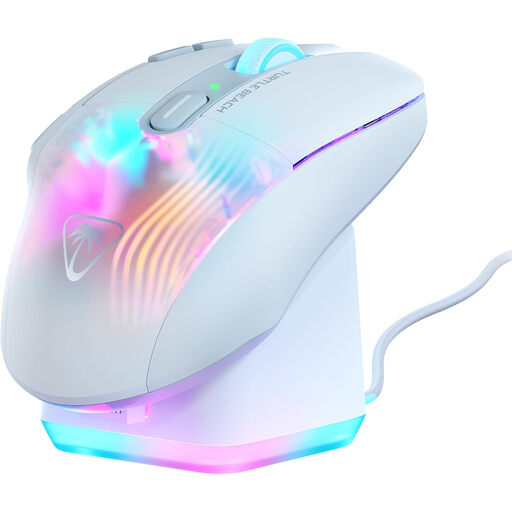
Why it stands out: The Kone XP Air is the ultimate weapon for players who want a maximum number of commands at their thumb. With its 10 physical buttons, expanded by the Easy-Shift[+] technology that assigns them a secondary function, it offers no fewer than 29 programmable actions. Its fast-charging RGB dock isn't just a stylish accessory; it's also a valuable ally.
The pros:
Who is it for? This mouse is tailored for fans of MMOs, MOBAs, and other shortcut-heavy games. If you're the type to fine-tune your setup and a cohesive RGB gaming mouse ecosystem is important to you, the Kone XP Air checks all the boxes.
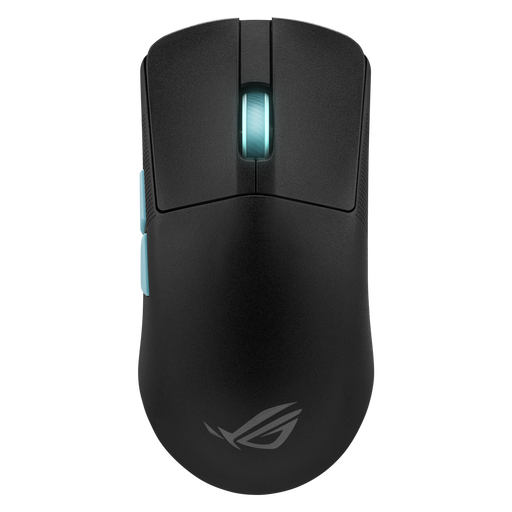
Why it stands out: Born from a collaboration with the experts at Aim Lab, this mouse is a pure competitive machine. Its featherlight weight of 54 grams places it among the lightest on the market. The result: less fatigue and astonishingly fast flicks. The software, co-developed with Aim Lab, analyses your playstyle to suggest tailor-made settings.
The pros:
Who is it for? The Asus ROG Harpe Ace is the quintessential FPS mouse. Competitive players obsessed with optimising every millisecond and every movement will find their new weapon of choice here. Its extreme lightness makes it a formidable tool for games that demand phenomenal reflexes and sweep speed.
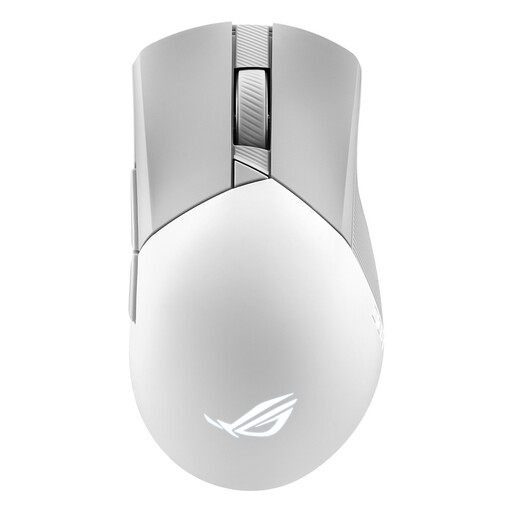
Why it stands out: The Gladius III stays true to the series' heritage: an ultra-ergonomic asymmetrical shape for right-handers, updated with the brand's latest innovations. At 79 grams, it strikes the perfect balance between agility and stability. Its secret weapon? Its "Push-Fit II" switch sockets. They allow you to change the main click micro-switches on the fly, without any soldering. This is ideal for customising the click feel or replacing a worn-out switch.
The pros:
Who is it for? This model is for gamers seeking a versatile, high-performance mouse who refuse to compromise on ergonomics, featuring a classic, proven shape. The ability to swap switches will appeal to enthusiasts who love to tinker with their gear to fine-tune it and extend its lifespan.
Choosing a mouse is a very personal matter. If these three models don't check all your boxes—whether in terms of DPI, shape, or features—feel free to explore our full catalogue.
? Explore our full catalogue of mice by DPI level
Absolutely. That's an old myth that dies hard. Today, wireless technologies (especially 2.4 GHz connections) achieve polling rates of 1000 Hz, which translates to a 1 ms latency. This is simply imperceptible to the human eye and identical to the performance of a wired model, even for professional gamers.
The ideal DPI setting is a personal preference that depends on your screen resolution, playstyle, and habits. Generally, FPS players who prefer large arm movements (low sens) opt for a low DPI (between 400 and 1600). Conversely, players who rely on wrist dexterity (high sens) will prefer a higher DPI. The best approach is to choose a mouse that allows you to switch between several DPI levels on the fly, so you can find the perfect setting for any situation.
The 2.4 GHz connection (via its USB dongle) is the gold standard for gaming. It is optimised to deliver minimal latency and rock-solid stability. Bluetooth, on the other hand, is the champion of versatility: no dongle is needed (if your machine is compatible) and it offers reduced power consumption. The trade-off is slightly higher latency. It's an excellent option for office work or for games that don't demand ninja-like reflexes.