
Livraison le jour même ou le lendemain

Qualité garantie

Débloquez vos offres de bienvenue: Livraison GRATUITE | Jusqu'à -80 % | 30 jours d'essai gratuits à JoyPlus
Téléchargez l'application
Choosing a wireless gaming mouse can quickly become a daunting task. Between the fear of latency, the importance of weight, and the jungle of available sensors, it's easy to get lost. For competitive gamers, every millisecond and every gram counts. This guide is here to provide clear benchmarks and practical advice to help you choose the mouse that meets your performance demands, without drowning you in marketing jargon.
Before diving into our top picks, here are the essential criteria to understand so you can make the right choice.
Weight is a critical factor. A lightweight gaming mouse (often under the 80-gram mark) allows for swifter movements and reduces fatigue during long sessions—a major advantage for first-person shooters (FPS mouse). Ergonomics are just as crucial. For most gamers, a right-handed ergonomic mouse ensures a natural hand position, minimizing strain. Make sure the mouse's shape matches your grip style (palm, claw, or fingertip grip).
The performance of a wireless mouse rests on three technical pillars?:
Because the look of your setup matters, too. A white gaming mouse fits perfectly into clean, modern setups. But customization goes far beyond just color. An RGB gaming mouse allows you to sync lighting with the rest of your peripherals, while programmable buttons give you game-changing shortcuts.
Here are a few models that stand out from the crowd for their specs and design, built for different types of gamers.
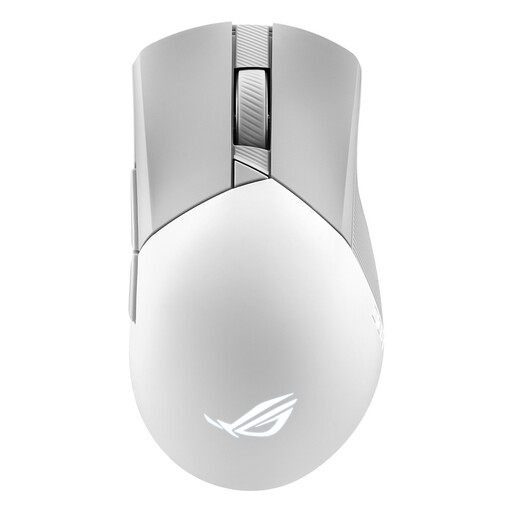
Why it stands out?: This model combines a classic, highly comfortable asymmetrical shape with cutting-edge technology. The ROG AimPoint optical sensor goes up to 36,000 DPI with near-zero deviation for pinpoint accuracy. Weighing in at just 79 grams, it remains exceptionally agile. Its tri-mode connectivity (2.4 GHz, Bluetooth, and wired) and hot-swappable switches (Push-Fit Switch Socket II) make it a choice that's as versatile as it is durable.
Pros?:
Who is it for?? For demanding gamers looking for a versatile, precise, and customizable mouse that is equally at home in FPS titles and other game genres.
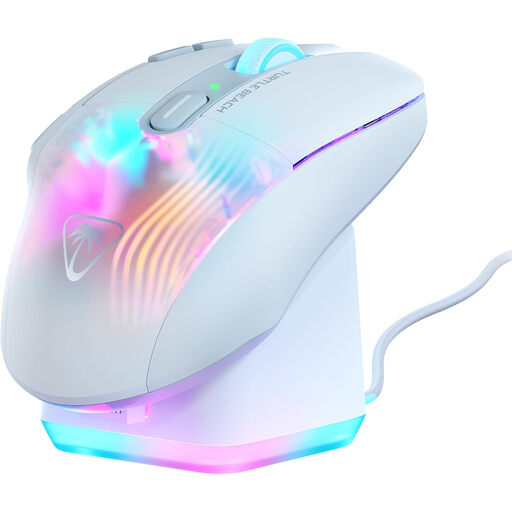
Why it stands out?: The Kone XP Air was designed for gamers who want a maximum number of commands at their fingertips. With its 10 physical buttons and Easy-Shift[+] technology, it gives you access to up to 29 programmable functions. Its ergonomic shape and 5-zone AIMO RGB lighting make it a peripheral that's as comfortable as it is spectacular. The included rapid charging dock is a huge plus, ensuring you never run out of battery.
Pros?:
Who is it for?? For MMO and MOBA players, or anyone who loves to automate as many actions as possible with macros. Its arsenal of buttons makes it a true pro-level gaming mouse for the most complex games.
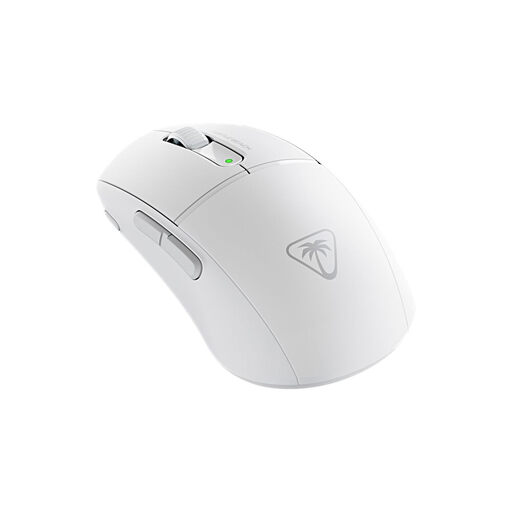
Why it stands out?: With a featherlight weight of just 47 grams, the Burst II Air is one of the lightest wireless mice on the market. It's built for pure speed. Its TITAN optical switches guarantee lightning-fast responsiveness and unbeatable durability. Despite its minimalist weight, it boasts a marathon-like battery life of up to 120 hours and dual wireless connectivity. Its symmetrical design will suit most grip styles.
Pros?:
Who is it for?? For FPS and fast-paced game players who prioritize lightness and speed above all else. It's the go-to choice for those looking to minimize friction and fatigue.
The trend of clean setups has brought the white gaming mouse into the spotlight. If these models have caught your eye but you want to explore other options, there are plenty of alternatives.
Discover our complete collection of white mice to find the model that will fit perfectly into your gaming environment.
A 2.4 GHz connection uses a dedicated USB dongle to establish a very low-latency link, which is essential for competitive gaming. A Bluetooth connection is more versatile, as it doesn't require a dongle and connects to multiple devices. However, it has slightly higher latency, making it less suitable for high-level play.
For fast-paced games like FPS, a lightweight gaming mouse allows for quicker flicks and reduces wrist fatigue. However, some players prefer a slightly heavier mouse for games that require slower, more controlled movements, as the weight can provide a better sense of stability. Ultimately, it's a matter of personal preference and game type.
DPI (Dots Per Inch) measures the sensor's sensitivity. A high DPI means the cursor will travel a greater distance on the screen for the same hand movement. There's no magic setting. The best approach is to start with a low DPI (e.g., 800) and gradually adjust it until you find the ideal balance of speed and precision that works for you. Most gaming mice allow you to change DPI on the fly using a dedicated button.