
Livraison le jour même ou le lendemain

Qualité garantie

Débloquez vos offres de bienvenue: Livraison GRATUITE | Jusqu'à -80 % | 30 jours d'essai gratuits à JoyPlus
Téléchargez l'application
By the Joybuy Editorial Team, July 4, 2026
Finding the right wireless gaming headset can be a real headache. Caught between the promise of total freedom of movement and the fear of game-breaking latency, making a decision is tough. Should you prioritise compatibility, microphone quality, or comfort for those marathon gaming sessions??
This guide is here to help you make sense of it all. We've broken down the spec sheets of several models to bring you a curated selection for every type of gamer, whether you're on PC, a PS5 aficionado, or a dedicated Xbox fan. Our goal?: to give you everything you need to make an informed choice, without the unnecessary marketing jargon.
Before diving into our top picks, here are the essential points to keep in mind to make the right choice.
The very first question to ask yourself is about the connection type.
Audio immersion is at the heart of the gaming experience. A virtual 7.1 surround sound headset can offer a tactical advantage in compatible titles by improving spatialisation (your ability to pinpoint sounds in space). However, excellent stereo sound often proves to be just as effective.
The microphone is another crucial element. To communicate clearly with your team or for streaming, a gaming headset with a cardioid mic is highly recommended. This type of microphone focuses on sound from the front (your voice) and reduces ambient noise.
A headset can have an impressive spec sheet, but if it becomes uncomfortable after 30 minutes, it will end up in a drawer. Here are the points to watch closely?:
Let's get down to business. Here are the models that caught our eye, each with its own unique strengths.
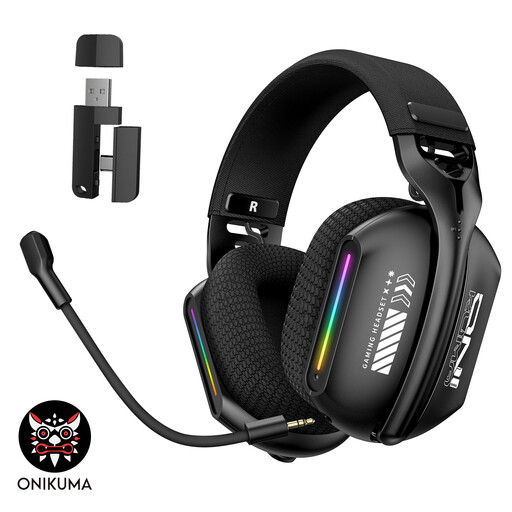
Why it stands out?? The biggest strength of the ONIKUMA GT808 is its triple-mode connectivity. It combines the low latency of 2.4?GHz for PC and console gaming, the convenience of Bluetooth 5.3 for mobile devices, and the reliability of a wired connection. This flexibility makes it a true Swiss Army knife for gamers who juggle multiple platforms. Its RGB lighting adds the final aesthetic touch, a popular feature in modern gaming setups.
Key Features?:
Who is it for?? The gamer looking for a do-it-all headset, capable of switching from their gaming PC to their console, smartphone, or tablet. It's the ideal option for simplifying your setup without compromising on features.
See details for the ONIKUMA GT808
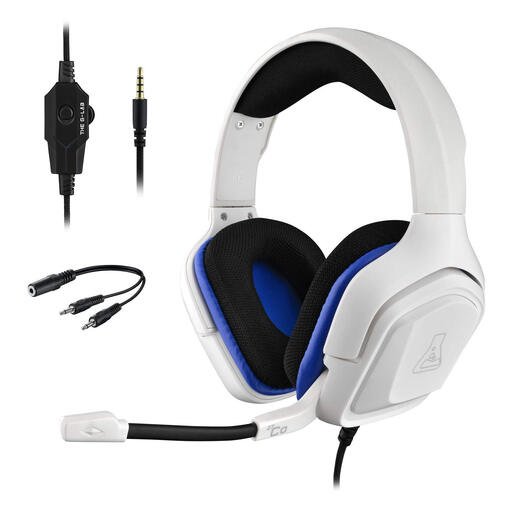
Why it stands out?? THE G-LAB's Korp Cobalt gets straight to the point?: a universal wired connection and a feather-light design. Thanks to its 3.5?mm jack, it's compatible with almost every platform on the market, from PC to PS5, Xbox, and Switch. Its extremely light weight is a real bonus for gamers who play for hours on end and want to avoid fatigue.
Key Features?:
Who is it for?? The gamer who values the reliability and simplicity of a wired connection. It's a smart choice for those on a budget or for anyone looking for a second, plug-and-play headset that can connect to any device without ever worrying about battery life.
Discover THE G-LAB Korp Cobalt
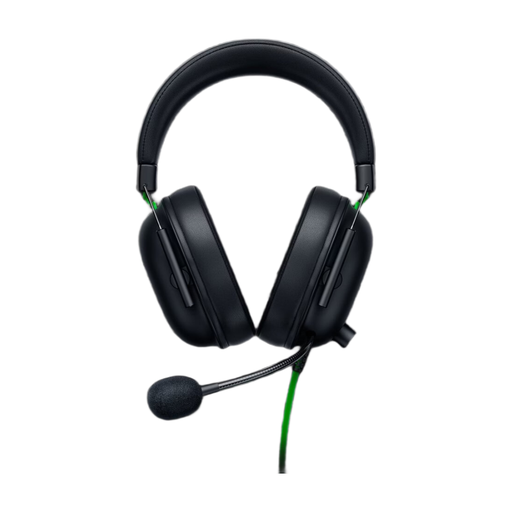
Why it stands out?? The Razer BlackShark V2 X is built for competition. It features specific technologies like the 50mm Razer TriForce drivers which, according to the brand, allow for individual tuning of highs, mids, and lows for richer, more precise audio. Its HyperClear cardioid mic is designed to perfectly isolate your voice, a decisive advantage in team play. Its feather-light weight (240g) is the icing on the cake for comfort.
Key Features?:
Who is it for?? The competitive PC or console gamer (especially Xbox, for which this model is licensed) who is looking for surgical audio precision to locate opponents and a flawless mic for seamless team communication.
Check out the Razer BlackShark V2 X
A good headset is essential, but a high-performance gaming setup also relies on dependable connections. To optimise your rig, whether for your monitor or other peripherals, quality cabling can make a real difference.
Discover our selection of video cables to perfect your setup.
1. What's the difference between a 2.4?GHz wireless gaming headset and a Bluetooth one? A 2.4?GHz connection uses a dedicated USB adapter to create a direct, ultra-stable link with your device. It offers very low latency (often under 30ms), which is crucial for video games. Bluetooth is a more universal standard but can introduce more noticeable latency, making it better suited for listening to music or for less fast-paced mobile games.
2. Is a 7.1 surround sound headset really useful for gaming? Virtual 7.1 surround sound can greatly enhance immersion and spatial awareness in compatible games, helping you to precisely locate the origin of sounds (gunshots, footsteps). However, its effectiveness depends on the quality of the software implementation and the game itself. An excellent stereo headset can also provide very good spatialisation and remains a formidably effective option.