
Livraison le jour même ou le lendemain

Qualité garantie

Débloquez vos offres de bienvenue: Livraison GRATUITE | Jusqu'à -80 % | 30 jours d'essai gratuits à JoyPlus
Téléchargez l'application
The USB cable snaking across the centre console, the connection dropping at the slightest turn, the inability to play a video for passengers during a break… If this scenario sounds familiar, rest assured : you're not alone. Many drivers love CarPlay and Android Auto but can no longer stand the constraints of a wired connection.
The good news? Simple and accessible solutions exist to switch to wireless CarPlay and even enhance your dashboard screen with new features. As the Head of the Auto & Tech section, my mission is to guide you through the jungle of accessories. This guide breaks down the best options to transform your driving experience, whether you're simply looking to cut the cord or turn your car's cabin into a true multimedia hub.
Before taking the plunge, there are a few key points to check to find the device that perfectly suits your needs and your car.
This is the essential prerequisite: most solutions, like a wireless CarPlay adapter, require your vehicle to already be equipped with a factory-fitted wired version of CarPlay. This is the case for the majority of models released after 2016. For Android users, check that your smartphone is compatible with wireless Android Auto (generally from Android 11 onwards, with a 5 GHz Wi-Fi chip). In any case, one step is a must: consult the compatibility list provided by the manufacturer.
Is your sole goal to say goodbye to the cable for managing GPS and music? In that case, a simple CarPlay dongle will do the job perfectly. If, on the other hand, you dream of watching videos while parked or offering real entertainment to your passengers, then a multimedia CarPlay box is what you need. These boxes act like true Android-powered mini-PCs, opening the door to the Play Store and its countless apps directly on your car's screen.
If your car lacks a built-in screen, replacing the original car stereo with a CarPlay-compatible model can be complex and costly. The smarter and much simpler alternative is a portable CarPlay screen. These mobile displays attach to the dashboard, plug into the cigarette lighter socket, and communicate wirelessly with your phone. The result? All the modern features, without any irreversible modifications to the vehicle.
Here are three products we've selected, each catering to a specific need: from a simple wireless conversion to the ultimate entertainment solution.

Why it stands out The OTTOCAST Mini has one mission, and one mission only: to transform your wired CarPlay or Android Auto into a 100% wireless experience, as discreetly as possible. Barely larger than a USB stick, it becomes completely unnoticeable in the cabin once plugged in.
Key features
Who is it for? For drivers who are already happy with the basic features of CarPlay or Android Auto and just want to free themselves from the chore of plugging in their phone every time they start the car. It's the perfect solution for simply adding everyday convenience.
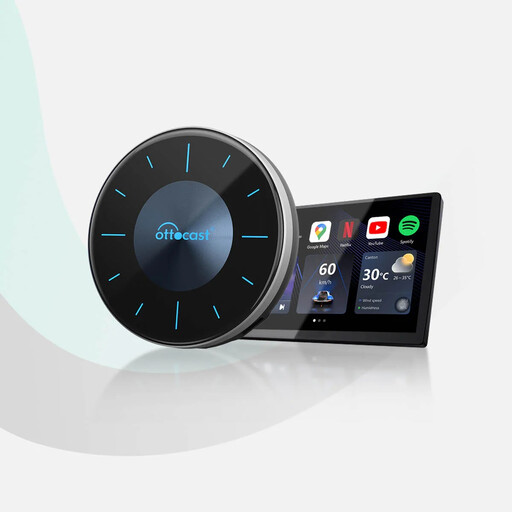
Why it stands out Much more than a simple adapter, the OTTOCAST P3 transforms your car's screen into a true Android 12 tablet. You can download and use apps like YouTube, Netflix, Disney+, and many others. The icing on the cake is its HDMI output, which allows you to stream content to an external screen—ideal for rear passengers.
Key features
Who is it for? The ideal road trip companion for families, long journeys, or anyone who often waits in their car. It unleashes the full entertainment potential of your screen while, of course, retaining access to wireless CarPlay and Android Auto.
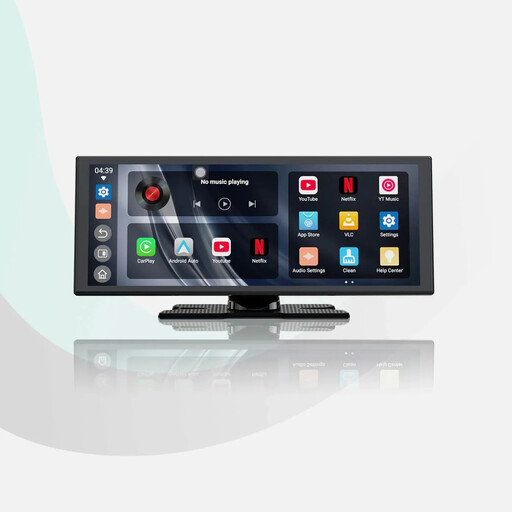
Why it stands out The ScreenFlow is the ultimate all-in-one solution for older vehicles or those without a factory-fitted screen. This 11.4-inch portable CarPlay screen not only adds wireless CarPlay and Android Auto but also includes built-in apps and a rear-view camera, all without any complex installation.
Key features
Who is it for? The perfect solution for drivers of vehicles not equipped with a modern infotainment system. A simple and remarkably effective upgrade to enjoy all the latest connectivity and safety features without touching the original car stereo.
The world of in-car connectivity accessories is vast. If our selection doesn't perfectly match your needs or if you're simply curious to discover other hidden gems, feel free to explore our full catalogue.
Find all our connectivity solutions in our Electronics Box category.
A wireless CarPlay adapter plugs into your car's USB port—the same one you use for your usual wired connection. The first time you use it, you simply pair it with your iPhone via Bluetooth. After that, every time you start the car, the adapter will use Wi-Fi to automatically connect to your phone and launch CarPlay on the car's screen. All without a single cable.
No, not by default. For obvious safety reasons, Apple CarPlay and Android Auto block video streaming apps. However, a CarPlay box like the OTTOCAST P3, which runs its own Android operating system, allows you to bypass this restriction. It gives you the ability to install and launch apps like Netflix or YouTube directly from the box. Of course, their use is intended for when the vehicle is stationary.
Yes, for the most part. Modern adapters that use 5 GHz Wi-Fi offer a very stable and responsive connection. The latency is nearly imperceptible for both music and navigation. In rare cases, areas with high Wi-Fi density (like dense city centres) can cause brief interruptions. But in the vast majority of situations, the experience is nearly identical to a wired one.