
Livraison le jour même ou le lendemain

Qualité garantie

Débloquez vos offres de bienvenue: Livraison GRATUITE | Jusqu'à -80 % | 30 jours d'essai gratuits à JoyPlus
Téléchargez l'application
Building a PC is, first and foremost, a quest for performance, but aesthetics now play an equally central role. For enthusiasts dreaming of a pristine and harmonious all-white PC build, every component is a piece of the puzzle. The white CPU cooler is the cornerstone?: its mission is twofold, to keep your processor cool under any circumstances and to elevate the design of your machine.
Navigating the jungle of available models is no easy task. This guide is here to shed some light?: we've broken down the essential criteria and selected the best models to help you find the ideal white processor cooler, whether you're a hardcore gamer, a content creator, or simply an admirer of beautiful builds.
Before you check out, let's review the crucial points to make the right choice.
The choice mainly comes down to two technologies?:
Ensure that your chosen model is compatible with three key elements of your build?:
For the perfect all-white PC build, lighting synchronization is essential. Most modern models integrate ARGB (Addressable RGB) lighting on the fans and/or the pump. Verify that the system is compatible with your motherboard's software (Asus Aura Sync, MSI Mystic Light, Gigabyte RGB Fusion, etc.) to control all colors and effects from a single interface.
We have selected a few gems that stand out for their design and features, catering to all profiles and budgets.
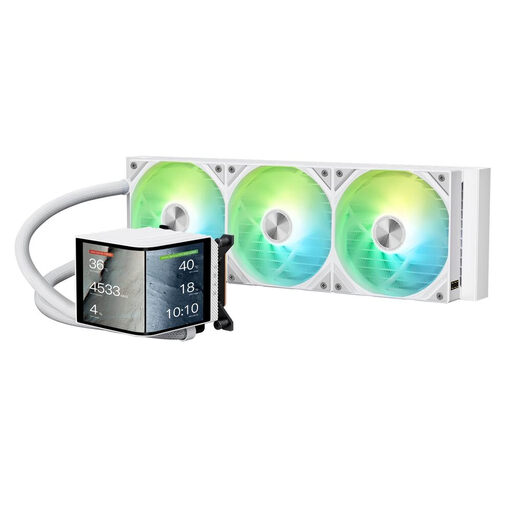
Why it stands out: Its key feature?? An integrated L-curved screen directly on the pump block. Customizable via the KANALI software, it displays vital system information (temperatures, speeds) or animations, for a stunning high-tech touch.
Pros:
Who is it for?? For those seeking a high-performance white AIO water cooler with an original display function for monitoring and style, without jumping to more complex (and often more expensive) screen solutions.
See the TRYX Panorama 360 ARGB on Joybuy.fr
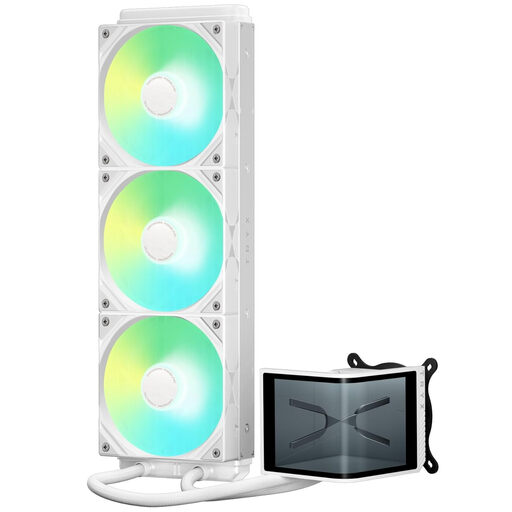
Why it stands out: The SE version takes it to the next level with an impressive 6.5-6.67 inch curved AMOLED screen (2240 × 1080) that sits atop the pump. The display quality is simply stunning and transforms the waterblock into a true mini-monitor for control and animation.
Pros:
Who is it for?? For modding enthusiasts who want to make their white CPU cooler the centerpiece of their machine. A prime choice for those who make no compromises between aesthetics and customization.
See the TRYX Panorama SE 360 ARGB on Joybuy.fr
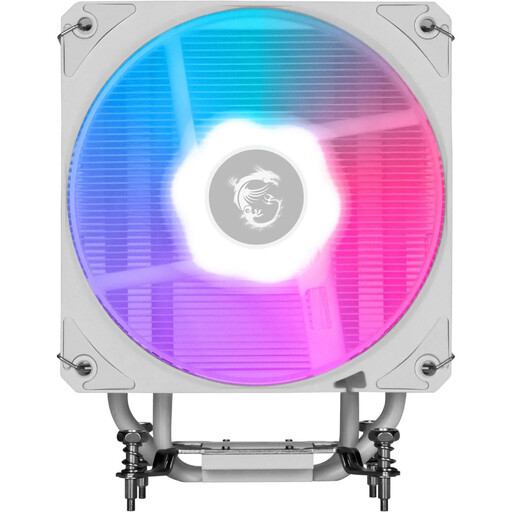
Why it stands out: This white ARGB air cooler from MSI stands out as a prime alternative to AIOs. Its compact single-tower format, matte white finish, and laser-engraved MSI logo give it an understated and polished look. It's proof that air cooling can go hand-in-hand with performance and elegance.
Pros:
Who is it for?? For fans of air cooling who swear by its reliability and simplicity, or for more compact builds that are incompatible with a 360?mm radiator. It is the quintessential balanced solution for a high-performance and discreet all-white PC build.
See the MSI MAG Corefrozr AA13 on Joybuy.fr
Cooling your components is vital. But don't forget about your own comfort?! To ensure your long gaming sessions remain comfortable even in the middle of summer, you also need to think about your space.
Discover our selection of room fans
As a general rule, a large AIO water cooler (280?mm or 360?mm) offers better thermal dissipation capacity than most air coolers, which is an advantage for overclocking or very power-hungry processors. However, an excellent air cooler can certainly compete with 240?mm AIOs, with the added benefit of reliability (no risk of leaks). The final choice will therefore depend on your processor, your case, and of course, your personal taste.
The most reliable method is to consult your case's technical specifications. Manufacturers always specify the compatible radiator sizes and their possible mounting locations (front, top, etc.). Also, remember to check the total thickness of the radiator + fan assembly (usually around 52-55?mm), a detail that matters.
The majority of ARGB coolers use a standard 3-pin (5V) connector that plugs into the motherboard. You can then control the lighting via the motherboard's software (Asus Armoury Crate, MSI Center, etc.) to synchronize all your components. Note that some models, especially those equipped with a screen, require proprietary software (like KANALI for the TRYX models) to unlock all customization options.