
Livraison le jour même ou le lendemain

Qualité garantie

Débloquez vos offres de bienvenue: Livraison GRATUITE | Jusqu'à -80 % | 30 jours d'essai gratuits à JoyPlus
Téléchargez l'application
Laptop, smartphone, tablet, headphones… Our desks and living rooms are often buried under a jungle of cables and chargers. A fast-charging USB-C power strip seems like the perfect solution, but the market is saturated with products making sometimes misleading marketing claims. A poor choice doesn't just result in painfully slow charging; it can also put your valuable devices at risk.
My role as a product expert at Joybuy is to help you navigate this landscape. Let's break down the common pitfalls and the essential technical criteria to help you make an informed choice that's perfectly suited to your needs.
Before you even start comparing models, it's crucial to know how to spot a bad deal in disguise.
To effectively organize your desk or media center, there are three technical parameters you need to examine closely.
Power, measured in watts (W), determines the charging speed and which devices you can connect. The gold standard for fast charging via USB-C is Power Delivery (PD).
Important Note: The advertised total wattage is often shared across all USB ports. Always check the maximum power a single USB-C port can deliver.
A good desktop power strip must be both safe and well-designed.
For the most demanding users, certain technologies stand out.
Instead of an exhaustive list, here are three options that cater to specific user profiles, all meeting our performance and safety criteria.
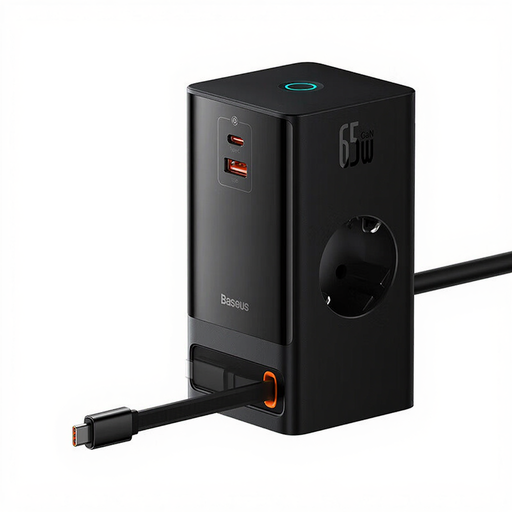
Perfect for a modern, minimalist desk. This all-in-one station powers a laptop, smartphone, and other peripherals without cluttering your workspace, thanks to its clever retractable cable.
Delivers a true 65W of Power Delivery on its USB-C port, enough to efficiently charge most laptops, steering clear of the empty "fast-charging" promises made by some competitors.
GaN technology ensures a compact design and controlled heat dissipation. Its retractable power cord is the key to a consistently tidy desk.
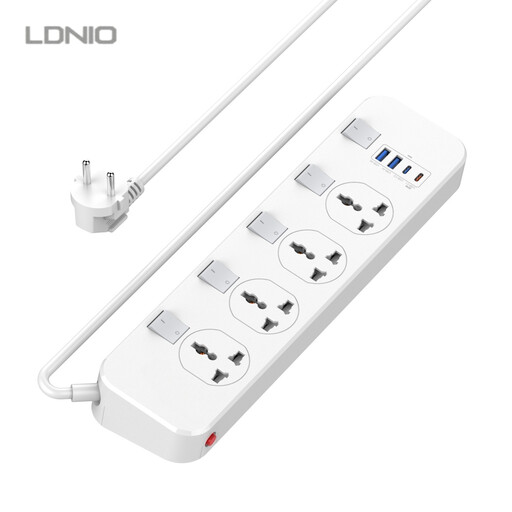
A must-have for the living room or a teen's bedroom where devices multiply. The individual switches let you control power to each device (console, TV, chargers) for maximum safety and energy savings.
Safety is the priority: surge protection and 5 independent switches. A real advantage over basic models that only offer a single master switch.
Incredibly versatile with 4 AC outlets and 4 USB ports (including one 20W USB-C PD port). The individual control for each outlet is a major plus for managing power consumption.
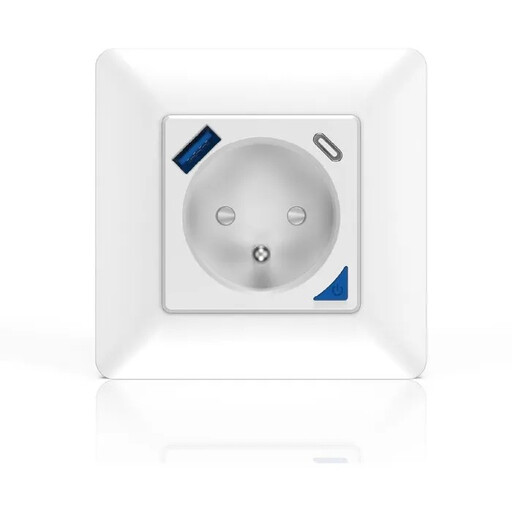
For those who want a permanent, invisible, and intelligent solution. This in-wall outlet replaces a standard outlet to offer remote control, energy monitoring, and built-in USB-A/C charging ports—all without a power strip cluttering the floor.
Offers true smart home integration (compatible with Alexa and Google Home) and precise energy monitoring—advanced features that place it far above basic, entry-level "smart" plugs.
An in-wall solution for a flawless finish. It combines a powerful 16A (3000W) smart outlet with 20W USB-C/A ports. Everything is controllable via the Smart Life/Tuya app.
We've curated a complete selection of products that meet our strict performance and safety criteria.
It all depends on the model. An ultraportable (like a MacBook Air) will be fine with 30W to 45W. A more standard laptop will require 65W for efficient charging. Mobile workstations or gaming laptops can even demand 90W, 100W, or more. The rule of thumb: check the wattage of your laptop's original charger. The USB-C PD port on your new power strip should be able to match that value.
Absolutely, especially when you're plugging in valuable devices. A surge protector acts as a shield against sudden voltage spikes (from storms, grid fluctuations, etc.). These surges can literally "fry" the internal circuits of your computers, TVs, or game consoles. It's a small investment to protect much more expensive equipment.
Yes, modern power strips are designed for continuous use and include protections against overload and overheating. However, even when turned off or fully charged, your devices and their chargers continue to draw a small amount of power (the infamous "phantom load"). Using a model with a switch (or switches) to cut all power when not in use is the best practice, both for safety and for your wallet.