
Livraison le jour même ou le lendemain

Qualité garantie

Débloquez vos offres de bienvenue: Livraison GRATUITE | Jusqu'à -80 % | 30 jours d'essai gratuits à JoyPlus
Téléchargez l'application
It's the ultimate challenge: a laptop powerful enough to run demanding applications, yet so light you'll forget it's in your backpack. Sound familiar? Whether you're a digital nomad, a student rushing between lecture halls and the library, or a creative searching for the perfect machine, choosing an ultraportable laptop is a critical decision. This guide is here to cut through the noise, give you the key things to look for, and point you toward the device that truly fits your needs.
Before diving into our top picks, it's essential to understand the criteria that define an excellent ultraportable in 2026. Here are the key points to keep in mind.
The days when "ultraportable" meant compromising on power are long gone. Modern processors, from Apple Silicon chips to Intel Core Ultra and Snapdragon X, now deliver stunning power efficiency. To seamlessly juggle applications and run demanding software, a laptop with 16?GB of RAM has become the new standard. This amount of memory ensures rock-solid responsiveness, even with a sea of open tabs and applications.
The DNA of an ultraportable is its featherlight weight and endurance. A lightweight laptop, typically weighing under 1.5?kg (3.3 lbs), is easy to forget in a backpack. Battery life is the other crucial factor. A long-lasting laptop should get you through a full day of work or classes far from a power outlet. Be wary of the figures advertised by manufacturers, which are often based on optimistic scenarios (like continuous video playback). Real-world use (browsing, office tasks, video calls) will logically result in slightly lower battery life.
2026 is undoubtedly the year of the AI-powered PC. Many models now integrate a Neural Processing Unit (NPU) dedicated to accelerating AI tasks. These machines, often branded as "Copilot+ PCs," can run advanced functions locally (without an internet connection), such as real-time translation, image generation, or writing assistance. At the same time, the 2-in-1 laptop format, a hybrid of a tablet and a traditional laptop, continues to win users over with its versatility.
We have selected three models that excel in their respective categories, each tailored to a specific user profile.
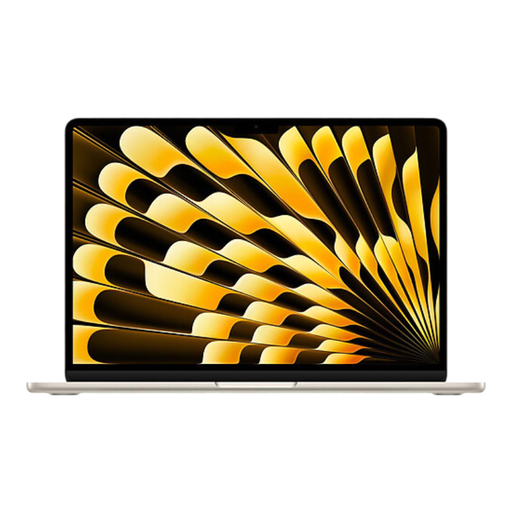
Why we chose it: The MacBook Air M4 remains the gold standard for ultraportability, striking a near-perfect balance between power and efficiency. Its M4 chip and powerful Neural Engine make it a pioneer for Apple's take on AI, right at the heart of the brand's ecosystem. Its fanless design ensures whisper-quiet operation, a key advantage in a library or open-plan office.
Key features:
Who is it for?: This is the top choice for students and professionals already invested in the Apple ecosystem. It will delight anyone looking for simplicity, marathon battery life, and a sleek design for hassle-free work and creativity.
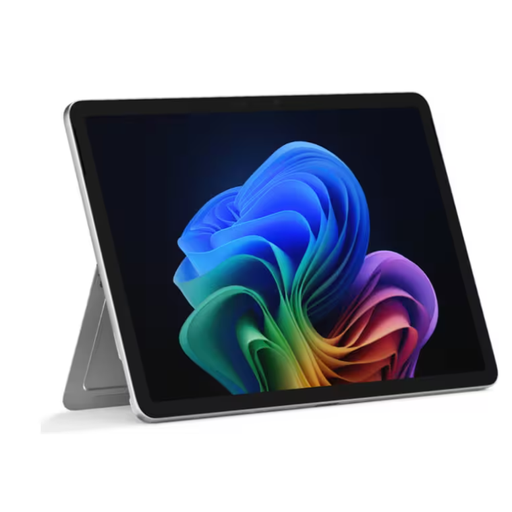
Why we chose it: The Surface Pro Copilot+ is Microsoft's showcase for the intelligent 2-in-1 computer. Ultra-light (just 686?g without its keyboard), it offers total flexibility, transforming from a touchscreen tablet into a full-fledged laptop once its Type Cover keyboard is attached (sold separately). Its Snapdragon X Plus processor was custom-built for the new Copilot+ experiences, making it a trailblazer for the AI-powered PC on Windows.
Key features:
Who is it for?: Perfect for ultra-mobile professionals, sales teams, and creatives who want a chameleon-like device that can adapt to any situation. Its lightness and versatility make it an exceptional travel companion for those who want to be on the cutting edge of AI on Windows.
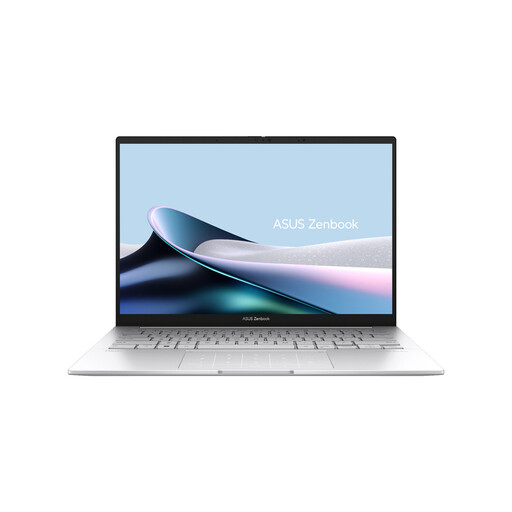
Why we chose it: The ASUS ZenBook 14 OLED goes all-in on the visual experience. Its 2.8K 120?Hz OLED panel is a feast for the eyes, delivering vibrant colours, deep blacks, and impeccable smoothness. It's a major asset for photo editing, video editing, or simply binge-watching shows. Powered by an Intel Core Ultra processor, it's also a certified Copilot+ PC, combining unparalleled display quality with the latest advancements in AI.
Key features:
Who is it for?: It's aimed at creatives, developers, and any professional for whom screen quality is non-negotiable. If your daily work involves photo editing, design, or if you're simply a connoisseur of visual quality, this professional laptop delivers a stunning visual experience in an ultra-compact chassis.
This selection is just a glimpse of the excellent models available on the market, and we know that choosing a computer is a highly personal decision. If these three machines don't check all your boxes or fit your budget, don't worry: many other configurations are out there.
While 8?GB of RAM can still get the job done for simple office tasks and web browsing, 16?GB of RAM is now the new baseline in 2026. This capacity not only ensures better future-proofing for your machine but is also essential for smooth multitasking and taking full advantage of the growing number of AI features.
A "Copilot+ PC" is a new designation for Windows computers. To be certified, a machine must include a processor with a Neural Processing Unit (NPU) capable of performing over 40 trillion operations per second (TOPS). This raw computing power allows it to run advanced AI functions directly on the device, locally. The result is greater responsiveness, enhanced privacy, and exclusive features like the "Recall" semantic search or instant translation.
Yes, and it's an excellent choice for many professionals. An OLED panel offers infinite contrast and unparalleled colour accuracy, which is the holy grail for creative professionals (photographers, videographers, graphic designers). The only potential downside is the risk of "burn-in," where static images displayed for extended periods can leave a faint ghost image on the panel. Rest assured, manufacturers integrate multiple software protections to mitigate this phenomenon. As a precaution, it's still advisable to enable a screensaver and avoid leaving static elements (like the taskbar) permanently displayed at full brightness.