
Livraison le jour même ou le lendemain

Qualité garantie

Débloquez vos offres de bienvenue: Livraison GRATUITE | Jusqu'à -80 % | 30 jours d'essai gratuits à JoyPlus
Téléchargez l'application
The tablet market is a veritable jungle where it's easy to get lost. Between operating systems, screen sizes, and performance levels, finding the right model can sometimes feel like a daunting task. Whether you're a student looking for a tool for your classes, a professional on the go, or a creative who wants to sketch anywhere, a tablet can become your best everyday companion.
This guide is here to help you see things more clearly. We'll break down the essential criteria to consider and present a selection of standout models for every use case and budget. The goal: to help you make the right choice, with complete peace of mind.
Before you fall for a particular model, take the time to define your needs precisely. Here are the key points to check.
The screen diagonal largely determines your experience. A compact tablet (between 8 and 10 inches) is easy to carry everywhere but is less comfortable for multitasking or binge-watching shows. Conversely, a large-screen tablet, like a 12-inch tablet or larger, offers superb visual comfort, ideal for drawing, video editing, or even occasionally replacing a laptop.
While all tablets include Wi-Fi by default, the question of 4G/5G arises for those who are always on the move. If you plan to use your tablet away from wireless networks, a cellular model (4G tablet or 5G) is a must. By inserting a SIM card (or activating an eSIM), you get constant internet access. This is a major advantage for professionals on the go or for staying entertained during long trips.
The use you have in mind will determine the essential accessories. A tablet with a keyboard and stylus transforms into a true mobile workstation, perfect as a tablet for students or for taking notes in meetings. For artists, a drawing tablet must offer excellent pressure sensitivity and a highly precise stylus. Lastly, don't overlook the operating system: an Android tablet shines with its flexibility, while the Apple ecosystem (iPadOS) is renowned for its smoothness and its unmatched library of optimised creative applications.
Here are a few models that have caught our eye and cater to very specific user profiles.
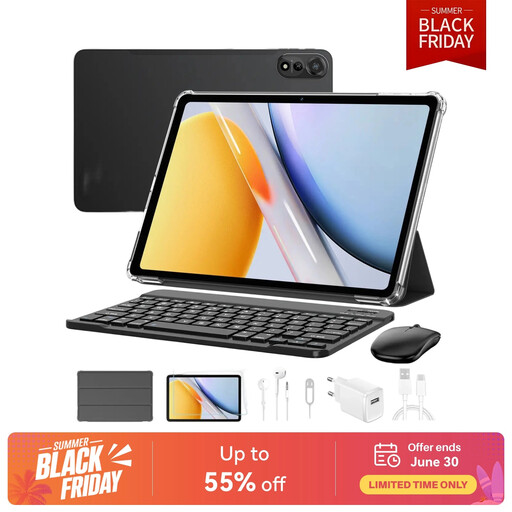
What sets it apart: The Blackview Mega2 is the ultimate complete and affordable solution. It comes with an ultra-comprehensive accessory pack (keyboard, mouse, stylus, and earphones), making it ready to use right out of the box. Its large 12-inch screen and 4G connectivity make it particularly versatile.
Highlights:
Who is it for?: Students, families, or anyone looking for a budget-friendly, all-in-one tablet for office tasks, web browsing, and multimedia without breaking the bank.
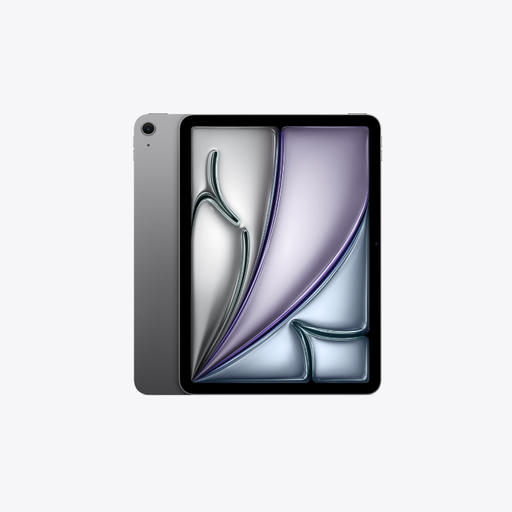
What sets it apart: The iPad Air M4 takes a giant leap forward in performance. Armed with the new M4 chip, it delivers computing power and graphics capabilities that rival many laptops. Its superb 13-inch Liquid Retina display and compatibility with the Apple Pencil Pro make it the dream tool for demanding creatives.
Highlights:
Who is it for?: Creative professionals, digital artists, photographers, and all fans of the Apple ecosystem who want cutting-edge performance in an ultra-mobile format.

What sets it apart: The Teclast ArtPad Pro is an Android tablet designed for drawing and note-taking. It stands out with its huge 12.7-inch screen and included stylus, which supports 4096 levels of pressure. A very interesting alternative for those looking for a drawing tablet without wanting to switch to Apple.
Highlights:
Who is it for?: Amateur or experienced artists, art students, and anyone who wants a very large screen for multimedia and creation on an Android tablet.
If your absolute priority is to be able to use your tablet anywhere, even without Wi-Fi in reach, a model with a SIM card slot is essential. It's the guarantee of having the freedom to work, browse, or stream wherever you are.
Discover our complete selection of tablets with a SIM card to stay connected in any situation.
The fundamental difference lies in the operating system. iPads run on iPadOS, a system known for its smoothness, security, and a rich App Store full of perfectly optimised applications. Android tablets, on the other hand, offer greater customisation freedom and more flexible file management, similar to a PC. The choice will therefore depend on your habits and the ecosystem you already use (smartphone, computer).
For most everyday tasks (web browsing, emails, word processing, streaming), a tablet equipped with a keyboard is a very credible and often more portable alternative. However, for intensive use or very specific software (complex video editing, 3D, coding), a laptop will still have the edge in terms of raw power and ergonomics.
For standard use (browsing, social media, a few apps), 128 GB is a good starting point. If you plan to download a lot of games, store movies for holidays, or handle large files (RAW photos, 4K videos), aim for at least 256 GB. Don't forget to check for a microSD card slot: it's the easiest and most cost-effective way to expand your device's memory.