
Livraison le jour même ou le lendemain

Qualité garantie

Débloquez vos offres de bienvenue: Livraison GRATUITE | Jusqu'à -80 % | 30 jours d'essai gratuits à JoyPlus
Téléchargez l'application
Are your holiday videos blurry?? Do your vlogs lack that smooth, professional touch?? Getting stable footage with a handheld smartphone can be a real challenge. A smartphone stabiliser, also known as a gimbal, is the most accessible solution for taking your videos to the next level.
This guide is here to help you navigate the options. I'm the Head of Product Recommendations at Joybuy, and my mission is simple?: to give you all the key information you need to make the right choice, without the unnecessary marketing jargon. We'll review the essential buying criteria before presenting a selection of models suited for every need and budget.
Before you dive in, it's essential to consider the few features that make all the difference. Here are three key points to examine to find the perfect stabiliser for you.
A stabiliser is an accessory you'll be taking everywhere. Its weight and footprint are therefore critical factors, especially if you're a traveller or an on-the-go content creator. Foldable models are particularly convenient, as they slide easily into a backpack. Some also integrate a selfie stick with a tripod function, offering welcome versatility for varying your shots, whether for a moving vlog or a perfectly stable timelapse.
Mechanical 3-axis stabilisation (pan, tilt, roll) is the foundation of any good gimbal. But recent models go much further by integrating advanced software features. The stabiliser with AI tracking (Artificial Intelligence) is one of the most popular. This technology allows the device to "lock on" to a subject (a person, pet, or object) and automatically follow its movements. This is a game-changer for creators who film themselves.
Always check the stabiliser's compatibility with your smartphone. Manufacturers specify a weight and dimension range that must be respected to ensure optimal balancing. Battery life is another crucial point. A long battery life will prevent you from running out of power mid-shoot. Most models today recharge via a standard USB-C port.
Here are a few models that stand out for their features and design, catering to a variety of uses, from intensive vlogging to capturing family memories.
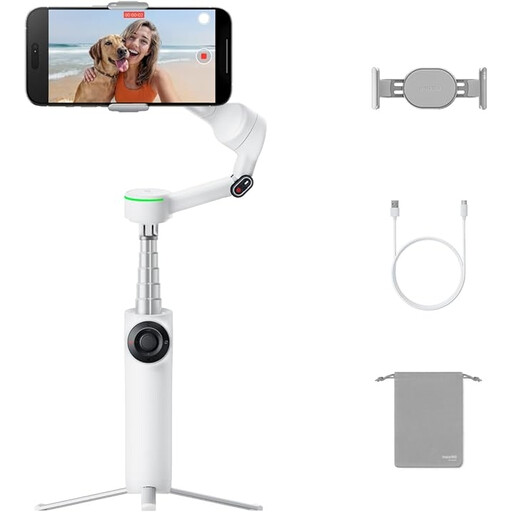
Why it stands out?: This model positions itself as an all-in-one tool for demanding creators. Its AI tracking system, Deep Track 3.0, is renowned for its pinpoint accuracy. Apple DockKit compatibility allows for deep integration with the iOS ecosystem. The "Pro Bundle" pack includes very useful accessories like a remote control and a small fill light (Spotlight), making it a ready-to-use solution, ideal as a vlogging stabiliser.
Key features:
Who is it for? For content creators, vloggers, and iPhone users looking for a powerful software ecosystem and the best tracking features on the market.
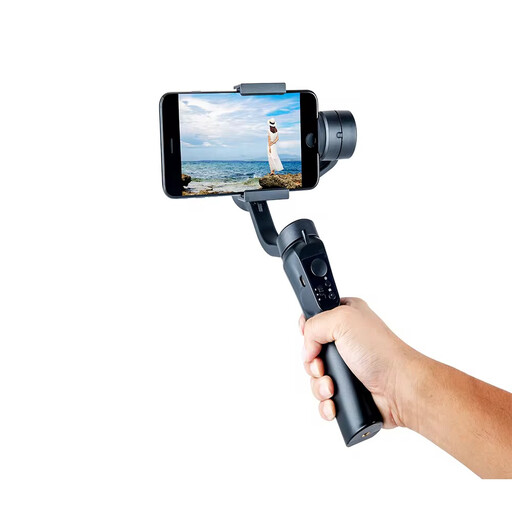
Why it stands out?: The Verbex C16 strikes a balance between features and ease of use. It incorporates the essential functions of a modern smartphone gimbal, such as face tracking and a foldable design, all at a very accessible price point. Its broad compatibility with both Android and Apple devices makes it a particularly versatile option.
Key features:
Who is it for? Ideal for YouTube and TikTok content creators, as well as amateurs who want an effective and simple solution to improve their videos without getting bogged down in complex settings.
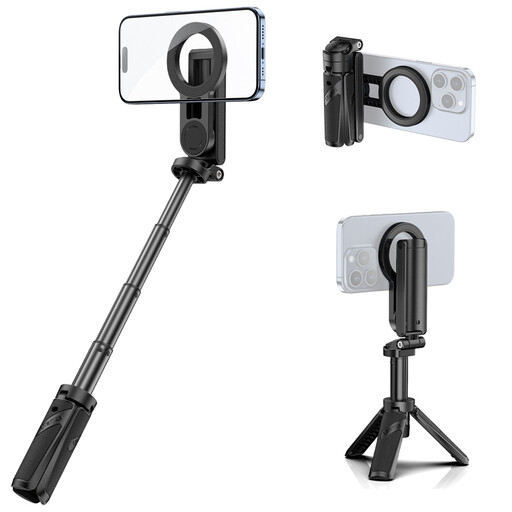
Why it stands out?: This Ulanzi product is a game-changer with a different approach. It's not a motorised gimbal, but an ultra-compact 3-in-1 mobile video accessory: a grip, selfie stick, and mini-tripod. Its major innovation?? A magnetic mount, compatible with the MagSafe technology of recent iPhones (or via an adapter for other models). It provides basic stability for static shots and selfies, with unbeatable setup speed.
Key features:
Who is it for? Perfect for travellers, casual users, and iPhone owners who prioritise the speed, light weight, and versatility of a selfie stick with a tripod over the active stabilisation of a gimbal.
Our selection covers several use cases, but the market for mobile video accessories is vast. If you're looking for a simpler solution or a different design, like a compact foldable tripod for static shots, feel free to explore our dedicated category to discover an even wider range of products.
Discover our range of foldable tripods
A smartphone gimbal (or motorised stabiliser) uses motors and sensors to actively compensate for your movements on multiple axes (usually 3). It keeps the phone perfectly steady even when you're walking or running. In contrast, a simple mount like a selfie stick with a tripod provides a stable base for static shots or a better grip, but it doesn't correct for shakes while you're on the move.
Yes, for most models, using the manufacturer's app is highly recommended. It's what unlocks all the advanced features like the stabiliser with AI tracking, creative modes (timelapse, hyperlapse), and allows you to install firmware updates. Basic stabilisation sometimes works without the app, but the experience is very limited.
No, and this is a critical point to watch out for. Each stabiliser is designed to support a maximum payload (weight) and dimensions. It is therefore crucial to check these specifications before buying to ensure that your phone, with or without its case, can be properly balanced. A smartphone that is too heavy or too wide can strain the motors and compromise the quality of the stabilisation.