
Livraison le jour même ou le lendemain

Qualité garantie

Débloquez vos offres de bienvenue: Livraison GRATUITE | Jusqu'à -80 % | 30 jours d'essai gratuits à JoyPlus
Téléchargez l'application
In the gaming arena, every millisecond is crucial. The responsiveness of your equipment can be the difference between a stunning victory and a bitter defeat. The red switch mechanical gaming keyboard is often the star of gaming setups for its speed and fluidity, but with a plethora of options available, making a choice can quickly become a daunting task.
This guide is here to help you see things more clearly. Whether you're an esports pro in search of ultimate performance or an enthusiast looking to enhance your gaming comfort on PC or console, we'll give you all the keys to finding the keyboard that's right for you.
Before diving into our selection, let's review the essential criteria for making the right choice.
The size of your keyboard directly impacts your ergonomics and, most importantly, the space available for your mouse. Three main form factors stand out from the crowd:
The switches are the heart of a mechanical keyboard. Red switches, which are a "linear" type, are characterized by a perfectly smooth and direct keystroke, without any tactile feedback or audible click at the actuation point.
Their low actuation force allows for effortless and lightning-fast keystrokes. This is a decisive advantage in games that require a high number of actions per minute (APM).
A good gaming keyboard should adapt to you, not the other way around. Here are the features you shouldn't overlook:
Let's get down to business with our selection of models that have caught our eye, both for their technical specs and their design, which is tailor-made for gamers.
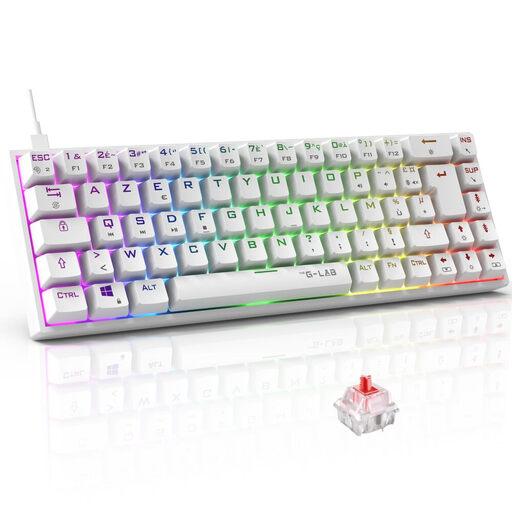
Why we love it: The Keyz Titanium is a white gaming keyboard in a 65% form factor that maximises desk space without compromising on the essentials. Its ultra-compact design is a godsend for gamers who need maximum freedom of movement for their mouse.
Key points:
Who is it for? For competitive gamers and fans of clean setups looking for a compact, responsive, and fully customisable keyboard.
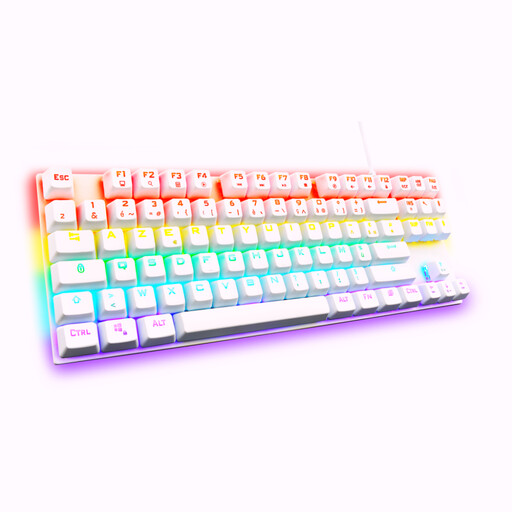
Why we love it: This mechanical TKL keyboard strikes the perfect balance. It ditches the number pad to free up space but retains the valuable function and navigation keys. Its reinforced ABS thermoplastic chassis ensures excellent stability.
Key points:
Who is it for? For gamers who feel cramped on a 65% keyboard but still want to save space compared to a full-size one.
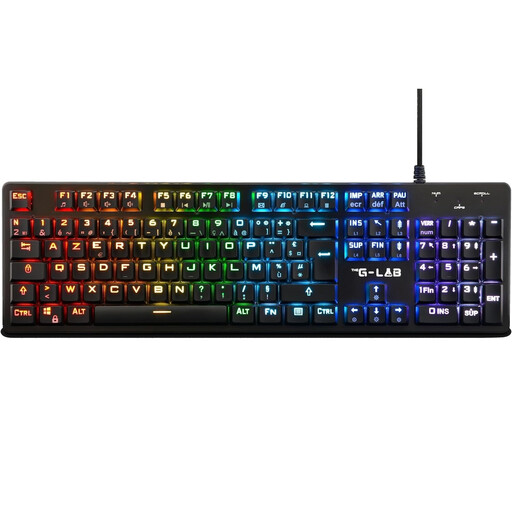
Why we love it: The Keyz Platinum competes in the low-profile mechanical keyboard category. Its switches, 40% shorter than traditional ones, reduce the actuation distance for lightning-fast responsiveness. Its slim chassis, enhanced with an aluminium alloy plate, combines modern design with unwavering durability.
Key points:
Who is it for? For gamers who love the short, quick keystrokes of flat keyboards but don't want to sacrifice the precision and durability of a mechanical one. It's also an excellent choice for those who can't do without a full-size keyboard.
Having the right keyboard is good. Optimising your gaming space is even better. To perfect the comfort and organisation of your setup, consider ergonomic accessories. They are essential for maintaining good posture during long gaming sessions.
To improve your setup's ergonomics and free up even more space, take a look at our selection of ergonomic keyboard trays.
1. Why choose a mechanical keyboard with red switches for gaming? Red switches are a linear type: they have no tactile bump or audible click upon actuation. This unique design allows for faster, smoother, and less fatiguing key presses. This is a decisive advantage in games that require rapid and repeated actions, such as FPS or MOBAs.
2. Is a gaming keyboard compatible with a PS5 or Xbox? Yes, the vast majority of wired USB gaming keyboards, like The G-Lab models in our selection, are compatible with modern consoles (PS4, PS5, Xbox One, Xbox Series X/S). Recognition is almost always instantaneous (Plug & Play) for basic functions like typing text or navigating menus. An increasing number of console games even allow the use of a keyboard for gameplay.
3. What is the difference between a TKL and a 65% keyboard? A TKL (Tenkeyless) keyboard is a full-size keyboard with the number pad removed. It retains the function key row (F1-F12) and the navigation cluster (Insert, Delete, etc.). A 65% keyboard goes even further in compactness: it also removes these two sections but cleverly reintegrates the arrow keys and some navigation keys (like Delete) into the main block, so you don't lose anything essential.