
Livraison le jour même ou le lendemain

Qualité garantie

Débloquez vos offres de bienvenue: Livraison GRATUITE | Jusqu'à -80 % | 30 jours d'essai gratuits à JoyPlus
Téléchargez l'application
Is your trusty DualSense starting to show its age? Are you looking to gain a competitive edge online, or simply need an extra controller for couch co-op sessions? Choosing a new PS5 controller is no small decision. The market is flooded with options, from the official model to ultra-specialised pro controllers.
Our goal: to guide you with clear, objective information to find the perfect controller for your playstyle, cutting through the marketing jargon.
Before diving into our selection, let's break down the key factors that will help you make the right choice.
The ideal gamepad depends first and foremost on how you play.
The majority of PS5 controllers are wireless (Bluetooth), offering complete gaming freedom. Competitors, however, often swear by a wired connection to eliminate every millisecond of input lag.
Do you also play on PC? Remember to check for PS5 PC controller compatibility. Most official and licensed models are recognised by Windows (often via USB-C), but be aware: advanced features like haptic feedback or adaptive triggers are not always supported by PC games.
Customisation is no longer a luxury. Remapping buttons, adjusting stick sensitivity, setting trigger travel distance, or saving multiple profiles... These options, once reserved for the elite, are now a real performance booster. Typically found on an esports controller, they allow you to tailor the controller's behaviour to your hands and your gameplay.
We've selected three models that cover every profile, from the casual gamer to the competitive pro.
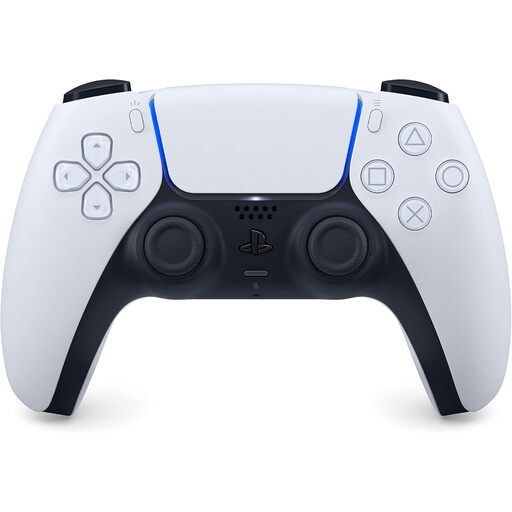
Why it stands out: This is THE official Sony controller for the PS5, the one that redefined gaming immersion with its haptic feedback and adaptive triggers. Gone is the crude rumble of the past: haptic feedback delivers ultra-fine, localised sensations. The triggers, meanwhile, adjust their resistance in real-time to simulate the tension of a bowstring or the braking of a vehicle.
Key features:
Who is it for? It's the default choice for a good reason: it caters to the vast majority of PS5 players. Versatile and reliable, it delivers the immersive experience intended by developers. It's also the simplest and most dependable option for a second controller.
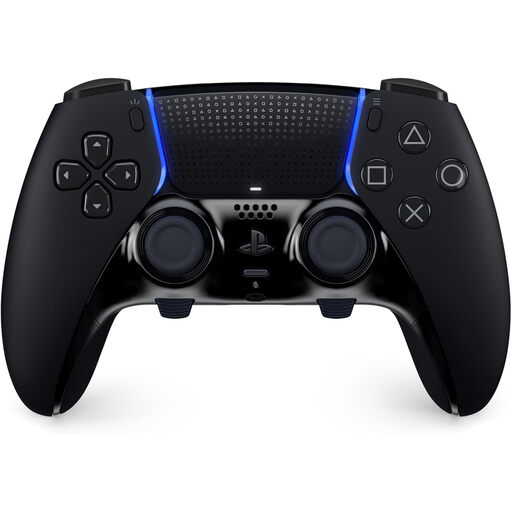
Why it stands out: The DualSense Edge is Sony's answer to players who leave nothing to chance. This pro PS5 controller takes the best of the classic DualSense and grafts on an arsenal of hardware and software customisation. Engineered for pure performance, it focuses on adaptability with its interchangeable components and on-the-fly profiles.
Key features:
Who is it for? It's clearly aimed at competitive players and esports enthusiasts who want to optimise every microsecond. If you grind FPS games, racing sims, or any title where reactivity is king, the DualSense Edge is an investment that can make all the difference.
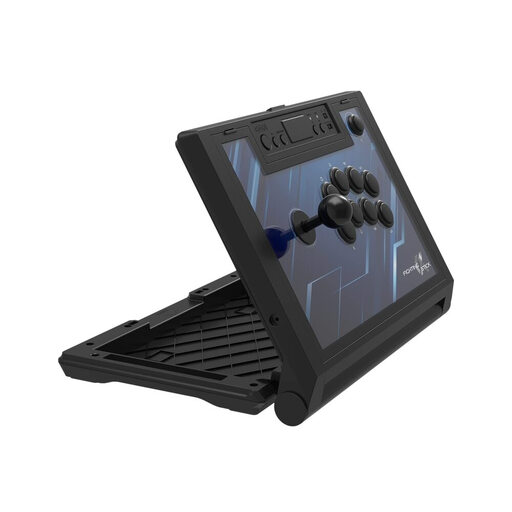
Why it stands out: This officially licensed PS5 arcade stick from Hori is the weapon of choice for fighting game purists. It features the brand's famous HAYABUSA joystick and buttons, a benchmark for responsiveness and durability. Its wired connection guarantees zero latency, a must-have for tournaments.
Key features:
Who is it for? This PS5 fighting controller is tailor-made for fans of Street Fighter, Tekken, Guilty Gear, and other versus fighting games. If you want to recapture that arcade feeling and pull off complex, pixel-perfect combos, this stick is for you.
Our selection covers the essentials, but the accessories market is a vast ocean. Are you looking for a particular colour, like a blue game controller, or just want to explore other options? Feel free to browse our full catalogue.
Discover all our game controllers
In a word: customisation. The DualSense Edge is the "pro" version, designed for competitors, with its interchangeable hardware components (sticks, paddles) and advanced software settings (mapping, sensitivity). The standard DualSense offers the "classic" PS5 experience with its haptic feedback and adaptive triggers, which will satisfy the vast majority of players.
Yes, the DualSense and DualSense Edge work on PC. For maximum responsiveness, opt for a wired USB-C connection, although Bluetooth also works. Be aware, however, that support for flagship features (haptic feedback, adaptive triggers) depends entirely on the game developers on PC. Not all of them integrate these features.
A little maintenance can greatly extend your controller's lifespan. A simple soft, dry cloth is enough for the shell (and definitely no liquids or abrasive cleaners!). Make sure to check that the ports, especially the USB-C port, are not blocked by dust. Finally, when you're not playing, store it away from impacts and moisture.