
Livraison le jour même ou le lendemain

Qualité garantie

Débloquez vos offres de bienvenue: Livraison GRATUITE | Jusqu'à -80 % | 30 jours d'essai gratuits à JoyPlus
Téléchargez l'application
The dream of a home cinema has never been more accessible. More immersive and often more flexible than a large TV, the home cinema projector has become a mainstream delight for film lovers. But with a plethora of options and often cryptic spec sheets, how do you make the right choice?
No need to worry! This guide is here to decode the essential features and present our selection of the best current models, for every budget and need.
Before you take the plunge, let's review the key technical points that will make all the difference to your viewing experience.
Image quality is, above all, a matter of pixels and light.
Gone are the days of the "dumb" projector that always needed to be connected to a computer. Modern models are true standalone media hubs.
Positioning and adjusting a projector can quickly become a headache. Fortunately, manufacturers have made huge strides to simplify our lives.
We have selected three models that stand out for their versatility and value, catering to very different budgets and use cases.
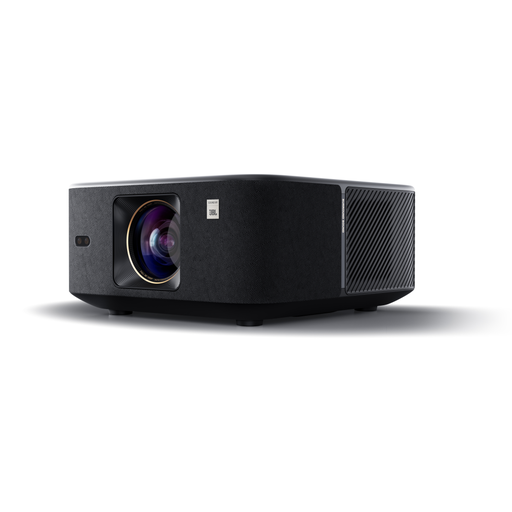
Why it stands out: The Yaber K3 focuses on a turnkey audiovisual experience. With its 1000 ISO lumens of brightness, it performs admirably even if the room isn't completely dark. Its real strength is its audio system, designed with JBL and compatible with Dolby Audio, which delivers power and clarity rarely seen in this price range.
Pros:
Who is it for? For those looking for a high-performance, all-in-one solution that's easy to use in a living room and who don't want to bother with an external audio system.
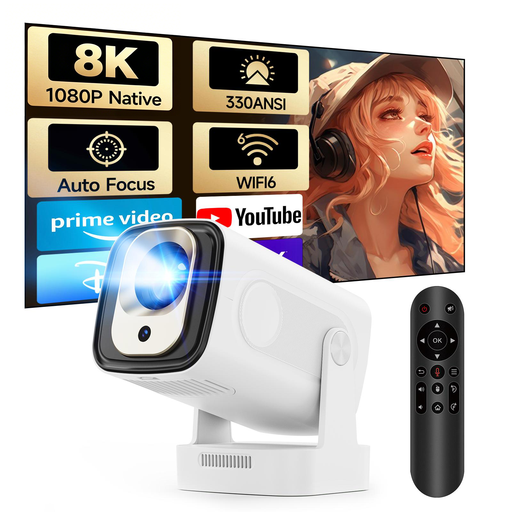
Why it stands out: The MAGCUBIC HY310 perfectly embodies the concept of a smart and affordable portable mini projector. Its ultra-compact form factor and automatic adjustments (autofocus, vertical correction) make it incredibly easy to use anywhere. Despite its tiny size, it displays a native Full HD 1080p image and features modern connectivity with Wi-Fi 6 and Bluetooth 5.4.
Pros:
Who is it for? The ideal companion for digital nomads and families. Perfect for a teen's room, an impromptu movie night in the garden, or for taking on vacation. A fun and affordable entry point into the world of projection.
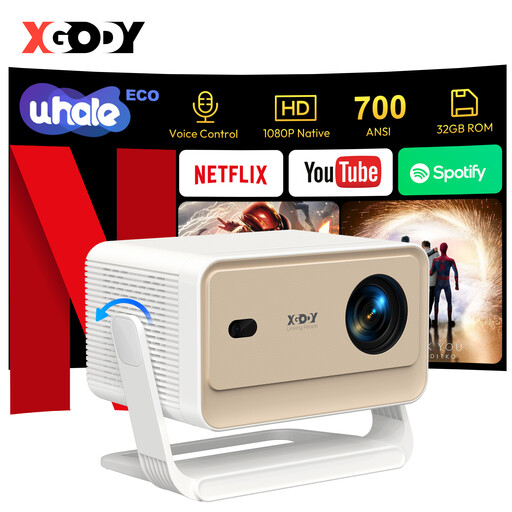
Why it stands out: The XGODY N6 Pro's trump card is its official Netflix certification. This is a game-changing detail: it guarantees smooth, high-definition streaming, whereas many competing projectors struggle with non-optimised versions of the app. Its operating system, WhaleOS 3.0, is designed from the ground up for fast, direct access to SVoD platforms.
Pros:
Who is it for? For streaming addicts (especially Netflix fans) who want a "plug-and-play" solution without worrying about app compatibility or buying an external TV box.
Our selection is just a glimpse of what's possible. The projector market is vast and full of hidden gems for more specific needs.
If you're looking for more advanced features (native 4K, ultra-low latency for gaming, ultra-short throw...), feel free to explore our full category of 4k portable projector to discover a much wider range.
Native resolution is the actual number of pixels on the projector's chip (its true DNA, so to speak). This is the real indicator of its display sharpness. Supported resolution (e.g., 4K) means the projector can read a higher-quality video signal, but it will have to downscale it to display it using its own pixels. The result is often better than a lower-resolution source, but it will never have the surgical precision of a native 4K projector.
In a pinch, a smooth, matte white wall will do the job. But to truly get the most out of your investment, a real projection screen is a significant upgrade. It's specifically designed to optimise contrast, brightness, and colour fidelity, unlocking your device's full potential. It's an investment you won't regret for a home cinema experience worthy of the name.
It all depends on the brightness of your room: