
Livraison le jour même ou le lendemain

Qualité garantie

Débloquez vos offres de bienvenue: Livraison GRATUITE | Jusqu'à -80 % | 30 jours d'essai gratuits à JoyPlus
Téléchargez l'application
Working from home, on business trips, at university, or simply in need of more screen space... does your laptop screen often feel too small? To boost your productivity and visual comfort wherever you are, the portable monitor has become an indispensable tool.
With a sea of options on the market, it's not easy to choose. Our guide is here to break down the key features and help you find the perfect model for your needs—all without the marketing fluff.
Before diving into our top picks, let's review the essential criteria to ensure you make the right choice.
The screen size (in inches) and resolution (the number of pixels) are the two pillars that determine display quality and the amount of workspace you'll have.
This is the critical factor for a second laptop screen. The simplest and most versatile connection is, by far, USB-C. A single cable can transmit both the video signal and power from your computer, provided its USB-C port is compatible (DisplayPort Alt Mode).
A Mini HDMI port is a real bonus, as it ensures compatibility with a myriad of devices, from game consoles to older PCs.
For office work, a 60?Hz refresh rate is perfectly fine. However, for gaming (portable gaming monitor) or video editing, aim for 120?Hz or 144?Hz. The smoothness is unparalleled, and it helps reduce eye strain. Likewise, good colour gamut coverage (e.g., 100% sRGB) is essential for photographers and graphic designers.
We have selected three models that stand out from the crowd, each catering to a specific user profile.
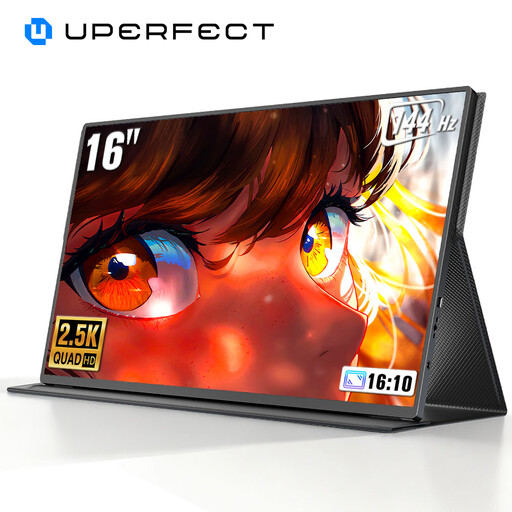
Key Features This UPERFECT monitor is a powerhouse of cutting-edge technology in a portable format. Its 16-inch 2K (2560?x?1600 pixels) panel offers a superb pixel density for an impeccably sharp image. But its real trump card is its 144?Hz refresh rate, which guarantees stunningly smooth performance in the most fast-paced games. Add to that a QLED panel and a brightness of 450 nits, and you get vibrant colours and excellent readability, even in broad daylight.
Pros
Who is it for? This portable display is primarily aimed at gamers who refuse to sacrifice performance on the move. It will also appeal to creatives who need high resolution and perfect fluidity for editing or design work.
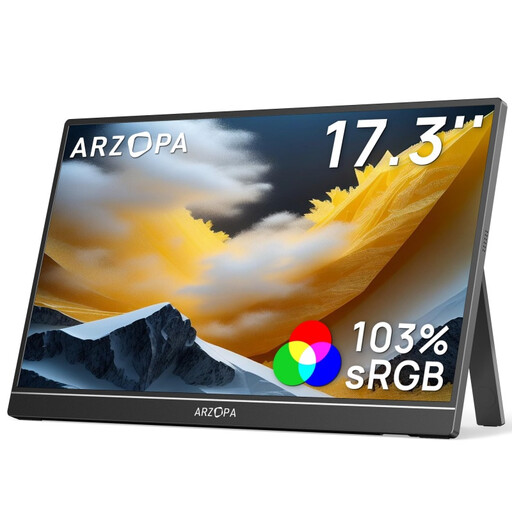
Key Features With its large 17.3-inch IPS panel, the ARZOPA A1M goes all-in on visual comfort. Such a generous screen size for a portable external monitor is perfect for multitasking with multiple windows or immersing yourself in movies and TV shows. Its practical built-in stand allows you to switch from landscape to portrait mode in an instant—a real godsend for coding or reading long documents.
Pros
Who is it for? This is the smart choice for remote workers or students who want to replicate the comfort of a true dual-monitor setup, wherever they are. Its large size also makes it an excellent companion for movie nights or small group presentations.
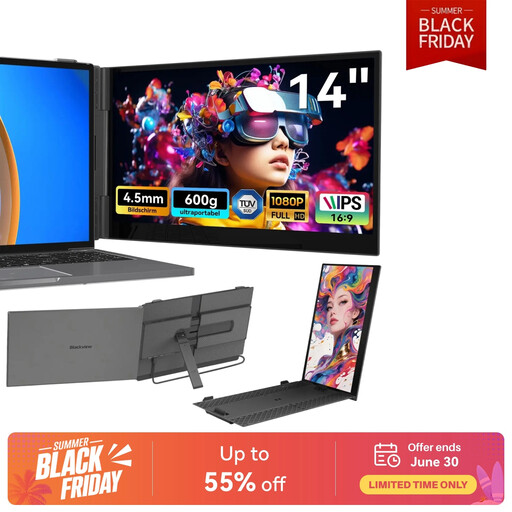
Key Features The Blackview SCM6 is the champion of mobility. Weighing in at just 600?g and with a thickness of only 4.5?mm, it will go unnoticed in any bag. Designed as an extension that clips directly onto your laptop, it allows you to deploy a dual-screen setup in an instant. Importantly, it is T?V S?D certified for its low blue light emission (a hardware-level feature), which helps reduce eye strain during long work sessions.
Pros
Who is it for? It's the ideal travel companion for digital nomads, consultants, and anyone for whom every gram counts. Its all-in-one design makes it an incredibly effective second screen for your laptop, perfect for working on the train, in a café, or at a coworking space.
Working on the go is great, but what about privacy in public places? To prevent prying eyes from looking over your shoulder, a privacy filter is a smart and essential accessory.
Discover our selection of monitor privacy filters and work with peace of mind.
The simplest solution is with USB-C monitors. They can be powered directly by your laptop, provided its USB-C port is powerful enough. A single cable handles both video and power. In other cases (HDMI connection, non-compatible USB-C port), you will need an external power source: either via a second USB-C port connected to a wall adapter or with a power bank.
It all depends on your PC's connectivity. For the simplicity of USB-C, your computer must have a port that supports the "DisplayPort Alternate Mode" protocol. This is the case for most recent machines (MacBooks, Dell XPS, etc.). If not, don't worry: if both the monitor and your PC have an HDMI port, video compatibility is guaranteed. You'll just need to manage the power separately.
Absolutely! That's one of their major advantages. For a console (Nintendo Switch, PS5, Xbox, etc.), you just need to connect the HDMI cable. For a smartphone, it must have a USB-C port that supports video output, as found on many high-end Android models (with Samsung DeX, for example). The portable monitor then transforms your phone into a genuine makeshift workstation.