
Livraison le jour même ou le lendemain

Qualité garantie

Débloquez vos offres de bienvenue: Livraison GRATUITE | Jusqu'à -80 % | 30 jours d'essai gratuits à JoyPlus
Téléchargez l'application
Driving a car without a modern infotainment system can quickly become frustrating. No clear navigation screen, music streaming, or hands-free calls—features that are sorely missed in daily driving and can complicate your journeys. Replacing the factory head unit? That's an operation that is often expensive, complex, or simply impossible in a rental or company car.
Fortunately, there is a simple and remarkably effective solution: the portable CarPlay screen. This device, often described as a plug-and-play car stereo, gives you access to CarPlay and Android Auto without altering your vehicle's original setup. This guide is here to help you make an informed choice and select the perfect model for your needs.
Before diving into our selection, let's review the essential criteria for finding the model that's right for you.
The primary purpose of such a screen is, of course, to safely access your favourite apps while driving. Therefore, you must ensure it's compatible with your smartphone. Most recent models offer wireless CarPlay (for iPhone) and portable Android Auto (for Android devices). The wireless connection (via Bluetooth and Wi-Fi) is an absolute convenience: after the initial pairing, your phone connects to the screen automatically as soon as you turn on the ignition. Some models go even further with a Mirror Link function to mirror your smartphone's screen.
The best models do more than just display a map. The integration of a dashcam is a particularly clever option. It combines convenience with safety by recording the road while you enjoy your music. Some packages even include a backup camera, a real bonus for stress-free parking. This type of all-in-one car multimedia system often offers excellent value for money.
Their biggest advantage is their simplicity of installation. Mounted on the dashboard or windshield with a suction cup or adhesive, they simply plug into the cigarette lighter socket (12V-24V). To transmit audio, you have several options:
Here are a few models that have caught our eye for their performance and simplicity.

View Product: ESSGOO 10.26" HD Portable CarPlay Screen with 4K Dashcam
Highlights This ESSGOO model is the Swiss Army knife that transforms a somewhat dated interior into a truly modern cockpit. It combines a large 10.26-inch touchscreen with a dual-camera system (front dashcam and backup camera), all in an ultra-simple-to-install package.
Pros
Who is it for? For those who want it all (GPS, multimedia, safety) without the hassle of a tedious installation. It's the perfect solution for slightly older cars, rental vehicles, or company cars.
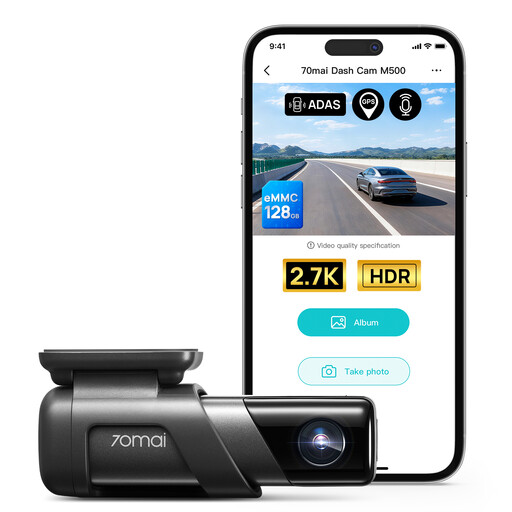
View Product: 70mai Dash Cam M500, True 1944P Ultra HD
Highlights There's no CarPlay screen here. The absolute priority of the 70mai M500 is safety and impeccable video quality. If that's what you're looking for, this model is an excellent choice, as it excels in its role as a premium dashcam.
Pros
Who is it for? For drivers who prioritise safety and high-quality video evidence over multimedia features. A very smart choice if your car is already equipped with a GPS and you simply want to add a reliable, high-performance dashcam.
View Product: Baseus PrimeTrip VD1 Pro Hardwire Kit for Dash Cam
Highlights Note that this is not a screen, but an essential accessory to fully utilise your dashcam (like the Baseus PrimeTrip VD1) by enabling its 24/7 parking surveillance mode.
Pros
Who is it for? For owners of compatible dashcams who want total protection, even when parked. If you're not comfortable with a car's electrical system, professional installation is recommended.
Our selection highlights turnkey solutions and targeted accessories. If you're looking for other types of cameras, specific mounts, or other accessories to perfect your setup, the choice is vast.
? Explore our Camera Parts category to discover a wider range of products.
1. Is a portable CarPlay screen compatible with all cars? Yes, in almost all cases. The only thing you need is a working cigarette lighter socket (12V or 24V). Since they require no modification to the dashboard, these screens fit nearly any vehicle, from the oldest to the newest.
2. How is the sound transmitted to my car stereo? You have several options. Most screens have a small built-in speaker, which is sufficient for GPS alerts. For music and calls, the most common solutions are the FM transmitter (you just need to tune your car radio to an unused radio frequency), the auxiliary cable (if your car has a jack input), or, for the best quality, a Bluetooth connection if your car stereo is compatible.
3. Is installing a screen with a dashcam and backup camera complicated? The main screen can be installed in two minutes: you mount it, plug it in, and that's it. Installing the backup camera requires a bit more care, as you need to run the cable from the rear of the car to the dashboard. Rest assured, the kits are designed to simplify the task, and numerous video tutorials are available to guide you step-by-step.