
Livraison le jour même ou le lendemain

Qualité garantie

Débloquez vos offres de bienvenue: Livraison GRATUITE | Jusqu'à -80 % | 30 jours d'essai gratuits à JoyPlus
Téléchargez l'application
Kitchen jars, storage boxes, piling folders… Who hasn't dreamed of getting everything organised once and for all? On paper, a portable Bluetooth label maker is the miracle solution: modern, fast, and connected. But be warned—the market is a jungle where apparent bargains often hide costly disappointments.
To avoid falling into the trap, it's best to know the most common pitfalls. As a product specialist at Joybuy, my role is to decode the spec sheets for you and guide you beyond the marketing slogans.
The 3 mistakes to avoid when buying a label printer:
To make the right choice, focus on these non-negotiable technical points. This is your guarantee of investing in a high-performance, economical device that's built to last.
This is arguably THE most important criterion. Opt for a direct thermal label maker. The principle? A print head heats special (thermosensitive) paper to create your text or logo.
The advantages are clear:
A portable Bluetooth label maker must, above all, offer a stable and intuitive connection. The presence of the Bluetooth Low Energy (BLE) standard is a good sign: it ensures fast pairing and reduced power consumption.
Here's a smart move before you buy: take five minutes to read reviews of the mobile app (on the App Store or Google Play Store). Is it updated regularly? Is the interface user-friendly for creating custom labels (text, icons, barcodes, QR codes)? A good app makes all the difference and is as crucial as the machine itself.
The convenience of a mini label printer depends entirely on its battery life. A model with a built-in rechargeable battery is essential. Take a look at the charging port: USB-C is the standard today. It allows you to use the same charger as your smartphone or laptop. One less cable to manage simplifies your life.
Rather than a long list, we've selected products that meet specific needs while adhering to the quality criteria we've just defined.
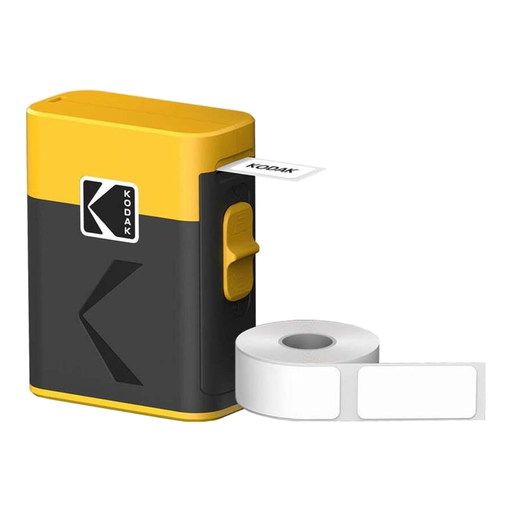
Why we love it: This is the ultimate turnkey solution. Just unbox and print. Perfect for home (jars, storage boxes), the office (files), or a small business, this bundle offers immediate versatility.
It uses direct thermal technology (zero ink costs), and the bundle includes 12 rolls, which is enough to keep you going for a long time. Its battery recharges via a USB-C port, as it should.
The ultra-generous starter pack of consumables ensures unbeatable value right from the start and provides peace of mind for months to come.
Why we love it: For professional use (price tags, inventory management, best-before dates), the ability to print crisp barcodes and QR codes is essential. Its portability makes it a perfect partner for markets or pop-up shops.
It provides access to professional features through a simple app, without the cost and complexity of enterprise software. The thermal technology ensures low and predictable operating costs, a key point for any professional budget.
Its 203 dpi resolution ensures barcodes and QR codes are perfectly scannable. A mark of reliability and efficiency.

Why we're highlighting it: Note that this is not a printer, but a consumable. It illustrates a key point: the availability of suitable label formats. This 15x40 mm size is ideal for specific uses like labelling cables, small vials, or file dividers.
It serves as a helpful reminder: always check the compatibility and availability of consumables before buying a printer. Choosing a model compatible with standard, easy-to-find formats will prevent you from being locked into a single brand.
It's proof of the flexibility of the direct thermal ecosystem: you can easily find competitively priced paper in different formats for any use case.
If these models don't perfectly match your needs, don't worry. Explore our full selection of devices that meet our quality criteria and current safety standards.
The lifespan of a thermal label depends on its exposure to heat and UV light (sunlight). For indoor use away from direct light (in cupboards, files, storage boxes), a label will remain perfectly legible for several years. However, their use is not recommended for outdoor applications or on objects exposed to high heat.
No, it's generally very straightforward, and the process is nearly identical on all recent models. Simply charge the device, download the manufacturer's app on your smartphone, enable Bluetooth, and follow the instructions to connect the printer. It's even faster and more reliable with models equipped with Bluetooth Low Energy.
The main advantage is that there's no ink or ribbon to buy. The only recurring cost is the thermal paper rolls. Before you decide, it's smart to check the price and availability of refills. Starter bundles that include numerous rolls, like the Kodak model we feature, are an excellent way to reduce the long-term cost of ownership.